Hello zainab0309,
Thank you for using Apple Support Communities! I understand that you're not hearing sound when you record the screen of your Mac using QuickTime. I would be happy to help point you towards a resolution.
I'd like to start by having you go to System Preferences > Security & Privacy. Click the Privacy tab, then click Microphone. Ensure that QuickTime has been granted access to your microphone. Scroll down where you selected Microphone and select Screen Recording next. Confirm QuickTime is also allowed to record the contents of your screen here.
Using QuickTime Player, select the microphone you want to use as follows:
How to record the screen on your Mac - Apple Support
"Use QuickTime Player
QuickTime Player also has a screen-recording feature, and you don't need macOS Mojave to use it.
- Open QuickTime Player from your Applications folder, then choose File > New Screen Recording from the menu bar. The Screen Recording window opens.
- Before starting your recording, you can click the arrow next to
 to change the recording settings:
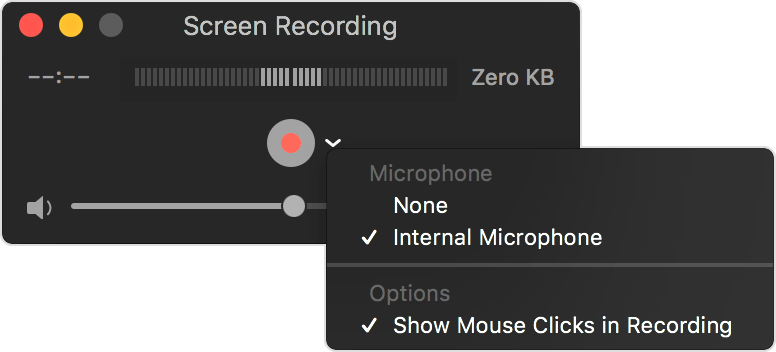 To record your voice or other audio with the screen recording, choose a microphone. To monitor that audio during recording, adjust the volume slider (if you get audio feedback, lower the volume or use headphones with a microphone).
 - To show a black circle around your pointer when you click, choose Show Mouse Clicks in Recording."
If you're still not hearing sound with your screen recording after following those steps, is your Mac running macOS Mojave or later? If it is, I'd like to have you follow the steps under the "Use Shift-Command-5 in macOS Mojave" section in that support article instead to test if your microphone works. Keep us posted on the results.
Cheers!


