different smtp servers for different mail accounts on one iOS device

I have several mail accounts on my iPhone/iPad. Some are private, some are work accounts. One of my workplaces demands that I route all outgoing mail for that account through their server, but I'm not allowed to route my outgoing private mail through that server.


But the iOS mail accounts setup seems to allow only one "main" smtp server for all accounts on that device. You can configure backup accounts for the event the main server fails, but it doesn't seem to be possible to configure each mail account to have its own smtp server. Configuring (or changing the configuration) the "main" smtp server in one account wil apply those settings to all mail accounts on the device.


On the Mac it is possible to set a different smtp server for each mail account, but seemingly not in iOS.


Is this a known constraint or am I overlooking something?


Thanks in advance,


Ton

iPad Pro 10.5-inch, Wi-Fi

Posted on Apr 23, 2020 3:23 AM

Reply

Similar questions

10 replies

Apr 23, 2020 8:21 AM in response to Ton Markus

I have two mail accounts on my devices, my personal account, and my work Exchange account. Each account is configured with its own SMTP server, and that has always been done when the accounts are added to the device. Each account asks for server information, both incoming and SMTP. I've been using the iPhone from the beginning, and the only time I've had to change anything was when Comcast moved from POP to IMAP. As I re-read your posts, I now see that you stated you used the same SMTP settings for each account, so that makes sense that it is a problem.

Apr 23, 2020 8:13 AM in response to LotusPilot

This is not about relaying.


This is (on the client side of iOS) a limitation of not being able to actually choose a (preset) smtp server like you can on macOS. But on the other side, if I enter the same smtp info for 5 email accounts (at the time of creation of each account) it doesn't seem to be stored as 5 seperate servers/bits of information each attached to its own account, but rather as one server attached to 5 accounts. With the added impossibility of later on changing the smtp info for one account without influencing the others.


This may also be an artefact as those mail accounts were created over 10 years ago and the mail settings were migrated to new phones ever since...

Apr 23, 2020 3:44 AM in response to Ton Markus

The arrangement in iOS/iPadOS Settings for the outgoing SMTP server, where you have multiple accounts that use the same server, is (and never has been) particularly clear or intuitive. That said, when you set-up an account, each account has its own unique account settings.


When drilling though the email account settings - and you happen across the list of SMTP servers - you are presented with a list of SMTP servers for which all accounts on the device are provisioned. If you stray from the account-default (created when initially setting-up the account on the device) by choosing an alternative from the presented list, you may create a problem. Most email providers do not allow you to use their SMTP server as a send-relay for other mail providers - and will only accept outgoing mail for their own domain(s).


Generally, unless you understand exactly what you are doing when straying from the created account default servers, I recommend that you avoid manual selection of SMTP server from the list. This ensures that when setting-up an email account on iOS/iPadOS devices, the correct outgoing SMTP server is selected for each specific account.


One question: Are you connecting to your employer over a VPN connection? If so, whilst the VPN is active, any applied network policies applied by the VPN Gateway/Network to which you connect may restrict traffic to policy-defined servers/services.

Apr 23, 2020 4:19 AM in response to Ton Markus

Okay. In short - I recommend that you don’t attempt to select an alternative SMTP server from the list. Unless you know what you’re doing, this will likely compound any problems you have.


For simplicity, I suggest that you delete all email accounts from your iPad. Assuming that you are using IMAP mailboxes (or Exchange mailboxes if connecting to Corporate email) no mail messages will be lost; all email is retained on the mail server(s).


After deleting the email accounts from your iPad, force-restart the iPad:


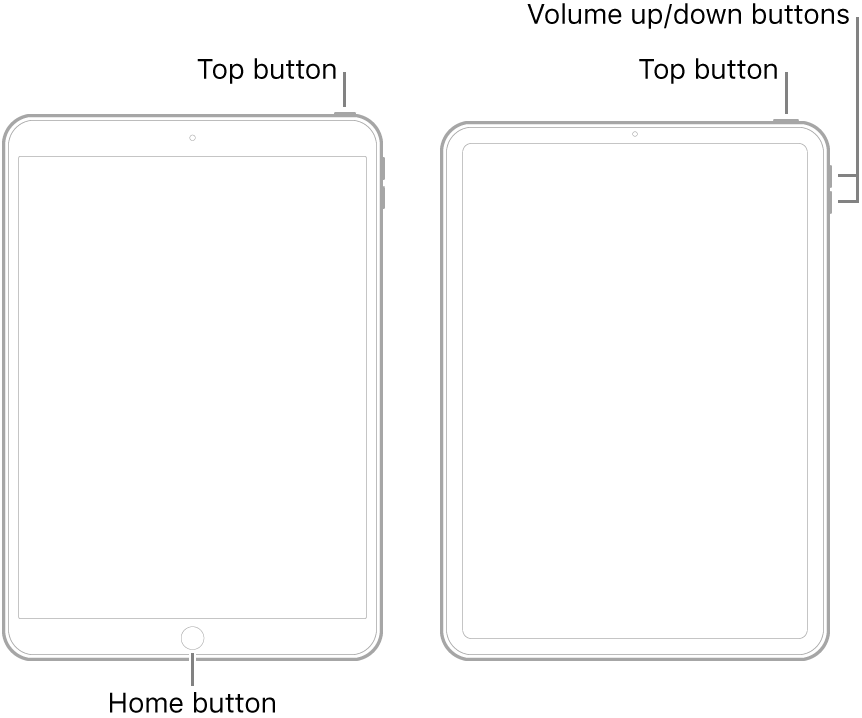
  • On an iPad with a Home button: Press and hold the top button and the Home button at the same time. When the Apple logo appears, release both buttons.
  • On an iPad with Face ID: Press and quickly release the volume up button, press and quickly release the volume down button, then press and hold the top button. When the Apple logo appears, release the button.


After the restart, add and verify each email account that you need to use - only one at a time using, checking for normal connectivity before moving on to the next account. For each account, accept default server settings.


This will hopefully resolve your problem

Apr 23, 2020 8:00 AM in response to Ton Markus

Your description would appear to confirm my earlier comments concerning SMTP - and the limitations imposed by email providers designed to inhibit SMTP-relay abuse.


As for automated switching between SMTP servers, outside of enterprise applications, this has limited usefulness. Most email operators facilitate switching between servers, for high availability applications, via DNS. As such, if a server needs to be taken offline for maintenance or other purposes, DNS resolution takes care of (a) switching email clients from one server to another, and (b) load sharing between servers.


Anyhow, it’s good to hear that diagnostics have seemingly resolved your issue.

Apr 23, 2020 8:49 AM in response to Ton Markus

I fully realise that your problem is not about wanting to explicitly use SMTP-relay (but is evidently what you have been doing). My intended point, perhaps missed, is that the vast majority of email providers will not allow you to send email via their servers for email addresses that do not belong to their domain. This measure will likely impact your configuration.


This measure is implemented, by email providers, to inhibit SMTP-relay abuse - such abuse having became a common problem some years ago.


Apr 23, 2020 4:04 AM in response to Ton Markus

Hi LotusPilot,


Thanks for your answer, but there is a point in your answer that doesn't mak sense to me. You mention "choosing an alternative from the presented list". But the core of my problem is that I don't seem to be able to choose an alternative server from the list. I get one "Main" server at the top of the window, a list of "other smtp servers" below and at the bottom of that list a text "If the main server is not usable, Mail will try the other SMTP servers" (sorry for the whacked translation, but my main language is set to Dutch, so I'm not sure what the exact translation is).


Pressing one of the Other servers will take me to the settings of that server (but no option to set it to Main server) and sliding or dragging the name to make a server from the Other list the Main server doesn't work.


Pressing the Main server will take me to the settings of that server, but changing those settings will update them for all mail accounts on the device, not just the account I'm actually doing the updating in.


So what am I missing to set one of the Other servers to the Main server without influencing the other accounts?


Regards,


Ton

Apr 23, 2020 7:50 AM in response to LotusPilot

This works..


It seems you can't actually "switch" between smtp servers. It will stick to the information entered when the account is created. What caused my 'problem' is that when creating the accounts I used information of one smtp server for all accounts. And from there on (even though the info was entered separately for all accounts at the time of creation) it seemed to be viewed as one server that was attached to all accounts. Which meant changing the info on that "one" server was spread over all accounts...


So now I have several smtp servers on one device and my 'problem' is solved, but I'm still wondering whether or not it is actually possible to 'switch' between servers (as you can on macOS), or that switching merely means changing the info in the smtp settings that were created during the setup of the account.


Thanks for the help.


Ton

This thread has been closed by the system or the community team. You may vote for any posts you find helpful, or search the Community for additional answers.

different smtp servers for different mail accounts on one iOS device

Welcome to Apple Support Community
A forum where Apple customers help each other with their products. Get started with your Apple Account.