iPhone 11 stuck at black screen after update

I just purchased an iPhone 11, brand new online from Koodo. I got the phone it turned on properly and after doing the update for iOS 13.4.1 I believe the screen has gone black with just the Apple logo showing.

what can I do to fix this? I literally haven’t even had the opportunity to use the phone yet as it is brand new.

HELP!!!!!

iPhone 11, iOS 13

Posted on Apr 24, 2020 7:57 AM

Reply
1 reply

Apr 24, 2020 9:59 AM in response to kristie277

If your iPhone is stuck on the Apple logo - Apple Support


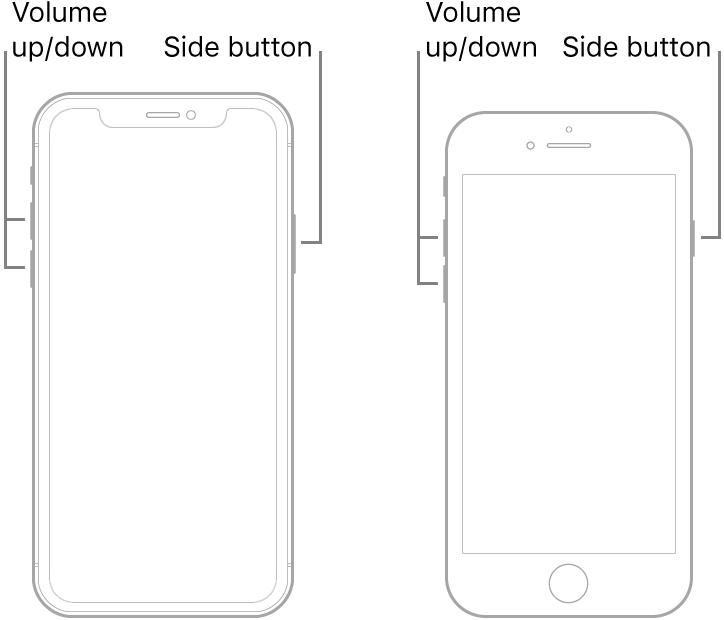
Force restart iPhone - Apple Support


  1. Press and quickly release the volume up button.
  2. Press and quickly release the volume down button.
  3. Press and hold the side button.
  4. When the Apple logo appears, release the button.


Note: If iPhone still doesn’t turn on, or if it gets stuck during start up, see the Apple Support article If your iPhone, iPad, or iPod touch won’t turn on or is frozen.

This thread has been closed by the system or the community team. You may vote for any posts you find helpful, or search the Community for additional answers.

iPhone 11 stuck at black screen after update

Welcome to Apple Support Community
A forum where Apple customers help each other with their products. Get started with your Apple Account.