If John's latest post doesn't work, there is a way to get rid of the item. It's tedious, but the only suggestion I can think of that will work is to use CCC to create a clone that excludes the one item, then erase the main drive and clone the fixed volume back.
1) Create a new folder somewhere easy to locate, such as on your desktop. Name it something obvious, like "Kill this".
2) Move the stuck file into the new folder so it's the only thing in it.
3) If you don't already own a copy, download Carbon Copy Cloner. You'll still be able to use it as a 30 day trial.
4) You will need an empty partition somewhere. Either on an external drive, or a new, hard partition on the internal drive. This would be preferable (in this case) rather than a new volume group.
5) The main trick: Use CCC to clone everything to the empty volume except the new folder the stuck file is in, as shown next. Use the option to Copy Some Files.
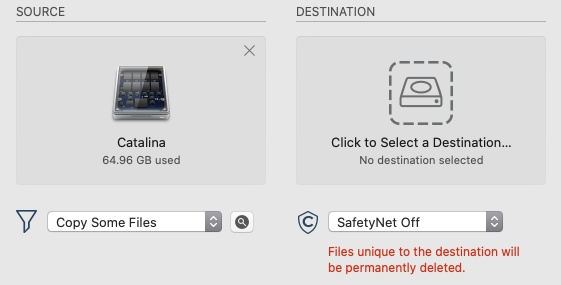
Click the magnifying glass to the right of the drop down menu. By default, everything is checked to copy, other than the hidden Trash folders. Though there's a separate check box not shown in my screen shot to include those if you want. Navigate to your desktop and uncheck the one folder:
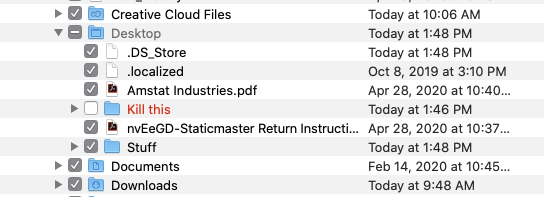
6) Choose the empty destination drive and start the cloning process. Do not try and use the Mac while the clone is being created. You don't want the contents of the drive to change at the same time CCC is trying to create an exact copy (minus the one folder).
7) When the clone is complete, boot to the newly copied clone.
8) Use Disk Utility to erase the main drive.
9) Launch CCC and copy the entire clone back with Copy All Files. The destination being the main drive you just erased.
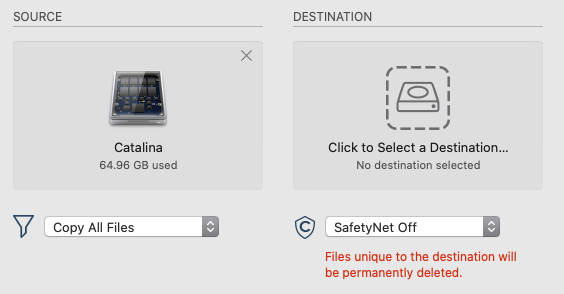
Mostly, this is just a lot of sitting around watching a clone go to one drive, and then back to the other. But still far less work than erasing the drive, followed by reinstalling the OS, your third party apps, and manually bringing all of your personal data back in. Using these steps, the final drive will be exactly as it started, but without the one folder containing the stuck file.




