External camera laggy - low frame rate

I've just upgraded from a 2018 MacBook Pro to the MacBook Pro (13-inch, 2020, Four Thunderbolt 3 ports).

When using the Mac's FaceTime camera, everything works fine. However, when connecting it to my LG UltraFine 5K (as I was my previous Mac), the camera feed is laggy (in every application).


The frame rate is really low and erratic - ranging from one frame per second to even fewer.


My previous Mac worked fine with the same monitor.


I've tried:

Using a different Thunderbolt port on the Mac to connect to the display.

Resetting the Mac's PRAM and SMC.

Creating and testing with a new user.

Reinstalling 10.15.4.

Checking for firmware updates for the external display.


all to no avail.


I can't seem to fix the issue, nor can I find any suitable help online.


Any thoughts are appreciated.


Posted on May 19, 2020 8:46 AM

Reply

Similar questions

213 replies

Feb 15, 2021 1:43 PM in response to QameraDesign

What is wrong with you you D-bag and your amateur comments? A better computer? Upgrade? And MacBook Air is an upgrade to what? A M1 hobby machine against a 16" 64GB 2TB 8GB High end graphics GPU 4000 dollar MacBook Pro 8 Core - that runs everything, not just a web browser? LG5K needs to work. You can run many external displays at the same time on a Pro Intel - you cannot on M1. Cant even connect 2 4K 's lol. Why would any PRO downgrade to a M1 air or small 13" MBP - instead of sticking to Pro gear. We are working with Movie, Music and Programming software - and none of it works with the entry level M1. Apple needs to fix a problem for current high end luxury Macs & Apple LG branded Monitors. Yes 16" MacBook pros . Google - Luxury Laptop. Got it? The M1 is still a test project for students - and unless M2 comes to the big boys your comments are as arrogant as useless. People have new pro gear - they don't want to switch to your hobby machine! Intel os the Pro standard - M1 is a new adventure. Feel sorry for you - trolling a forum like that to make yourself feel better and your 13" mini computer. My 16" beast outperforms any M1 on all levels of course , and even on CPU .

Jun 18, 2020 11:05 AM in response to magicmarc

I did a bunch of debugging as I have the same issue, and annoyingly the upload of some images failed and the post was lost.


Anyway, after I hit submit I did some more digging and found the culprit, which wasn't in the original post.


The yellow errors are thrown when I changed cameras in Photo Booth from either my Logitech C920 (connected to the USB ports on the back of the display) or the laptop's Facetime camera to the LG 5K display's camera.
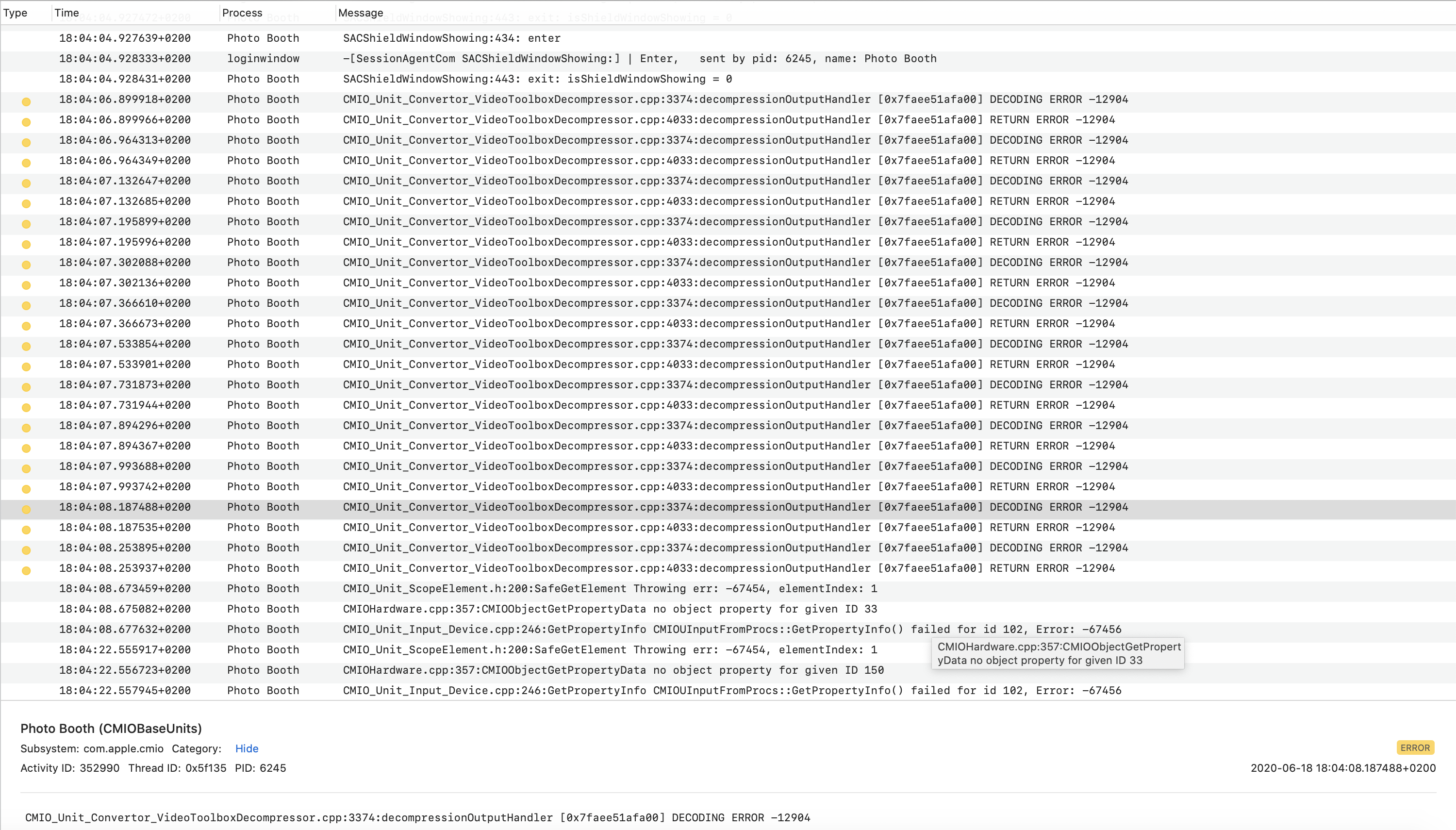


The repeating pairs of


DECODING ERROR -12904
RETURN ERROR -12904


tell us that the


decompressionOutputHandler


method on line 3374 in the


CMIO_Unit_Convertor_VideoToolboxDecompressor


C++ class is receiving an errant response that it can't decode, likely frame data which needs to evaluate to a set of numbers of particular format which constitute a valid basis for conversion by the decompressor into a frame as displayed by the output application (Photo Booth in my test case).


Unfortunately, that source file is part of the CoreMedia framework itself and is thus closed source, so I can't actually see exactly what it's doing, but I'm pretty certain the scenario outlined above is the likely case.


So now we know part of the what that is causing the symptoms, but we still don't have a root cause for what is causing that nor the why it is happening on this model only.


On that, I'm guessing that the Intel graphics hardware this model contains, the Intel Iris Plus, Device ID: 0x8a53 and Revision ID: 0x0007 (which perhaps the current 16" has as well, though both models there would likely hand off to the AMD GPU thus masking this bug) is generating some data which results in an array (which represents the numeric data set that a video frame is encapsulated in) boundary being overstepped so only 1 in several fall into line with the expected format (apologies to anyone on this thread who isn't a software developer, this is about as high level as I can make it; but think of a clock which needs to show 12 o'clock every time you look at at it, but each time you look away it increments the time by 1 hour; you only get a valid response once every 12 attempts), resulting in a large volume of dropped frames and juddering output.


Sadly, the only way I can test that out is with an eGPU for the OS to delegate the graphics offload to with a suitable application (I checked and it doesn't look like Photo Booth would do this, but I think zoom does if a real GPU is available).


So who needs to fix this? Well, that's tricky because I haven't conclusively proven what is at fault, but my first port of call would be Apple, to patch that method to handle the returned data that can't currently be processed, effectively fixing the broken array by reindexing it before returning the value (assuming my hypothesis above is correct).


I'll add my findings to the chorus with a bug ticket.

Aug 27, 2020 9:49 AM in response to bkorth

magicmarc Said:

"External camera laggy: all to no avail. I can't seem to fix the issue, nor can I find any suitable help online. Any thoughts are appreciated."

-------


In the Longrun, Learn from this:

If you never made a Time Machine Backup before this update, then learn from this. Know to always. back up your mac, piroshki's to updating it. Create a Time Machine backup of your Mac, so that you can have something to restore your Mac from, should anything go wrong with the update.

Aug 28, 2020 3:43 PM in response to magicmarc

Having the exact same issue after upgrading from mid 2016 MBP 13" to 2020 13". I thought it was just my 5K LG display as I could not find any hits when searching for the issue until today. I've upgraded both the 2016 and 2020 MBP's to Big Sur and the 2016 works as expected with the 5K display, but the 2020 lags and is not useable for video conferencing. I've got the first revision of the 5K display.

This thread has been closed by the system or the community team. You may vote for any posts you find helpful, or search the Community for additional answers.

External camera laggy - low frame rate

Welcome to Apple Support Community
A forum where Apple customers help each other with their products. Get started with your Apple Account.