when i hold the side button and volume it sos

I phone is disabled .....i get SOS when i try the volume side button method


iPhone XS, iOS 13

Posted on Jun 11, 2020 1:54 AM

Reply
Question marked as Top-ranking reply

Posted on Jun 11, 2020 3:08 AM

Force Restart the phone:

  • Press and quickly release Volume UP button
  • Press and quickly release Volume DOWN button
  • Press and Hold the SIDE button until an Apple logo appears then release the Side button (Can take up to 20 seconds. DO NOT release Side Button when invited to Slide Power OFF)


Axel F.

4 replies

Jun 11, 2020 3:14 AM in response to mnovak11

If you have forgotten your Lock Screen passcode, or if a message says that your device is disabled, learn what you need, what you get and what is lost.


You need a computer to follow these steps. If you don't have a computer, borrow one from a friend.


Forgot? Click below to reset…

Click->If you forgot the passcode for your iPhone, iPad, or iPod touch, or your ...


Regarding your data, If…
  1. You have an iCloud or iTunes latest backup, then there is nothing to worry. If not read more...
  2. You have synced your data to iCloud, then what you will get back is what you have synced to iCloud and uploaded to iCloud Drive; like the information that are synced and stored in iCloud are, Contacts, Calendars, Bookmarks, Mail, Notes, Voice Memosshared photosiCloud Photos*, Health data, call history, and files you store in iCloud Drive. (*-If you had turned on iCloud Photos, your content is automatically stored in iCloud.)
  3. You have imported your Photos & Videos to Mac/PC then they are safely residing there on Mac/PC
  4. You have uploaded some of it to Cloud Drives using Files app (iCloud Drive, Google Drive, OneDrive, DropBox, Flickr, box, AmazonDrive, Adobe Creative Cloud etc). The data remains there.
  5. You have not backed up or do not have latest backup, nor imported nor you have synced nor uploaded your data to cloud drives prior to forgetting the passcode then I am sorry, all your data is lost.


Jun 11, 2020 3:13 AM in response to mnovak11


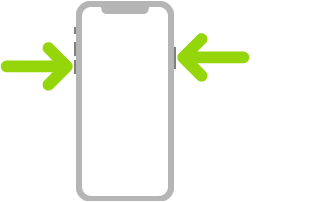
Turn off. Simultaneously press and hold the side button and either volume button until the sliders appear, then drag the top slider to power off. Or go to Settings > General > Shut Down. See Turn iPhone off and on.
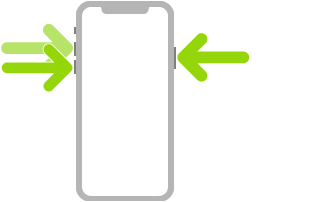


Force restart. Press and release the volume up button, press and release the volume down button, then press and hold the side button until the Apple logo appears. See Force restart iPhone.

Jun 11, 2020 3:12 AM in response to mnovak11

Use Emergency SOS


Use Emergency SOS (all countries or regions except India). Simultaneously press and hold the side button and either volume button until the sliders appear, then drag Emergency SOS. See Use Emergency SOS (in all countries or regions except India).
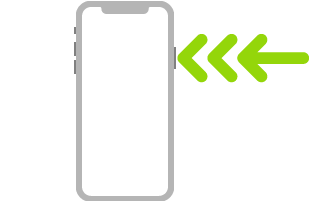
Use Emergency SOS (in India). Triple-click the side button. If you’ve turned on Accessibility Shortcut, simultaneously press and hold the side button and either volume button until the sliders appear, then drag Emergency SOS. See Use Emergency SOS (India).

This thread has been closed by the system or the community team. You may vote for any posts you find helpful, or search the Community for additional answers.

when i hold the side button and volume it sos

Welcome to Apple Support Community
A forum where Apple customers help each other with their products. Get started with your Apple Account.
