why am i not able to upgrade the roblox app on my sons account /ipad. we have family sharing

I created family sharing account and included my son with a separate email I’d on his iPad. We are not able to upgrade his Roblox app on it. Why is it so? We are unable to even sign out of his Apple account !? Please help

Posted on Jun 11, 2020 4:06 PM

Reply
Question marked as Top-ranking reply

Posted on Jun 27, 2020 10:33 AM

Well, if the App was downloaded with your Apple ID. then yes, it will require your Apple ID and password to update for ever as its tied inextricably to your Apple ID.


To fix this, you would have needed to delete the App from the iPad, and the redownload it through Family Sharing from your purchases. This makes it so the App can be updated through Family Sharing then.


I suggest you do this, for all other Apps that were originally downloaded with your Apple ID to the iPad.


5 replies
Question marked as Top-ranking reply

Jun 27, 2020 10:33 AM in response to ItIsMePhany

Well, if the App was downloaded with your Apple ID. then yes, it will require your Apple ID and password to update for ever as its tied inextricably to your Apple ID.


To fix this, you would have needed to delete the App from the iPad, and the redownload it through Family Sharing from your purchases. This makes it so the App can be updated through Family Sharing then.


I suggest you do this, for all other Apps that were originally downloaded with your Apple ID to the iPad.


Jun 26, 2020 10:51 AM in response to anithaj

We are experiencing something similar. (We have iOS 13.5.1 on our Apple devices.)


With Family Sharing I have an Apple ID created for my child. On my Family Sharing Family Members list, I show up as the "Organizer" and my child is also on the list as [Her Name] Age: ##.


Note: we don't have Screen Time restrictions set up. It's just configured to whatever default is.


My child is logged in with her Apple ID on our iPad. She went to play Roblox but first she was prompted to upgrade the app and couldn't play without upgrading. She was redirected to the App Store on the iPad... she attempted to upgrade Roblox, the iPad prompted her for her password.
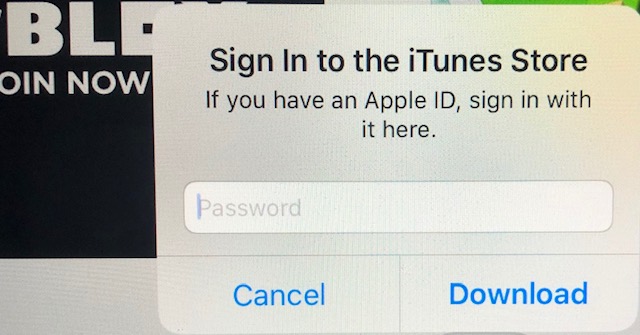


But the iPad wasn't accepting the password, it was saying verification failed. I tried a few times, typing very slowly and carefully. Nope, wasn't accepting the password. I tried my password for the heck of it! Nope.


So I attempted to troubleshoot. I tried to download a new app from the app store on the iPad using her Apple ID.... that works fine... it accepts her password, I'm sent an approval request on my device, she completes the download on the iPad. But the Roblox upgrade will not work.


I ran out of time to spend on this so I resorted to my work around ... I signed her out of the iPad... then logged in using my Apple ID... I performed the Roblox upgrade... and then I logged out and logged my child back in with her Apple ID.


Her Roblox app on the iPad is now at version 2.437.406997


Does anyone know what's going on ? Otherwise, hope this workaround helps.

This thread has been closed by the system or the community team. You may vote for any posts you find helpful, or search the Community for additional answers.

why am i not able to upgrade the roblox app on my sons account /ipad. we have family sharing

Welcome to Apple Support Community
A forum where Apple customers help each other with their products. Get started with your Apple Account.
