How do I delete robokiller, there is no unsubscribe
How can I delete RoboKiller off my phone. There is no unsubscribe.
iPhone 7 Plus, iOS 13
How can I delete RoboKiller off my phone. There is no unsubscribe.
iPhone 7 Plus, iOS 13
Here are the steps to remove RoboKiller and disable its call blocking/forwarding. This consolidates all the recommendations without having to jump to multiple posts or links. Links are provided with more details for each section under Additional Information. Below outlines how to do the following:
TO CANCEL A SUBSCRIPTION
TO DISABLE ROBOKILLER’S CALL BLOCKING/FORWARDING
Step 1
Step 2 (If App Wasn’t Deleted)
Step 3 (If Step 2 Didn’t Work or App Was Deleted)
Step 4 (If Step 3 Didn’t Work)
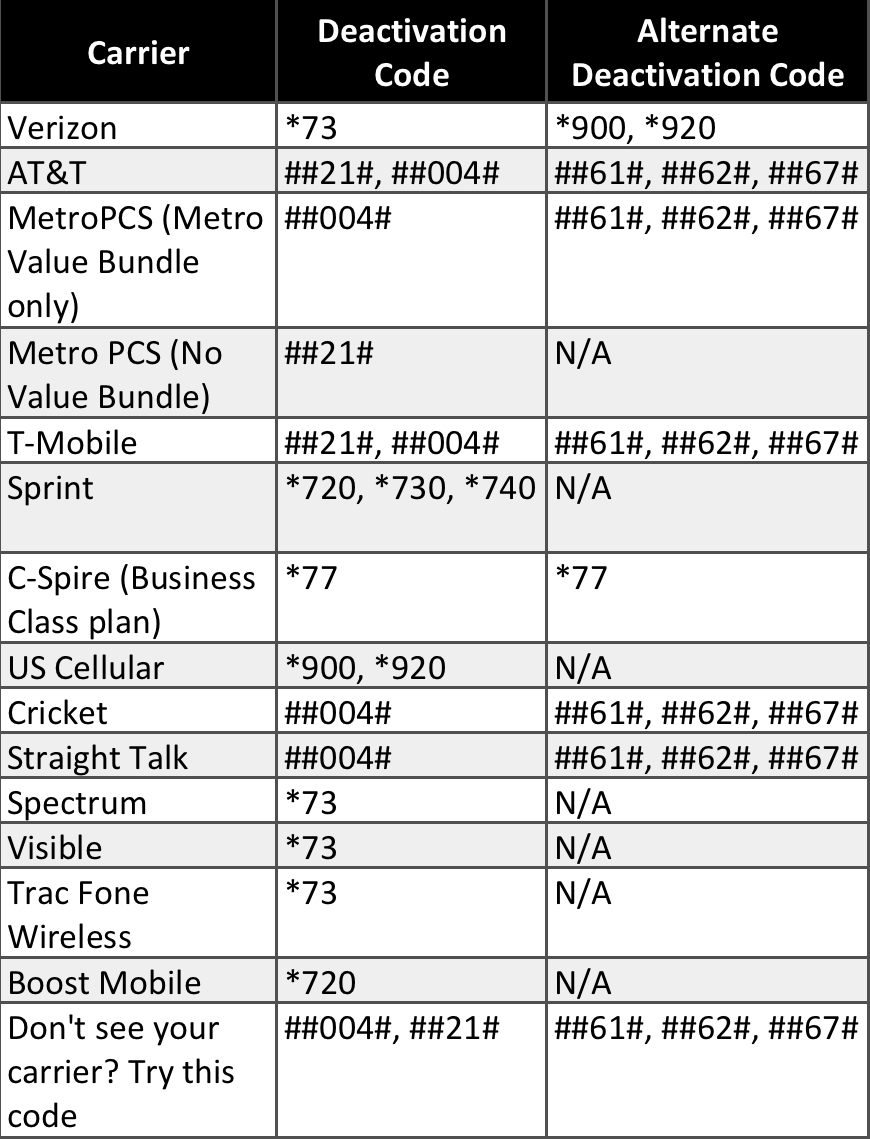
Call the deactivation code for your carrier.
Step 5 (If Step 4 Didn’t Work)
Call your carrier directly to disable.
TO DELETE AN APP
REQUEST A REFUND
Some purchases from the App Store, iTunes Store, Apple Books, or other Apple services might be eligible for a refund. Limitations apply. See the Apple Media Services Terms and Conditions for details.
It took me a while to get RoboKiller completely removed, so I hope this helps others. Good luck!
Justin
First send *73 to unforward your phone number then go into settings and turn it off, then you can delete the app
I had to go to my carrier and provide them with my IMEI and ICCID. They had to reset my network. Good luck.
It blocks my contacts as well I have tried deleting the app stopped forwarding the calls I am having 1990’s weatherbug flashbacks here at the annoying level of this software - I should have researched it better before installing it
I cannot delete RoboKiller, their is no place to unsubscribe on my phone. I removed the app and tried to unsubscribe under itunes
I've deleted the Robokiller app, deleted the subscription, and it still blocks my contacts when they call me. How do I get rid of this thing?
I’m having the same problem! Trial period is over, unsubscribes before it ended, and deleted the app. But still blocking calls and I don’t know how to fix it
I can’t cancel robokiller and robocall I went thru all steps posted
Has anyone figured it out, I’ve done EVERYTHING they’ve asked me to do
and it still blocks my contacts, never rings on my end, etc.
[Edited by Moderator]
I can’t get rid of it keeps blocking calls Apple needs to remove this malware from the App Store
Spot on - I used the ##61# code and it pulled it off my phone completely. Thank you!
If you read through the thread there are posts on what to do. Please read my post on Dec 16, 2020 and I outline how to do everything. Hope this helps.
I tried to unsubscribe from Robokiller and there was no unsubscribe option so I deleted the app in hopes it would stop. It is still filtering all of my calls. What can I do to get this crazy app unsubscribed from my phone?
Yes God willing Apple will finally react. Robo killer is clearly putting some sort of malicious software on our iPhones. I have no idea how. We to have followed all the steps. Deleted the app canceled our subscription, yet every couple of months Robo killer will block calls, even from our contacts. All we get is a text message from Robo killer saying they blocked the call but they could not reach Robo killers app. It’s a real scam to get you to resubscribe. I’m always fond of Apple and the ecosystem. They should not only remove Robo killer from their App Store they really should litigate against them in favor of all of us Apple users. Me and my immediate family have over 21 devices. We are completely in the ecosystem because usually things like this don’t happen. Please Apple fix this.
None of the solutions provided by Apple work. My Robokiller is supposed to be out of my phone - I even got a new battery and hand selected all apps that went back into phone - but somehow, Robokiller found its way in. In one week, it has prevented me from getting 3 crucial work calls. I inititally cancelled this app in Feb '21. It's now May '21! So frustrated!!
How do I delete robokiller, there is no unsubscribe