How do I delete robokiller, there is no unsubscribe
How can I delete RoboKiller off my phone. There is no unsubscribe.
iPhone 7 Plus, iOS 13
How can I delete RoboKiller off my phone. There is no unsubscribe.
iPhone 7 Plus, iOS 13
Here are the steps to remove RoboKiller and disable its call blocking/forwarding. This consolidates all the recommendations without having to jump to multiple posts or links. Links are provided with more details for each section under Additional Information. Below outlines how to do the following:
TO CANCEL A SUBSCRIPTION
TO DISABLE ROBOKILLER’S CALL BLOCKING/FORWARDING
Step 1
Step 2 (If App Wasn’t Deleted)
Step 3 (If Step 2 Didn’t Work or App Was Deleted)
Step 4 (If Step 3 Didn’t Work)
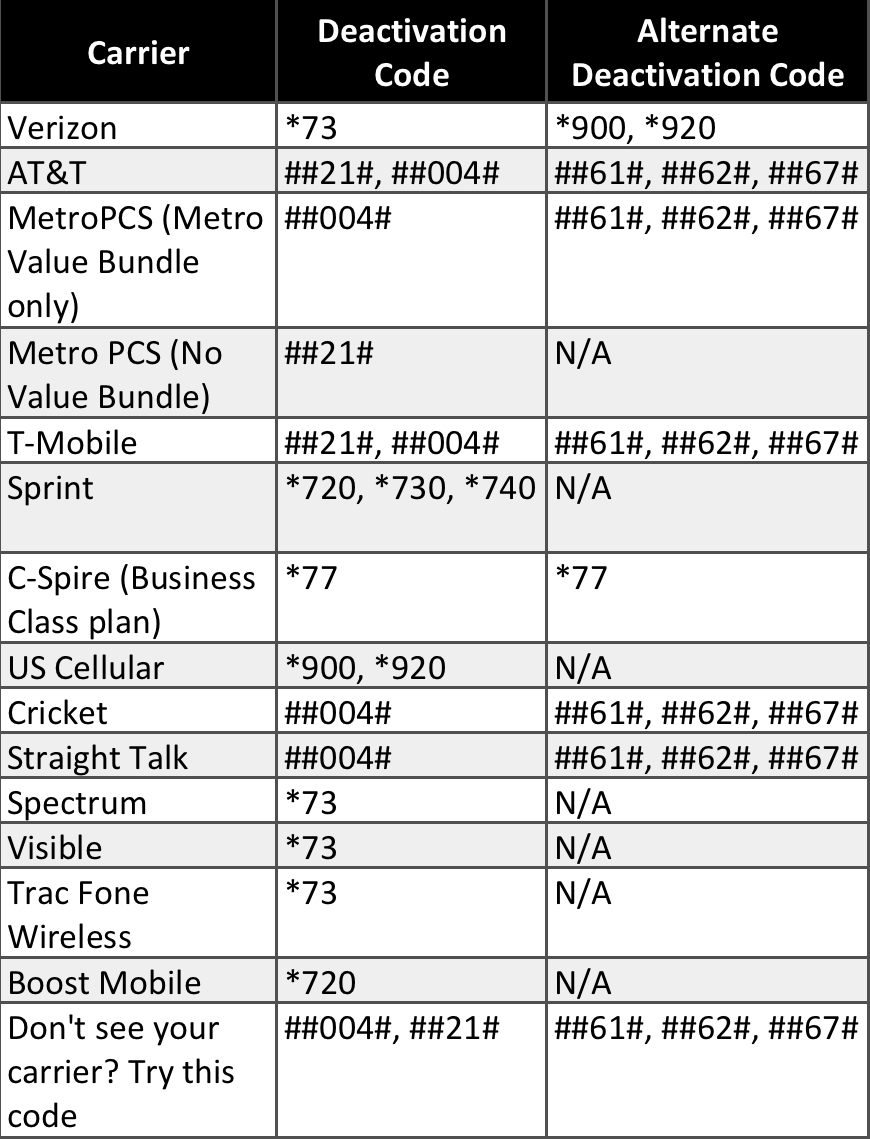
Call the deactivation code for your carrier.
Step 5 (If Step 4 Didn’t Work)
Call your carrier directly to disable.
TO DELETE AN APP
REQUEST A REFUND
Some purchases from the App Store, iTunes Store, Apple Books, or other Apple services might be eligible for a refund. Limitations apply. See the Apple Media Services Terms and Conditions for details.
It took me a while to get RoboKiller completely removed, so I hope this helps others. Good luck!
Justin
Here are the steps to remove RoboKiller and disable its call blocking/forwarding. This consolidates all the recommendations without having to jump to multiple posts or links. Links are provided with more details for each section under Additional Information. Below outlines how to do the following:
TO CANCEL A SUBSCRIPTION
TO DISABLE ROBOKILLER’S CALL BLOCKING/FORWARDING
Step 1
Step 2 (If App Wasn’t Deleted)
Step 3 (If Step 2 Didn’t Work or App Was Deleted)
Step 4 (If Step 3 Didn’t Work)
Call the deactivation code for your carrier.
Step 5 (If Step 4 Didn’t Work)
Call your carrier directly to disable.
TO DELETE AN APP
REQUEST A REFUND
Some purchases from the App Store, iTunes Store, Apple Books, or other Apple services might be eligible for a refund. Limitations apply. See the Apple Media Services Terms and Conditions for details.
It took me a while to get RoboKiller completely removed, so I hope this helps others. Good luck!
Justin
I had the same issue. I deleted the app and canceled the subscription before end of trial. However, I was still getting calls blocked and couldn’t access voicemail. I ultimately had to call my service provider, AT&T, and they said RoboKiller places a port forwarding on your line. They had to manually remove and clear it. It’s working fine now, but I still have RoboKiller group under my contacts and I haven’t been able to figure out how to remove it. This app truly is an abomination! DO NOT INSTALL!
I had same problem. uninstalled / deleted app, cancelled subscription – it was nowhere on my iPhone, but calls were still being forwarded to Robokiller. To complete the process, it appears you have to engage with Robokiller support through the app (before deleting) or calling them or your carrier, etc. if this was not done prior. Anyway, the Aug 27 2020 reply in this forum contains a link that unfortunately goes to 404 page. However, I was able to find a (currently) good link here: https://support.robokiller.com/hc/en-us/articles/360027065591-How-can-I-disable-RoboKiller-on-my-iPhone-or-Android-device- This page includes video, phone #s and a table of "Deactivation codes" listed by carrier. The code for AT&T worked for me... but they sure don't make it easy.
Cancel/see your subscriptions here - See or cancel your subscriptions - Apple Support
I had to reinstall the robo app then click settings, help and support, then disable robo killer, then uninstall the app. So far it’s disabled.
How to disable RoboKiller by contacting your carrier.
If you continue to experience issues deprogramming RoboKiller’s call blocking integration with your carrier, you will need to contact your phone provider and request that they reset your call forwarding settings.
We strongly advise you to contact your carrier if you have recently used your carrier’s blocking app, also. Multiple incidents have proved that carriers’ blocking applications can interfere with RoboKiller reprogramming or can cause confusion regarding RoboKiller deactivation. In those cases RoboKiller is, in fact, deactivated, while your carrier's call blocking app remains.
Customer service phone numbers for major carriers:
Carrier
Phone Number
AT&T
+1 800-331-0500
Verizon
+1 800-922-0204
T-Mobile
+1 800-937-8997
Sprint
+1 844-665-6327
Metro PCS
+1 530-303-6234
TracFone Wireless
+1 800-867-7183
Cricket
+1 800-867-7183
Boost Mobile
+1 866-402-7366
U.S Cellular
+1 888-944-9400
C Spire
+1 733-801-3928
If you experience any additional issues when following these recommended troubleshooting steps, please reach out to our Technical Support Team at support@RoboKiller.com. Please note that we are presently experiencing longer than expected wait times due to this issue, and are doing our best to ensure we get back to you as soon as possible. We appreciate your patience!
This APP is an abomination. It wouldn’t train. It infuriated my MOST important partner as she could not reach me!
DO NOT INSTALL THIS APP EVER. It will lead to missed calls, lost revenue, etc. Then when you delete the app — IT STILL BLOCKS YOUR CALLS until you dial one of these codes: https://support.robokiller.com/hc/en-us/articles/360039457831-How-can-I-disable-RoboKiller-on-my-phone-iOS-12-
Ridiculous!
I did everything that everyone suggested, and I was still having issues with this app even though I canceled before the trial ended. Ugh! Even today they blocked a call. So I did more searching, even all through my phone. The app created a contact group in my iCloud that I didn’t realize it had done. I couldn’t delete it through my phone. I had to login on the computer and delete it that way. I looked back through my phone, and it’s completely gone now in all of my settings. Woohoo! I shouldn’t have anymore issues. Praying this is it for me. Never again!! LOL!! Good luck everyone!!
The big issue that I ran into was that I had deleted the app but it kept blocking. After talking with my provider go into settings>phone>call forwarding and turn it off. Then in the same section of phone go to >silence unknown callers and turn it off also. The app automatically turns them on and it can be quite frustrating. Hopefully this helps someone and they won’t be frustrated like I was.
Cancel/see your subscriptions here - See or cancel your subscriptions - Apple Support
Or contact apple - Contact Support
this is where I FINALLY found the correct number to call to deactivate my phone.
hope this helps.
I deleted it like any other app on my phone. https://support.apple.com/en-us/HT207618
I found I was able to stop the Robokiller interception of my calls by doing this:
That deactivation code is carrier specific and not universal. You must use the deactivation code for your respective carrier. Please refer to my post for complete steps to remove RoboKiller and disable its call blocking/forwarding; which includes a table with each carriers’ deactivation code.
Simply go to Settings in the bottom right hand corner of the app. Go to Help and Feedback, and hit Deactivate this Phone. Follow the procedures and make the phone calls as needed and it should stop. Good luck
Go to Settings/Phone/Call Forwarding
The number that was installed on your phone to forward the calls to Robokiller should still be there. Turn off the Call Forwarding and your calls will now be allowed to pass through. This was a simple fix to something that has plagued me for weeks!!!
How do I delete robokiller, there is no unsubscribe