Open Airport Utility, click on the Time Capsule and then click Edit in the smaller window that appears
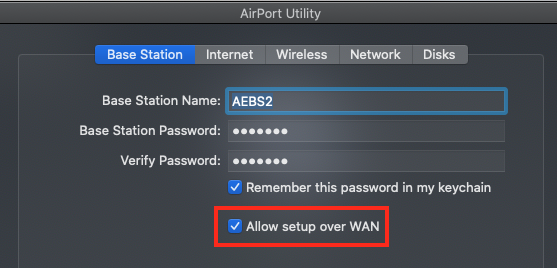
Click the Base Station tab at the top of the next window
Make sure that there is a check mark next to Allow Setup over WAN
Click Update to save the changes
Next, you will need to note the Time Capsule Public IP address
Open Airport Utility again and click on the picture of the Time Capsule
The IP Address will be listed near the top of the information
Check with your ISP to insure that they are providing you with a Static Public IP Address for the Time Capsule. If they aren't, the IP address of the Time Capsule will change, perhaps daily, and you will not be able to access it remotely unless you have the current IP Address for the Time Capsule at the time.
When you are at a remote location like the coffee place, log onto the WiFi network there
Open AirPort Utility
Click on the File menu in the upper left corner of the screen
Click on Configure Other
Enter the Time Capsule Public IP Address
Enter the Time Capsule admin password
Click OK
If successful, you will be able to access all of the settings for the Time Capsule in AirPort Utility, which will confirm that you can reach the Time Capsule from a remote location over the Internet
Follow the instructions provided by Tesserax to set up the port information.


