Direction is Not Available From Any Location

When Open the Maps and Enter the Name of Place, Its Show the Direction Button When Click on this Button Message is Appear Direction is not Available. Even Location Services is Open Also Trace my Location Properly But When Go for Direction, Message is Appear Direction is Not Available From Any Location. Kindly Help Me for This.


Thank you

iPhone SE, iOS 13

Posted on Jul 8, 2020 4:09 AM

Reply
Question marked as Top-ranking reply

Posted on Jul 8, 2020 4:45 AM

Here's what can do-


Cellular data for Maps might be turned off - Go to Settings > Cellular and check that Maps is selected.


Also check if the feature is supported in your region - https://www.apple.com/ios/feature-availability/#maps-turn-by-turn-navigation


Do let me know if this helped.

7 replies

Jul 8, 2020 4:52 AM in response to Adnan_Niaz

There are few places where directions are not available. Watch the GIF below


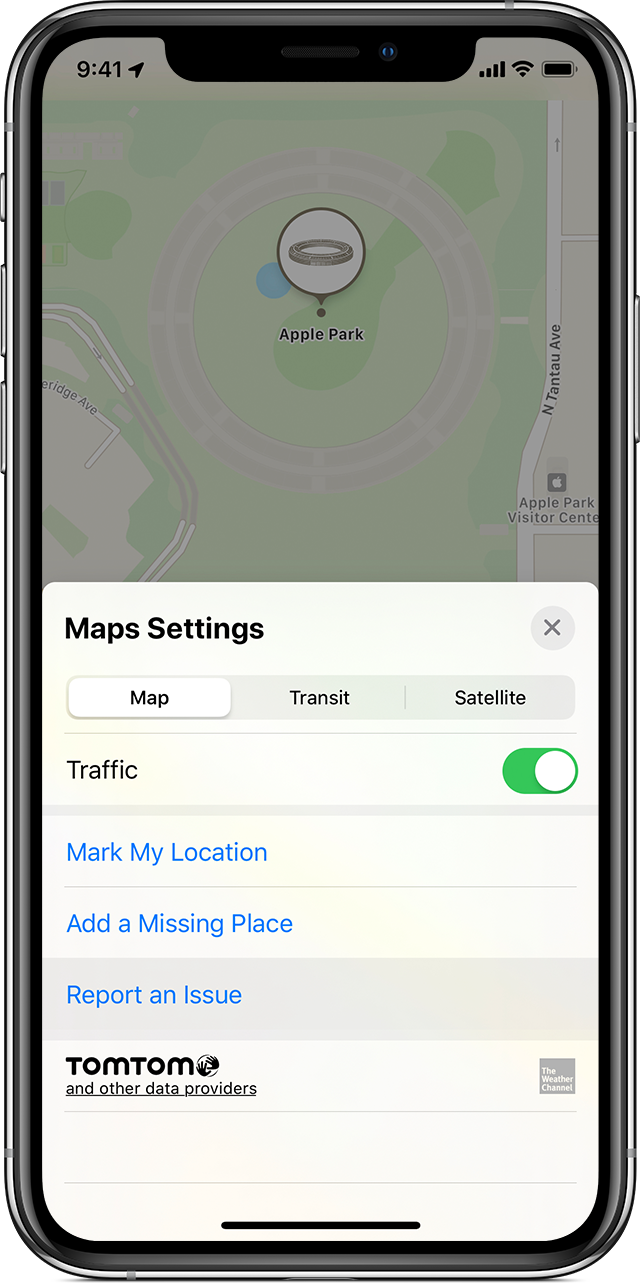
If you need to report an issue in Maps

You can report an issue with the following Maps features:

  • Map
  • Search
  • Navigation
  • Transit
  • Image quality

You can also add a place and edit your home or work address.


On your iPhone, iPad, or iPod touch

To report an issue, add a place, or edit your home or work address, follow these steps:

  1. Tap , in the upper-right corner.
  2. Tap Report an Issue.
  3. Choose the issue and follow the onscreen instructions.

To allow Apple to contact you with questions about a reported issue on your iPhone, iPad, or iPod touch, go to Settings > Maps, scroll to the bottom of the screen and turn on Follow up by Email. Maps uses your default contact.

This thread has been closed by the system or the community team. You may vote for any posts you find helpful, or search the Community for additional answers.

Direction is Not Available From Any Location

Welcome to Apple Support Community
A forum where Apple customers help each other with their products. Get started with your Apple Account.