Loud fans during built-in Chess game, new Macbook Air 2020

Hello! I’m aware that the Macbook Air 2020 isn’t made for heavy use, so I don’t play any huge games or edit videos. I just noticed yesterday however that my laptop seems to have problems with the chess app? I’ve had this model for a week and I barely used it for anything else than the web browser. I just got bored and played some chess but after 5 minutes, there was a loud fan/metallic noise that stopped as soon as I quit the app. I have a 8GB RAM and i5 model, so I’m kind of worried that something is wrong with it? I bought it for the next semester of university, since it’s so quiet, small, lightweight and is supposed to have no problems with easy tasks. Is there a way to fix this or will the fans easily go off?

MacBook Air 13″, macOS 10.15

Posted on Jul 10, 2020 1:49 AM

Reply
7 replies

Jul 13, 2020 3:54 PM in response to Laura0704

Resetting the SMC requires a simple press and hold of four keys, you won't break anything. Macbook Airs 2018 and later have the T2 chip.

Resetting the system management controller (SMC) can resolve certain issues related to power, battery, fans, and other features.

Reset the SMC on computers that have the T2 chip

If your Mac has the Apple T2 Security Chip, follow these steps. If you need help, contact Apple Support

Notebook computers with the T2 chip

Before resetting the SMC, try these steps:

  1. Shut down your Mac.
  2. Press and hold the power button for 10 seconds, then release the button.
  3. Wait a few seconds, then press the power button to turn on your Mac.

If the issue persists, follow these steps to reset the SMC:

  1. Shut down your Mac.
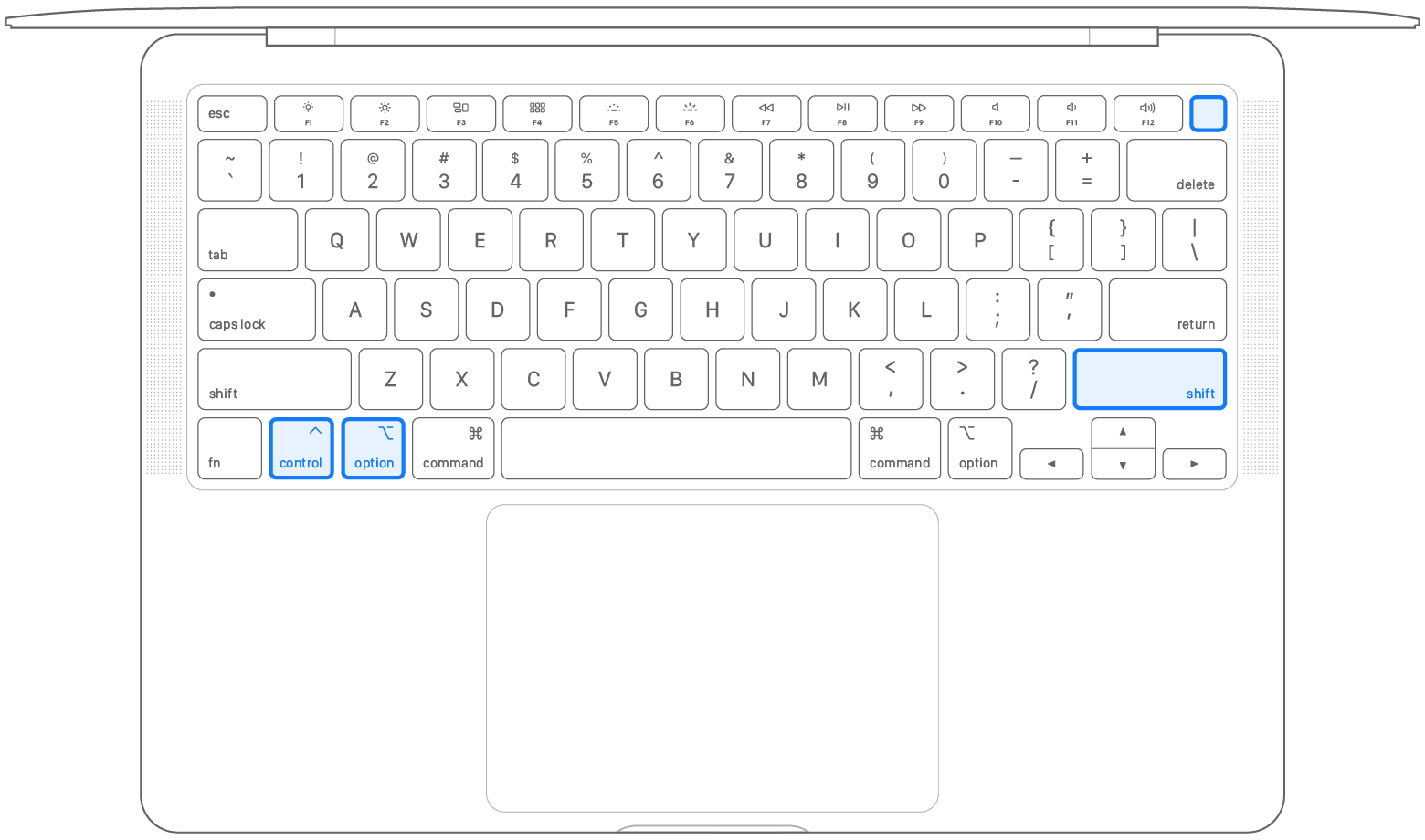
  2. On your built-in keyboard, press and hold all of the following keys. Your Mac might turn on.
    • Control  on the left side of your keyboard
    • Option (Alt)  on the left side of your keyboard
    • Shift  on the right side of your keyboard
  1. Keep holding all three keys for 7 seconds, then press and hold the power button as well. If your Mac is on, it will turn off as you hold the keys.

  2. Keep holding all four keys for another 7 seconds, then release them.
  3. Wait a few seconds, then press the power button to turn on your Mac


Jul 10, 2020 5:14 AM in response to Laura0704

The Chess app is surprisingly CPU-intensive. In fact, it's a great tool to use for stress-testing a Mac (make four copies of it and have the computer play against itself in each game and how well the Mac handles it before locking up will be a good indicator of how well your CPU/logic board is doing). The MacBook Air has an internal fan, but it's not connected to the CPU heatsink and therefore the CPU is technically being cooled passively. This has led to many thermal issues with the 2020 MacBook Air models, but especially with the i3 models. In fact, on MacRumors, there's a forum thread all about various modifications people have made to their MacBook Air's thermal system to better accommodate these thermal issues (doing this would definitely void AppleCare, but it's an interesting thread to check out from the standpoint of modifications that solve inherent design flaws).

Jul 10, 2020 5:38 AM in response to Yebubbleman

Does this mean I technically can’t ‘fix’ my Macbook in terms of cooling down the CPU without doing things that aren’t basic settings/functions? Like for example resetting the SMC? It’s a bummer because it was quite expensive and I like chess but if it overheats, I won’t use the laptop for that anymore. Hopefully having ~5 documents or websites and YouTube/Itunes open won’t make it overheat as well...

Jul 13, 2020 4:38 AM in response to SeaPapp

Not yet! I read the page that you linked but I’m scared of breaking my laptop.. Ny fans aren’t VERY loud, just clearly audible as soon as you play the game for more than 2 minutes. I don’t know much about tech, but could that be normal??


It’s this part right?


‘Reset the SMC on computers that have the T2 chip

If your Mac has the Apple T2 Security Chip, follow these steps. If you need help, contact Apple Support. ......’

This thread has been closed by the system or the community team. You may vote for any posts you find helpful, or search the Community for additional answers.

Loud fans during built-in Chess game, new Macbook Air 2020

Welcome to Apple Support Community
A forum where Apple customers help each other with their products. Get started with your Apple Account.