
iPhone 11 has suddenly zoomed in - unable to unclock the phone using face ID and/or put a code.
My iPhone 11 has suddenly zoomed in when locked - unable to unlock the phone using face ID and/or put a code.
My iPhone 11 has suddenly zoomed in when locked - unable to unlock the phone using face ID and/or put a code.
Force Restart;
Force Restart;
Can't do that as I can't see the slide button to turn off the phone - everything's zoomed in and not able to move the screen.
Got it. Thanks a lot.
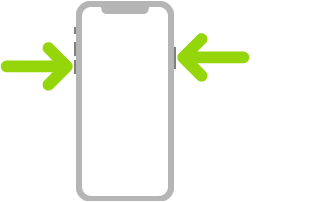
Turn off. Simultaneously press and hold the side button and either volume button until the sliders appear, then drag the top slider to power off. Or go to Settings > General > Shut Down. See Turn iPhone off and on.
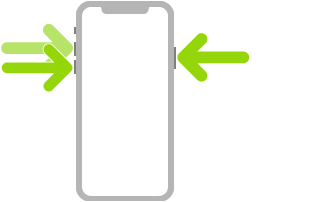
Force restart. Press and release the volume up button, press and release the volume down button, then press and hold the side button until the Apple logo appears. See Force restart iPhone.
iPhone 11 has suddenly zoomed in - unable to unclock the phone using face ID and/or put a code.

