Apple Music keeps skipping songs on my iPhone.

After trying all of the solutions i.e. reloading tines, authorizing/deauthorizing, signing in and out of iTunes of which none worked, I hit on a workaround that worked for me. When selecting a album or playlist, rather than hitting the play button, start by selecting the first song in the list. That song will then play and the remaining songs will cycle through without skipping. It is not a fix but it worked for me.

iPhone XR, iOS 13

Posted on Jul 28, 2020 6:13 AM

Reply
5 replies

Aug 1, 2020 11:31 AM in response to brucevette

brucevette,


Thanks for providing those details.


Just in case you were referring to shuffling, you can follow the steps in this resource to turn that off: Repeat and shuffle music


These steps specifically will help on your iPhone:


"Open the Apple Music app.

Play an album or playlist.

    • Turn on shuffle: Tap the player at the bottom of the screen to open Now Playing, tap Playing Next , then tap Shuffle Off  to turn Shuffle On . You can also open an album or playlist and tap Shuffle at the top of the screen.
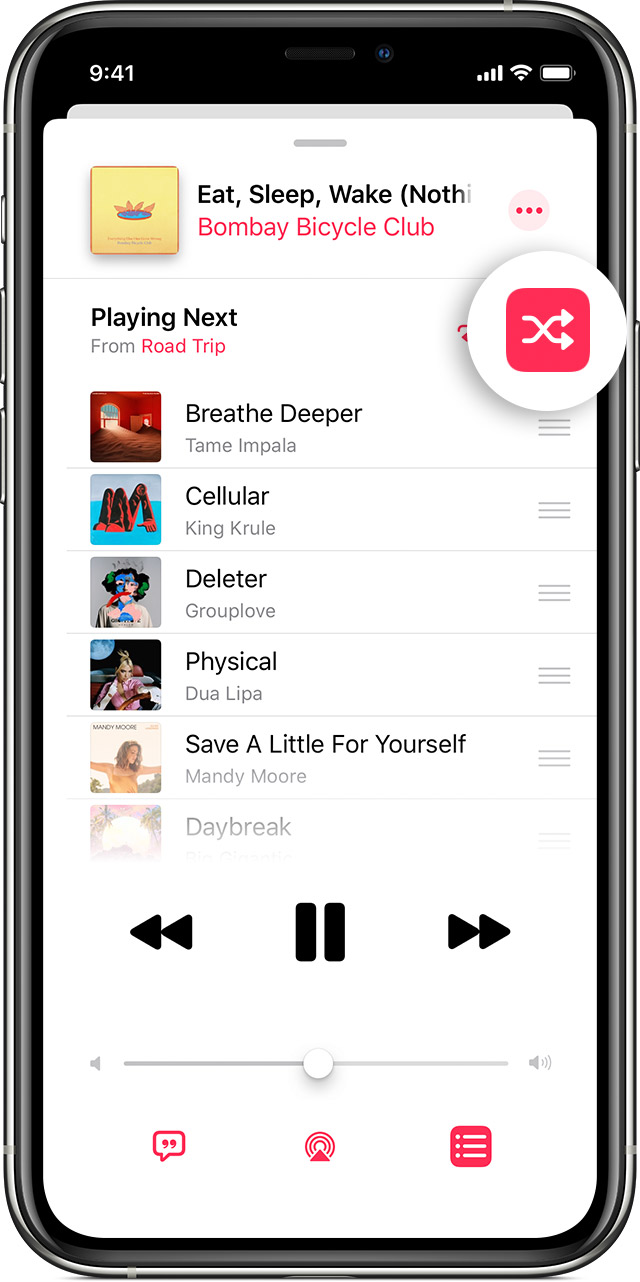

    • Turn off shuffle: Tap the player at the bottom of the screen to open Now Playing, tap Playing Next , then tap Shuffle On  to turn Shuffle Off ."


If you were not referring to the shuffle function, please try deleting the songs from the playlist and then downloading them again to test the issue.


Take care.

Aug 9, 2020 6:35 AM in response to chris_g1

I am not referring to shuffle. I have also deleted all songs, playlists, albums etc. from my iPhone and reloaded them several times and I still have the same problem. When I select a album, or playlist the first song in the list will start and then stop and switch to another song without completing. A song my play for a couple of seconds and then switch to a completely different song. That song will then start and then skip again. This is very frustrating and makes playing music on my iPhone useless.

Jul 30, 2020 5:27 PM in response to brucevette

Hello brucevette,


We know that you want to be able to listen to your selected music without interruption, so let's see what might be happening there.


You have tried some great steps so far, but we want to clarify some things: Does this happen on your Mac and your iPhone? Are these songs downloaded or streaming? If they are streaming have you tried on both cellular data and Wifi?


If not already, please update your iPhone to the latest version by following the steps here: Update your iPhone, iPad, or iPod touch


Have a great day!


This thread has been closed by the system or the community team. You may vote for any posts you find helpful, or search the Community for additional answers.

Apple Music keeps skipping songs on my iPhone.

Welcome to Apple Support Community
A forum where Apple customers help each other with their products. Get started with your Apple Account.
