I can open the document, but it reports that fonts are missing:
- DanteMTStd-Regular
- DanteMT-Italic
So, I downloaded these free fonts, and there was still document aberrations that I tracked down to embedded non-breaking spaces causing those huge line gaps, and forcing hyphens on the document. I have boxed in red one of these non-breaking spaces.
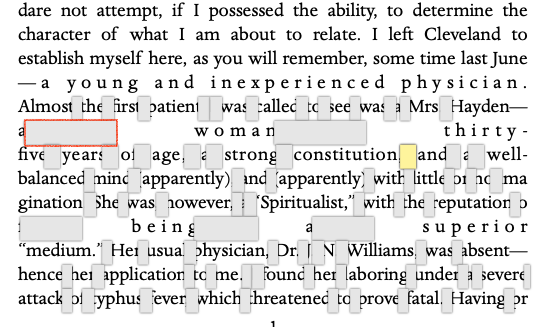
All of the gray selections here are actually non-breaking-spaces, even though they are different in size than the one outlined in red. There are 2927 of these gremlins in this document. If I replace all of them with a single space, then you have long continuous, fully justified block of text without hyphenation.
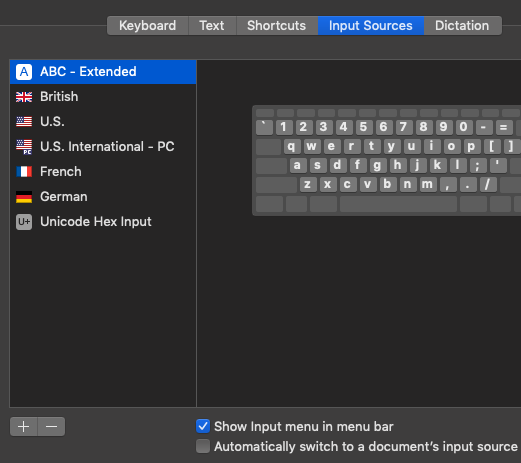
There is no means to remove the non-breaking spaces from the Pages document without adding an additional input source (Unicode Hex Input) in System Preferences : Keyboard : Input Sources. Click the [+] symbol and add it. When you have done that, select Show Input menu in menu bar.
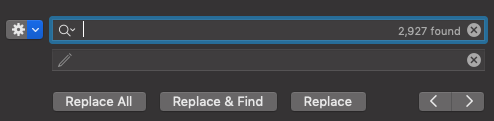
Using a backup copy of this Pages document, open it in Pages, and from the Edit menu choose Find. Click the gear icon in the Find panel to choose Find & Replace. Now, on the right-hand Finder menu bar, you will see an icon, possibly your country flag just before the date. Click that icon, and choose Unicode Hex Input.
Click in the Find & Replace panel's Find field. Press and hold the option-key while you enter 00A0, which is the Unicode string for the non-breaking space. This will not echo the characters. It may take Pages 1 - 2 seconds to show these selections due to the quantity. In the replace field, press the space bar once, and then click Replace All.
After the replacement, the same text appears as:
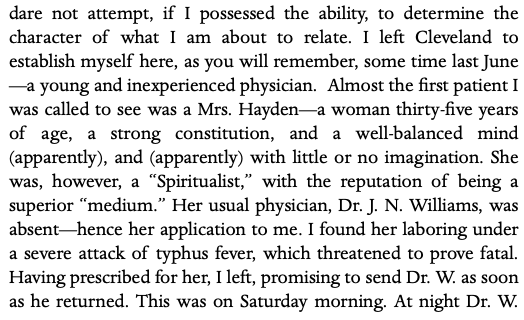
Any apparent gaps now are regular spaces. Back to the input menu. Set it back to your country flag (e.g. in my case U.S.).
What ever the original source of this Pages content, it was simply ripe with non-breaking spaces, and that was the cause of your initial formatting headache.

