We are seeing an increased incidence of issues activating 9 year old iPad2 devices. If experiencing difficulties with activation and you are able to connect your iPad to either a PC (with iTunes installed) or a Mac (with iTunes or Finder - as appropriate for the installed version of macOS), you may be successfully activate the iPad.
You might also try a restart of your home router - or changing your DNS Server settings. If none of these workarounds are successful in resolving the issue, you should directly contact Apple Support for assistance.
To restart you home router, disconnect power - then wait at least 30 seconds before restarting. When you router has rebooted (which may take several minutes), force-restart your iPad:
- On an iPad with a Home button: Press and hold the top button and the Home button at the same time. When the Apple logo appears, release both buttons.
- On an iPad with Face ID: Press and quickly release the volume up button, press and quickly release the volume down button, then press and hold the top button. When the Apple logo appears, release the button.
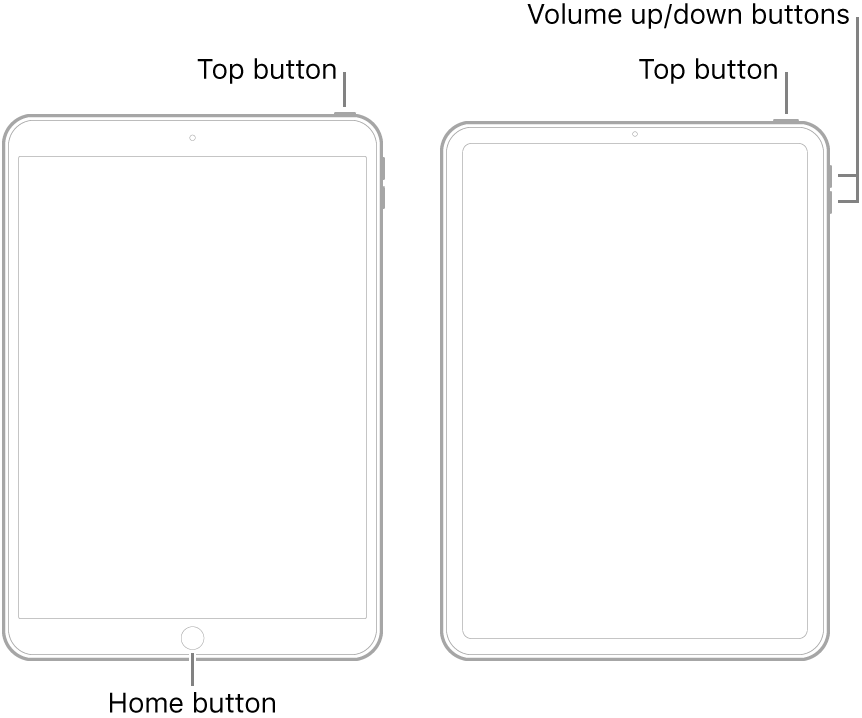
For recommended DNS servers (configured at your home router and/or your iPad), you might choose one of the following Recursive DNS Providers (IPv4 and IPv6 addresses included below):
Quad9
9.9.9.9
149.112.112.112
2620:fe::fe
2620:fe::9
OpenDNS
208.67.222.222
208.67.220.220
2620:0:ccc::2
2620:0:ccd::2
Cloudflare+APNIC
1.1.1.1
1.0.0.1
2606:4700:4700::1111
2606:4700:4700::1001
Should it be necessary to escalate your issue to Apple Support, the quickest route to engaging with the Apple Support Team will be via the Contact Support link at top-right of this page.
You also need to know that Apple ended update support for iPad2 in September 2016. iPad2 cannot be updated to iOS 10 or later versions as the internal hardware does not meet the minimum technical requirements for new versions of iOS/iPadOS.
Many App Developers have also dropped support for older devices and iOS versions preceding iOS11/12/13 - and have withdrawn older versions of their Apps from the Apple App Store, now limiting utility and usefulness of older devices. Even if you do manage to resolve the Activation issue, you will find that Apps compatible with you iPad are now not available for (re)download or (re)installation - therefore severely impacting the usefulness and utility of your [now very old] iPad2.
If Apps that you need to use now have higher minimum iOS-version requirements, your only option is to replace your iPad with newer model. Of current models, even the budget priced iPad7 supports current iPadOS13.x (and the soon to be released iPadOS14) and has hardware specifications and capabilities that will vastly outperform your old iPad.
I hope this information and guidance is helpful in both resolving your activation problem - and in clearly outlining the limitations of your current iPad and available options.


