Best software to help organize iphotos and delete duplicates.

I have thousands and thousands of photos and looking for a way to organize them by folder of subject and at the same time eliminate all duplicates. Also, is there a way I can search on my computer for all of my photos and bring them to one place? Thanks for any advice.

iMac Pro

Posted on Aug 8, 2020 9:15 PM

Reply
7 replies

Aug 9, 2020 9:52 AM in response to CourageNY

Have you though of using Photos to manage your images? It provides for assembling them into one place, the library, and lets you organize them in any number of ways. When importing it will detect dupilicstes and alert you so you can either import or not.


Photos is a database driven DAM (digital asset managment) app which lets you use a photo in multiple situations, many albums, projects, etc. while only having one image file on the hard drive and in the library.


With Photos all edits are nondestructive which means the original file is considered the "digital negative" and is not modified by any edit. All edits are recorded in the database and applied to the preview version for viewing or a copy of the original file when exporting to email or use outside of the library.


If you just want to manage files then look at NeoFinder. The free version will run locally. The subscription version lets you store online and access from multiple devices.

Aug 9, 2020 11:37 AM in response to CourageNY

Personally I use Photos to manage all of my photos and videos but have a Time Machine backing up by boot and external storage drives and a clone of my boot drive on an external SSD. Redundancy is good and is not one of the seven deadly sins.


I also keep a copy of the original image files on an external SSD in folders arranged by date taken:


My primary Photos library is arranged the same way.

Aug 9, 2020 1:27 PM in response to CourageNY

Yes. If you're importing from folders (like you might be) you'll get this warning when it detects a duplicate:
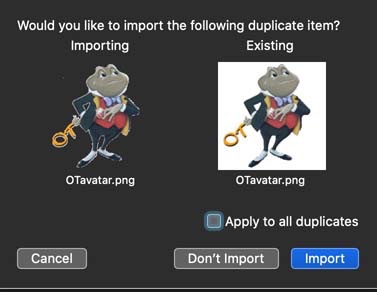


For duplicates already in the library there are a couple of apps that will identify the potential duplicates, put them in an album or mark them with a keyword for easy retrieval and deletion by you. You don't want one that does the deletion itself for obvious reasons. 


I've run tests on the following apps with these results:


PhotoSweeper - $9.99 - Demo version available. 


PowerPhotos - $29.95  


PowerPhotos is the iPhoto Library Manager version for Photos and is very powerful. Although more expensive I would recommend it as it has more capabilities than the others like the capability to merge Photos libraries or copy photos, both original and edited versions, along with their metadata between libraries.


PhotoSweeper compares bitmaps and/or histograms so it can detect duplicate images even if they have different file sizes, file names, image sizes and capture dates.



Aug 9, 2020 4:08 AM in response to CourageNY

You can use Spotlight (Cmd+Spacebar) to search for "pictures", which will find all image files, folders (and all sorts of other buried stuff). Scroll to the bottom of the left hand pane to see everything in Finder.


For the rest of the question you should provide more information about your system and apps. Are you suing the Photos app?


Stephen

This thread has been closed by the system or the community team. You may vote for any posts you find helpful, or search the Community for additional answers.

Best software to help organize iphotos and delete duplicates.

Welcome to Apple Support Community
A forum where Apple customers help each other with their products. Get started with your Apple Account.