icloud Photos/Videos are not in Sync with my iphone

Hi Team, I have an iphone 11 Pro. I have enough space in my icloud.


The icloud photos and videos are not in sync with my iphone 11 pro. Can you please let me know how can I sync the photos/videos in icould or is there any issue with my icloud ?


Please note that i have tried multiple times backing up but no luck. can someone please help.


Those photos/videos are extremely important to me.


Thanks,

Sateesh

iPhone 11 Pro, iOS 13

Posted on Aug 22, 2020 8:52 PM

Reply
Question marked as Top-ranking reply

Posted on Aug 23, 2020 12:25 AM

Verify by going to iCloud website: goto a web browser on any PC/Mac computer and goto the website www.icloud.com, Sign-in using your iCloud Apple ID. Then check your photos. Are all your photos there?


If not, then please backup your iPhone and recheck the settings for iCloud on your iPhone.


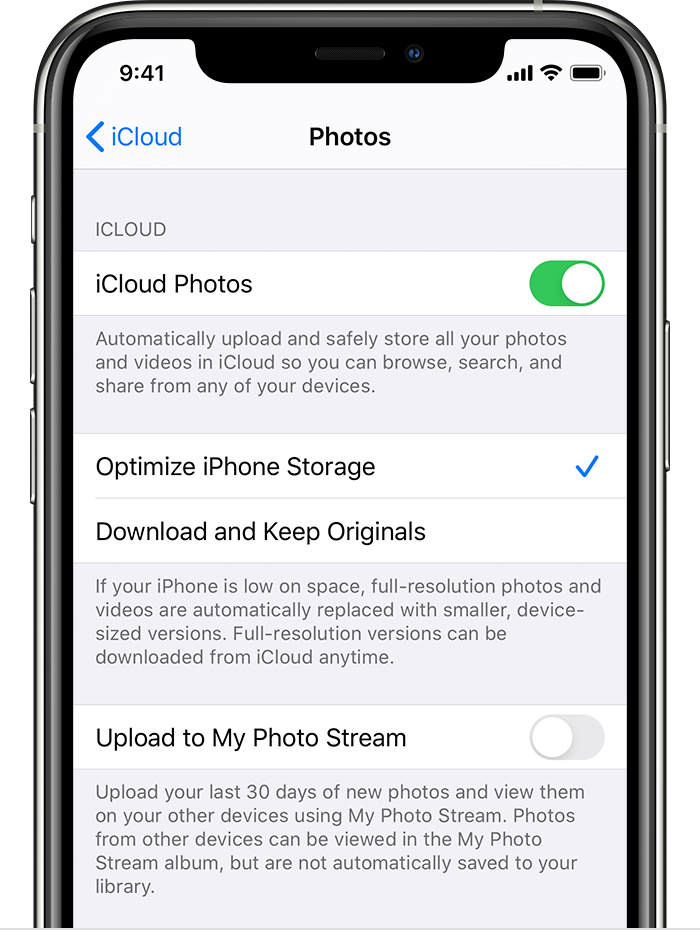
Do or [Re-do "toggle iCloud Photos from ON to OFF to ON"] these steps:


  1. Tap Settings > [your name] > iCloud > Photos.
  2. Turn on iCloud Photos.
  3. Select Optimize iPhone Storage to save space on your device. (Optional Step)


(When you turn on iCloud Photos, the time it takes for your photos and videos to upload to iCloud depends on the size of your collection and your Internet speed. If you have a large collection of photos and videos, your upload might take more time than usual.)

You can see the status.

Open the Photos app, go to the Photos tab, and scroll to the bottom of your screen.

6 replies
Question marked as Top-ranking reply

Aug 23, 2020 12:25 AM in response to sundraja

Verify by going to iCloud website: goto a web browser on any PC/Mac computer and goto the website www.icloud.com, Sign-in using your iCloud Apple ID. Then check your photos. Are all your photos there?


If not, then please backup your iPhone and recheck the settings for iCloud on your iPhone.


Do or [Re-do "toggle iCloud Photos from ON to OFF to ON"] these steps:


  1. Tap Settings > [your name] > iCloud > Photos.
  2. Turn on iCloud Photos.
  3. Select Optimize iPhone Storage to save space on your device. (Optional Step)


(When you turn on iCloud Photos, the time it takes for your photos and videos to upload to iCloud depends on the size of your collection and your Internet speed. If you have a large collection of photos and videos, your upload might take more time than usual.)

You can see the status.

Open the Photos app, go to the Photos tab, and scroll to the bottom of your screen.

This thread has been closed by the system or the community team. You may vote for any posts you find helpful, or search the Community for additional answers.

icloud Photos/Videos are not in Sync with my iphone

Welcome to Apple Support Community
A forum where Apple customers help each other with their products. Get started with your Apple Account.