
OneDrive attachments
When I try to add an attachment from my email on my phone, it doesn’t give me option to add an attachment from OneDrive. I store my docs on OneDrive and need to be able to do this. How can I accomplish this?
When I try to add an attachment from my email on my phone, it doesn’t give me option to add an attachment from OneDrive. I store my docs on OneDrive and need to be able to do this. How can I accomplish this?
Hi WadeSwiger,
Thanks for following up.
Check out the steps in the following article: Use the Files app on your iPhone, iPad, or iPod touch - Apple Support
"Use third-party apps in Files
The Files app lets you add your third-party cloud services — like Box, Dropbox, OneDrive, Adobe Creative Cloud, Google Drive, and more — so that you can access all of your files on all of your devices. The files you keep in iCloud Drive automatically appear in the Files app, but you need to set up your other cloud services to access them in the Files app too.
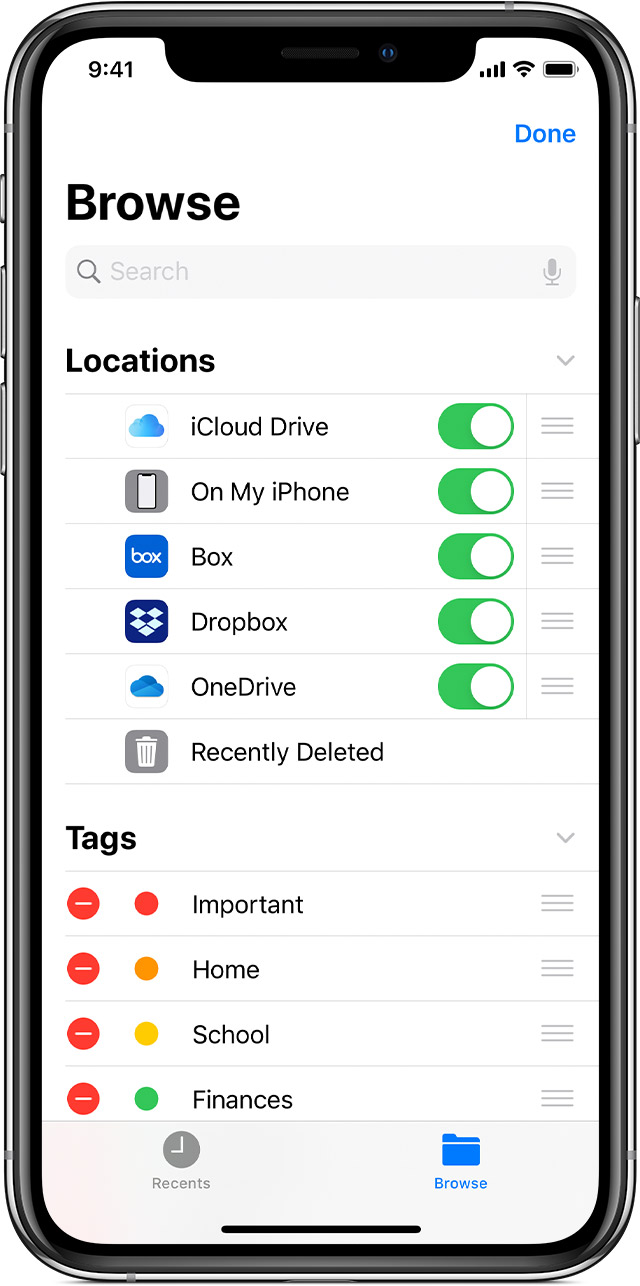
Add third-party apps
 > Edit.
If you don't see one of your third-party cloud services in the Files app, check with your cloud provider.
On iOS 12 or earlier, open the Files app then tap Locations > Edit to add third-party apps.

Move third-party cloud files
 > Copy.
Kind regards.
Hi WadeSwiger,
Thanks for following up.
Check out the steps in the following article: Use the Files app on your iPhone, iPad, or iPod touch - Apple Support
"Use third-party apps in Files
The Files app lets you add your third-party cloud services — like Box, Dropbox, OneDrive, Adobe Creative Cloud, Google Drive, and more — so that you can access all of your files on all of your devices. The files you keep in iCloud Drive automatically appear in the Files app, but you need to set up your other cloud services to access them in the Files app too.
Add third-party apps
> Edit.If you don't see one of your third-party cloud services in the Files app, check with your cloud provider.
On iOS 12 or earlier, open the Files app then tap Locations > Edit to add third-party apps.
Move third-party cloud files
> Copy.Kind regards.
Greetings WadeSwiger,
Thanks for visiting the Apple Support Communities! It seems you'd like to select a OneDrive file as an attachment when sending mail on your iPhone.
Are you able to add a file from OneDrive by selecting Files > Browse, then select OneDrive under Locations when adding an attachment?
You're welcome to leave feedback to Apple directly regarding attaching files to mail on iPhone: Product Feedback - Apple
Cheers.
OneDrive is not an option when going to files then browse. Any idea how to add it
OneDrive attachments

