Pasting over letterhead takes out watermark

I have a letterhead with a watermark that takes up about ⅓ of the page. When I create a table to fill the page and it covers the watermark, the table's cells are white and wipe out the watermark completely. How can I make the table cells transparent so that I can see the table and the contents of the cell table, but still see the watermark showing through?

MacBook Pro 15”, macOS 10.15

Posted on Oct 5, 2020 4:42 PM

Reply
Question marked as Top-ranking reply

Posted on Oct 5, 2020 9:09 PM

HI j'


Your watermark is likely already in Section Master.


If the watermark appears on every page, it's a master object. You can confirm this pretty easily:


With the document open, look in the Arrange menu, choose the Section Masters item, then Make Master Objects Selectable.


Then click on the watermark to Select it. You should see small handles (square or x) at each corner of the object.


You don't need to move that object; it's where it should be.


You do need to make the Table cells transparent by removing the colour fill in them or by setting the opacity of that fill to a value close to 0.
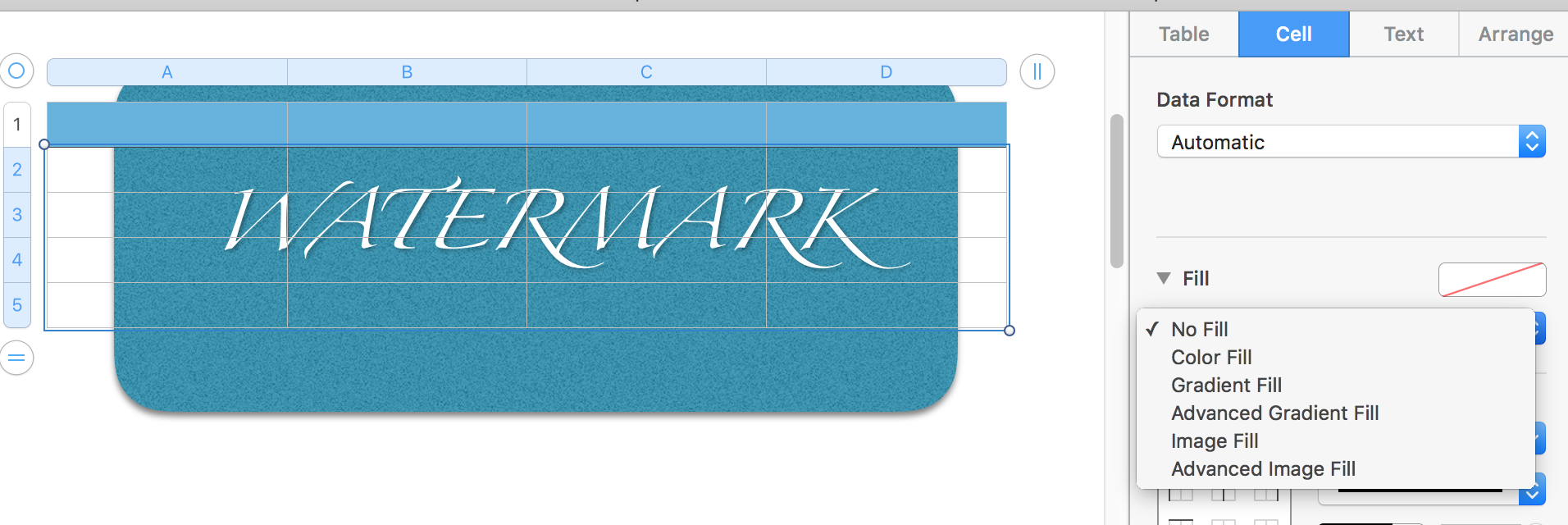

The example here is a lowly crafted one—a shape for the Shapes button with text placed in it—used just to illustrate the process.


Cells in Pages tables are colour filled by default (even the ones filled with white). Set it to No Fill (shown) or (if available) use a colour fill set to low opacity.


Regards,

Barry

Similar questions

4 replies
Question marked as Top-ranking reply

Oct 5, 2020 9:09 PM in response to jugreenman

HI j'


Your watermark is likely already in Section Master.


If the watermark appears on every page, it's a master object. You can confirm this pretty easily:


With the document open, look in the Arrange menu, choose the Section Masters item, then Make Master Objects Selectable.


Then click on the watermark to Select it. You should see small handles (square or x) at each corner of the object.


You don't need to move that object; it's where it should be.


You do need to make the Table cells transparent by removing the colour fill in them or by setting the opacity of that fill to a value close to 0.


The example here is a lowly crafted one—a shape for the Shapes button with text placed in it—used just to illustrate the process.


Cells in Pages tables are colour filled by default (even the ones filled with white). Set it to No Fill (shown) or (if available) use a colour fill set to low opacity.


Regards,

Barry

Oct 5, 2020 8:28 PM in response to VikingOSX

Sadly, the watermark is not available for me to place it in section master—I tried that. The document was created for me long ago and I would not know how to separate the watermark from the document. My friend who owns an older version of pages is able to use the forward and backward arranging. My newer version of pages 10.2 has disabled that feature. It is very upsetting!

This thread has been closed by the system or the community team. You may vote for any posts you find helpful, or search the Community for additional answers.

Pasting over letterhead takes out watermark

Welcome to Apple Support Community
A forum where Apple customers help each other with their products. Get started with your Apple Account.