"fax.backend will damage your computer."

I bought a new HP printer yesterday and as soon as I set it up I started to get this message. It pops up again as soon as I delete it. Can see kind person advise me how to get rid of it, and indeed any other dodgy malware on My MacBook Pro?


MacBook Pro 15″, macOS 10.15

Posted on Oct 25, 2020 9:20 AM

Reply
Question marked as Top-ranking reply

Posted on Oct 25, 2020 9:39 AM

HP have admitted to this being their fault. Long-serving forum member Kurt Lang posted this on Oct 24:


From sources familiar with the matter, HP Inc asked Apple to revoke its printer driver code-signing certificates. It appears this request backfired as it left users unable to print. A HP Inc spokesperson told us on Friday night (Oct 23):


“We unintentionally revoked credentials on some older versions of Mac drivers. This caused a temporary disruption for those customers and we are working with Apple to restore the drivers. In the meantime, we recommend users experiencing this problem to uninstall the HP driver and use the native AirPrint driver to print to their printer.”


HP supplied a new driver on Friday to fix the issue:


ftp://ftp.hp.com/pub/softlib/software12/HP_Quick_Start/osx/Installations/Essentials/hp-printer-essentials-S-5_14_8_4.pkg


However, that "fix" is producing this error for some users:


"Matterhorn.framework" will damage your computer…

If you're seeing that, try this fix. Go to System Preferences, select Printers and Scanners. Select your printer from the list then delete (-) it. Then add (+) your printer back and select the generic driver to use.


Update: HP Printer Software 5.1 should now be becoming available through Software Update to fix this issue.

(2220 UTC 23 October 2020)
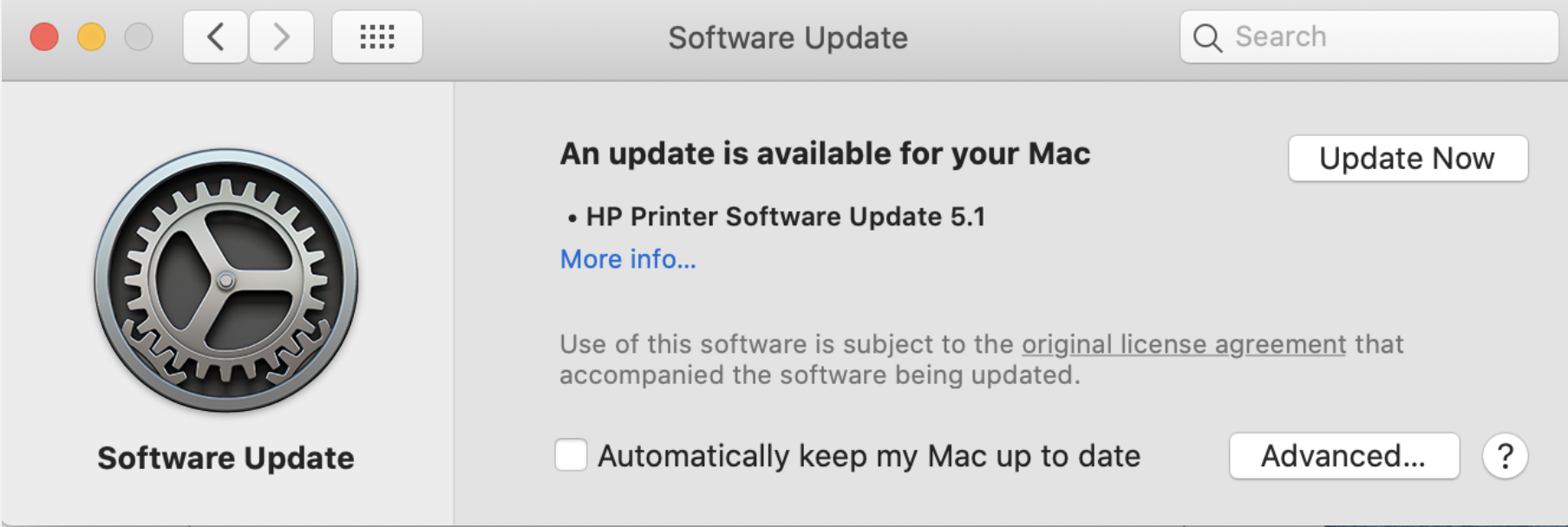


Open >System Preferences>Software Update      (Command R will reload and do a fresh check)

29 replies
Question marked as Top-ranking reply

Oct 25, 2020 9:39 AM in response to Bampot

HP have admitted to this being their fault. Long-serving forum member Kurt Lang posted this on Oct 24:


From sources familiar with the matter, HP Inc asked Apple to revoke its printer driver code-signing certificates. It appears this request backfired as it left users unable to print. A HP Inc spokesperson told us on Friday night (Oct 23):


“We unintentionally revoked credentials on some older versions of Mac drivers. This caused a temporary disruption for those customers and we are working with Apple to restore the drivers. In the meantime, we recommend users experiencing this problem to uninstall the HP driver and use the native AirPrint driver to print to their printer.”


HP supplied a new driver on Friday to fix the issue:


ftp://ftp.hp.com/pub/softlib/software12/HP_Quick_Start/osx/Installations/Essentials/hp-printer-essentials-S-5_14_8_4.pkg


However, that "fix" is producing this error for some users:


"Matterhorn.framework" will damage your computer…

If you're seeing that, try this fix. Go to System Preferences, select Printers and Scanners. Select your printer from the list then delete (-) it. Then add (+) your printer back and select the generic driver to use.


Update: HP Printer Software 5.1 should now be becoming available through Software Update to fix this issue.

(2220 UTC 23 October 2020)


Open >System Preferences>Software Update      (Command R will reload and do a fresh check)

Nov 16, 2020 12:44 PM in response to Steffen-Otto-Jensen

Hello, I had to get a new router and modem from my ISP Friday and when I tried to connect my printer something happened, I followed steps to uninstall my printer but now when I try to add a printer I get the fax.backend will damage your computer in a error box. I have an Epson printer not a HP so I have no idea how to get rid of this. I have the original printer installation CD, not sure if I should try to reinstall that way or not. I need to get rid of this error. Can you advise? I am running the latest software Big Sur 11.0.


Nov 27, 2020 11:48 AM in response to Bampot

Thanks for all the info very helpful. However how long does this totally uncalled for process take please? Im using printer ok but scanner won't work so I've been carrying on regardless. I realise I can't leave it like this forever but I've no idea how long it would take a no IT person like myself to do? Any timings would be gratefully received so I can arrange to take the week off!!!

Thanks Nita

Dec 14, 2020 11:41 AM in response to Steffen-Otto-Jensen

Hi, I've sent a message earlier, but not seeing now so am resending:

We purchased a new Canon G6020 printer & I'm having the same difficulty connecting it with my MacBookPro > that is I'm getting the caution message saying 'fax.backend' will damage your computer. It will not allow me to 'add' the printer. What are the steps I should take to resolve this. I too need step-by-step instructions. Thank you:)

May 1, 2021 2:05 AM in response to Bampot

how did you even find that folder. I went to "open file" and typed in what you said and nothing came up.. I also don't know how to find that location "/Library/Printers/PPDs/Contents/Resources" nor do I know how to find / delete the file called "InstalledPrinters.plist" or how to find it in "/Library/Printers" ..... like where do I go / what do I do on my Mac to find this ? and how did you delete & re install it ? ugh im so confused on what to do . this is annoying

This thread has been closed by the system or the community team. You may vote for any posts you find helpful, or search the Community for additional answers.

"fax.backend will damage your computer."

Welcome to Apple Support Community
A forum where Apple customers help each other with their products. Get started with your Apple Account.