my screen time doesn't add up

can someone explain where all this screen time is coming from?


i dont have the “share across device” option on. the screen time of Individual apps add up to about 3 to 4 hours less than what's shown as the total in screen time. 


also in the chart shown by categories, there is a a gray category that has a similar time to the time difference i mentioned earlier

iPhone X, iOS 14

Posted on Nov 10, 2020 10:50 PM

Reply
Question marked as Top-ranking reply

Posted on Nov 11, 2020 3:54 AM

Understanding Screen Time Graph (Grey Bar explained)

All apps have been assigned to certain categories in iTunes. Screen Time has chosen top 8 categories and have put all remaining categories in a category called "Others".


There are 9 Categories in Screen Time

  1. Social Networking: FaceBook, Hangout, Instagram
  2. Games : Scrabble, PUBG
  3. Entertainment: Netflix, Amazon Music
  4. Creativity: Photos, Google Photos
  5. Productivity: HDFC Bank
  6. Education: SkyView, Learn Python
  7. Reading & Reference: Kindle, NDTV
  8. Health & Fitness: BeatO, Health, Activity
  9. Others : Big Basket, 


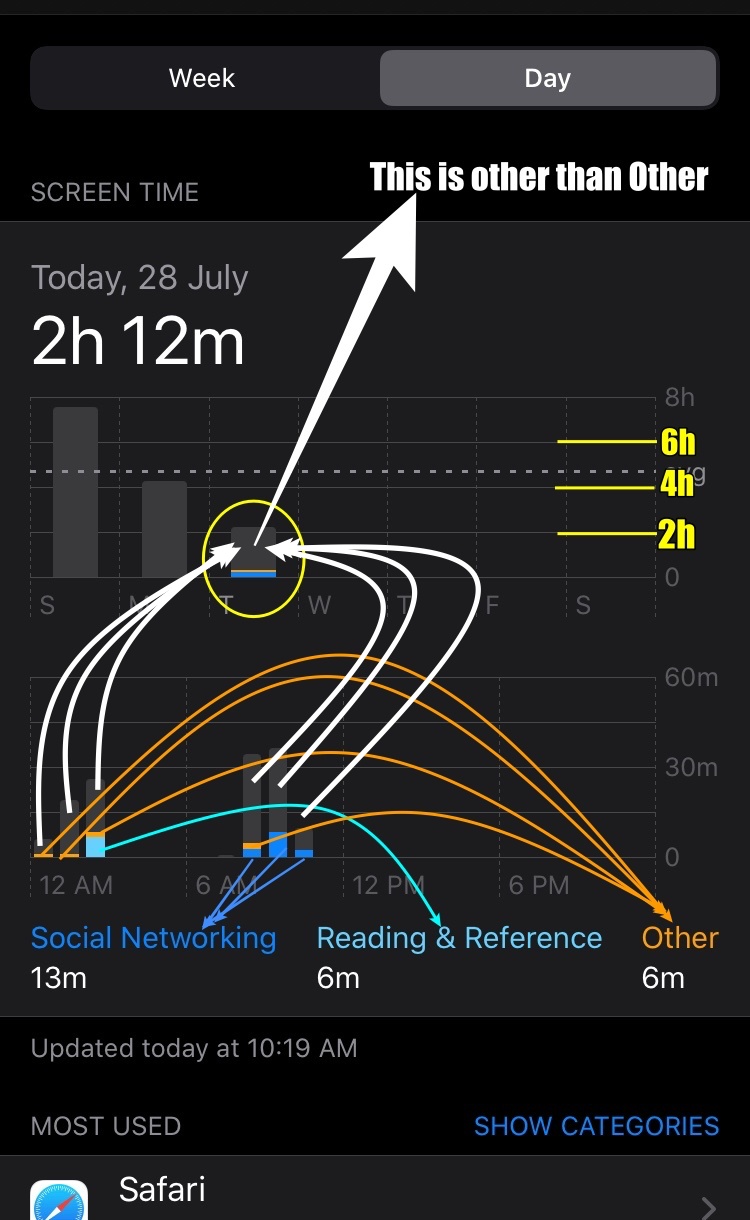
The graph displays top 3 (Time used by user) category legends in X axis. Anything other than these legend categories is Grey bar in the graph


For example:

If the user has used Social Networking, Reading and Reference and Others category apps for the maximum time during a time span. The graph will show these three categories in the X axis as legends and remaining categories (Remaining apps which has used less than 6 min account for what is being shown in Grey Colour.


See the pic below explained

1 reply
Question marked as Top-ranking reply

Nov 11, 2020 3:54 AM in response to hastislsl

Understanding Screen Time Graph (Grey Bar explained)

All apps have been assigned to certain categories in iTunes. Screen Time has chosen top 8 categories and have put all remaining categories in a category called "Others".


There are 9 Categories in Screen Time

  1. Social Networking: FaceBook, Hangout, Instagram
  2. Games : Scrabble, PUBG
  3. Entertainment: Netflix, Amazon Music
  4. Creativity: Photos, Google Photos
  5. Productivity: HDFC Bank
  6. Education: SkyView, Learn Python
  7. Reading & Reference: Kindle, NDTV
  8. Health & Fitness: BeatO, Health, Activity
  9. Others : Big Basket, 


The graph displays top 3 (Time used by user) category legends in X axis. Anything other than these legend categories is Grey bar in the graph


For example:

If the user has used Social Networking, Reading and Reference and Others category apps for the maximum time during a time span. The graph will show these three categories in the X axis as legends and remaining categories (Remaining apps which has used less than 6 min account for what is being shown in Grey Colour.


See the pic below explained


This thread has been closed by the system or the community team. You may vote for any posts you find helpful, or search the Community for additional answers.

my screen time doesn't add up

Welcome to Apple Support Community
A forum where Apple customers help each other with their products. Get started with your Apple Account.