Big Sur Upgrade - USB dongle for Headset not working

My USB dongle to connect to a wireless headset (Jabra) no longer works now I have updated to Big Sur anyone else had a similar problem with USB dongles not working? and know of a solution?

Mac Pro, macOS 11.0

Posted on Nov 17, 2020 12:33 AM

Reply
Question marked as Top-ranking reply

Posted on Nov 18, 2020 3:14 PM

Is it a Jabra dongle that you are using; If so be careful not to install Jabra Direct. The release notes from Jabra state "We expect macOS 11 (Big Sur) is (to be) supported in a release in week 51". Big Sur with Jabra Direct appears to cause near constant attaching and detaching of the dongle form the USB bus. As did my my softphone, I suspect because it makes use of the Jabra SDK internally.


The good news; if you have builtin bluetooth on your mac you should be able to pair directly with the headset. The method varies between models but should work fine for basic functionality. Alternatively if you have access to a windows VM or workstation you can pair the headset and dongle in windows then move it back to MacOS. As the pairing is internal to the 2 devices once paired they will continue to work when moved to a new device. If you are able to post the models you are using I could also point you to more exact directions.


https://www.jabra.ca/support/release-notes/release-note-jabra-direct

5 replies
Question marked as Top-ranking reply

Nov 18, 2020 3:14 PM in response to AndyM1577

Is it a Jabra dongle that you are using; If so be careful not to install Jabra Direct. The release notes from Jabra state "We expect macOS 11 (Big Sur) is (to be) supported in a release in week 51". Big Sur with Jabra Direct appears to cause near constant attaching and detaching of the dongle form the USB bus. As did my my softphone, I suspect because it makes use of the Jabra SDK internally.


The good news; if you have builtin bluetooth on your mac you should be able to pair directly with the headset. The method varies between models but should work fine for basic functionality. Alternatively if you have access to a windows VM or workstation you can pair the headset and dongle in windows then move it back to MacOS. As the pairing is internal to the 2 devices once paired they will continue to work when moved to a new device. If you are able to post the models you are using I could also point you to more exact directions.


https://www.jabra.ca/support/release-notes/release-note-jabra-direct

Nov 18, 2020 11:56 PM in response to Devorac

Thanks for posting, I contacted Jabra in the UK for support and they basically told me it was not their problem and go see Apple, so i will give them feedback on this issue so other customers will get the support they need.


I uninstalled Jabra Direct for the Mac, found the uninstall method on Reddit (https://www.reddit.com/r/Jabra/comments/ez2n1v/jabra_direct_uninstallation_instructions_for/), plugged in the Jabra 380 and now now have connection to the headset without continual drop out, so thanks once again


I do have a windows VM installed, that's a great option, i didn't think of that, may give it a try, as for the Bluetooth, i did pair it but people on my conference calls said it sounded like i was in a tunnel, but it did work


BTW, my headset is a Jabra Evolve2 65 through a Jabra 380 USB A dongle, if you could provide more directions it would be appreciated

Nov 23, 2020 9:14 AM in response to AndyM1577

To start with the manual can be found here:

https://www.jabra.com/supportpages/manuals


I'm not sure if you were asking for more directions on configuring the dongle in windows or direct bluetooth pairing in MacOS.


In windows you would install the JabraDirect app and and then select and configure the headset in it from the dropdown menu.


How to pair without the dongle in MacOS. Remove the dongle from the system. Then engage pairing mode via the power/pairing switch on the right ear cup the switch is has 3 positions (OFF/ON/Pairing) the OFF/ON positions are static but the PAIRING position is a toggle. Hold teh switch in the pairing mode it will announce that it in in pairing mode and you can release the switch. On the Mac go to System Preferences > Bluetooth and select CONNECT on the headset.


Note:

In this mode you will likely expearance a drop in quality when switching from use as headphones to a headset because of the differences in the bluetooth profiles. This is one of the reasons that the dongle is used. It presents a single device to the OS and takes care of the mode switching and likely includes a number of tweaks to provide the best possible quality that would otherwise be quite difficult for a standard user to do or cause issues with other paired devices.


Until Jabra retools Jabra Direct for Big Sur; your best option is likely to pair the dongle to the headset on a windows or pre BigSur mac and move it to the BigSur system after pairing. After that you would need to use that system or a mobile device with the Sound+ app make any configurtaion changes needed and be sure not to pair directly as having both the dongle connected and the headset configured is likely to result in more issues.


Other solutions that may work for you are:

1) Use a 3.5mm ( Limited functionality )

2) Use a USB-C cable. (May require a firmware update from a supported System)

3) Configure the dongle from a mobile device with the Sound+ app. Worked for me on Android but likely Highly Unsupported.


For your iPhone issues I'd suggest that you open a new topic on just that issiue.


Edit: Updated directions for Evolve 2 65 over Evolve 2 85; same switch but right not left ear also not sure about cable option(s) on the 65 over the 85. Look for "Pair with a smartphone" in the manual for greater detail.


Evolve2 65 Pairing Switch Right Ear:
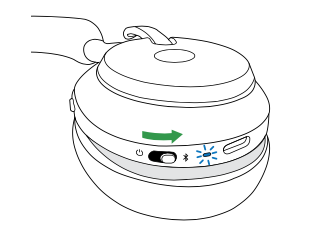
Evolve2 85:

This thread has been closed by the system or the community team. You may vote for any posts you find helpful, or search the Community for additional answers.

Big Sur Upgrade - USB dongle for Headset not working

Welcome to Apple Support Community
A forum where Apple customers help each other with their products. Get started with your Apple Account.
