To start with the manual can be found here:
https://www.jabra.com/supportpages/manuals
I'm not sure if you were asking for more directions on configuring the dongle in windows or direct bluetooth pairing in MacOS.
In windows you would install the JabraDirect app and and then select and configure the headset in it from the dropdown menu.
How to pair without the dongle in MacOS. Remove the dongle from the system. Then engage pairing mode via the power/pairing switch on the right ear cup the switch is has 3 positions (OFF/ON/Pairing) the OFF/ON positions are static but the PAIRING position is a toggle. Hold teh switch in the pairing mode it will announce that it in in pairing mode and you can release the switch. On the Mac go to System Preferences > Bluetooth and select CONNECT on the headset.
Note:
In this mode you will likely expearance a drop in quality when switching from use as headphones to a headset because of the differences in the bluetooth profiles. This is one of the reasons that the dongle is used. It presents a single device to the OS and takes care of the mode switching and likely includes a number of tweaks to provide the best possible quality that would otherwise be quite difficult for a standard user to do or cause issues with other paired devices.
Until Jabra retools Jabra Direct for Big Sur; your best option is likely to pair the dongle to the headset on a windows or pre BigSur mac and move it to the BigSur system after pairing. After that you would need to use that system or a mobile device with the Sound+ app make any configurtaion changes needed and be sure not to pair directly as having both the dongle connected and the headset configured is likely to result in more issues.
Other solutions that may work for you are:
1) Use a 3.5mm ( Limited functionality )
2) Use a USB-C cable. (May require a firmware update from a supported System)
3) Configure the dongle from a mobile device with the Sound+ app. Worked for me on Android but likely Highly Unsupported.
For your iPhone issues I'd suggest that you open a new topic on just that issiue.
Edit: Updated directions for Evolve 2 65 over Evolve 2 85; same switch but right not left ear also not sure about cable option(s) on the 65 over the 85. Look for "Pair with a smartphone" in the manual for greater detail.
Evolve2 65 Pairing Switch Right Ear:
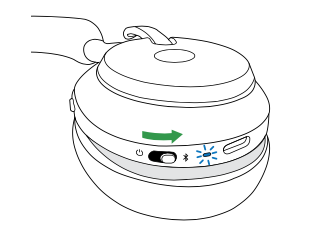
Evolve2 85:


