Why 5120x1440 Doesn't Work with Apple M1

Hi


Why the resolution 5120x1440 Doesn't work with the New Apple M1 ...


You indicate on the website '' One display with up to 6K resolution at 60Hz connected via Thunderbolt and one display with up to 4K resolution at 60Hz connected via HDMI 2.0 ''


But I can only use the resolution 3840 x 1080 not my native resolution 5120 x 1440.


Can I have a explication please ?


Thanks in advance


Mac mini 2018 or later

Posted on Nov 17, 2020 11:42 AM

Reply
Question marked as Top-ranking reply

Posted on Dec 5, 2020 11:07 AM

Hey all, my setup has the Samsung G9 with the M1 Mac Mini, and a desktop PC with an RTX2070. Watching some youtube vids, i made sure to buy a direct DisplayPort to USB-C cable that supported 1.4. I thought that would solve the issue, however, i still had to do some tinkering, although i think you'll still need a direct cable with DP 1.4 support for this to work.


Before playing around with the settings on the computers and the monitor, switching around and wake from sleep bugging out on the Mac Mini was really annoying. Even with the 1.4 direct DP > USB-C cable.


However, I think i've landed at a config that works, although this still requires the use of SwitchResX. Hopefully this will help some of you, there's a trial so you can try anyway.


G9 Monitor Settings:

Game: Refresh Rate > 120hz (240hz would bug out on wake from Mac)

Game: Adaptive Sync > off

System: DisplayPort Version > 1.4


Driver Version: 1008 (get from samsung site, requires a usb stick)


Mac Mini:

  • Used SwitchResX to set the display to 5k 120hz.
  • Setting Monitor to 240hz seems to bug out when i switch from PC > Mac, setting it to 120hz seems to not have this problem.


Mac OS: Big Sur 11.0.1


221 replies

Feb 10, 2021 5:11 AM in response to Vaskill

Thank you for your reply and assistance.


It's not the cable as I swapped out the Mini for my Intel 16" MBP and there were no Internet speed reductions.


Sadly, I just returned the Mini to Apple. The Internet speed issues were not the only problem. When the Mini rebooted there was a 100% CPU load that lasted over five minutes and slowed everything to a crawl.


It appears to me, that despite the improvements of the M1 chip, the Mini is still substandard when comparing it to the 16" MBP with 4x the memory. I think it's better to wait until the Mini is eventually refreshed and a more powerful chip with more ram options is available.

Mar 30, 2021 8:45 AM in response to Fyas

This is the same thing mine is doing now. I've tried the Cable Matters usb-c -> Displayport pigtail thing (which won't even wake the monitor up) and some other generic usb-c->dp cable, which claims 8k support (lmao) and I can get 5120x1440, although the font anti-aliasing goes away, and the scaling looks like garbage, plus what's happening in that screenshot, the input indicator popup just blinks on and off the whole time.


Does anyone know of a cable that works properly, or are the only people who are able to use their new M1 mini those who are willing to spend another 20% of the cost of the entire computer on a fancy dock?


Why couldn't they have just put a displayport plug on the back of the M1 mini is beyond me. I'm willing to try one more cable, but if they can't even get this thing to talk to an ultrawide monitor that's been out for years now, I'm just going to have to deal with Lightroom taking 6 seconds to open instead of 4 and keep using my windows machine.


Atrocious.

Apr 13, 2021 2:46 PM in response to Fyas

I'm having the same issue except I'm running BigSur 11.2.3. I have the recommended DP1.4 cable that was shown in that youtube video, and I even tried EasyRes to see if that would work. Somethings up with the updates and I really hope Apple takes care of this. I have a 5120x1440 @ 120hz Viotek 49" monitor and I'm out of ideas. If anyone has any other ideas or tips/tricks/fixes that they know of please let me know.

Apr 14, 2021 5:26 AM in response to ansolas

Folks, stop saying "it's working with this cable". It doesn't. You might be able to get a picture after some fooling around, but there is no HiDPI setting that's even remotely nice looking, and your fonts are always going to be either too small to read and blocky, or overblown and zoomed in to the point where the letters are quarter-inch tall.


I returned my mac mini, I'm over it.

Apr 14, 2021 6:54 AM in response to DrDyna

Which Screen do you tried ?

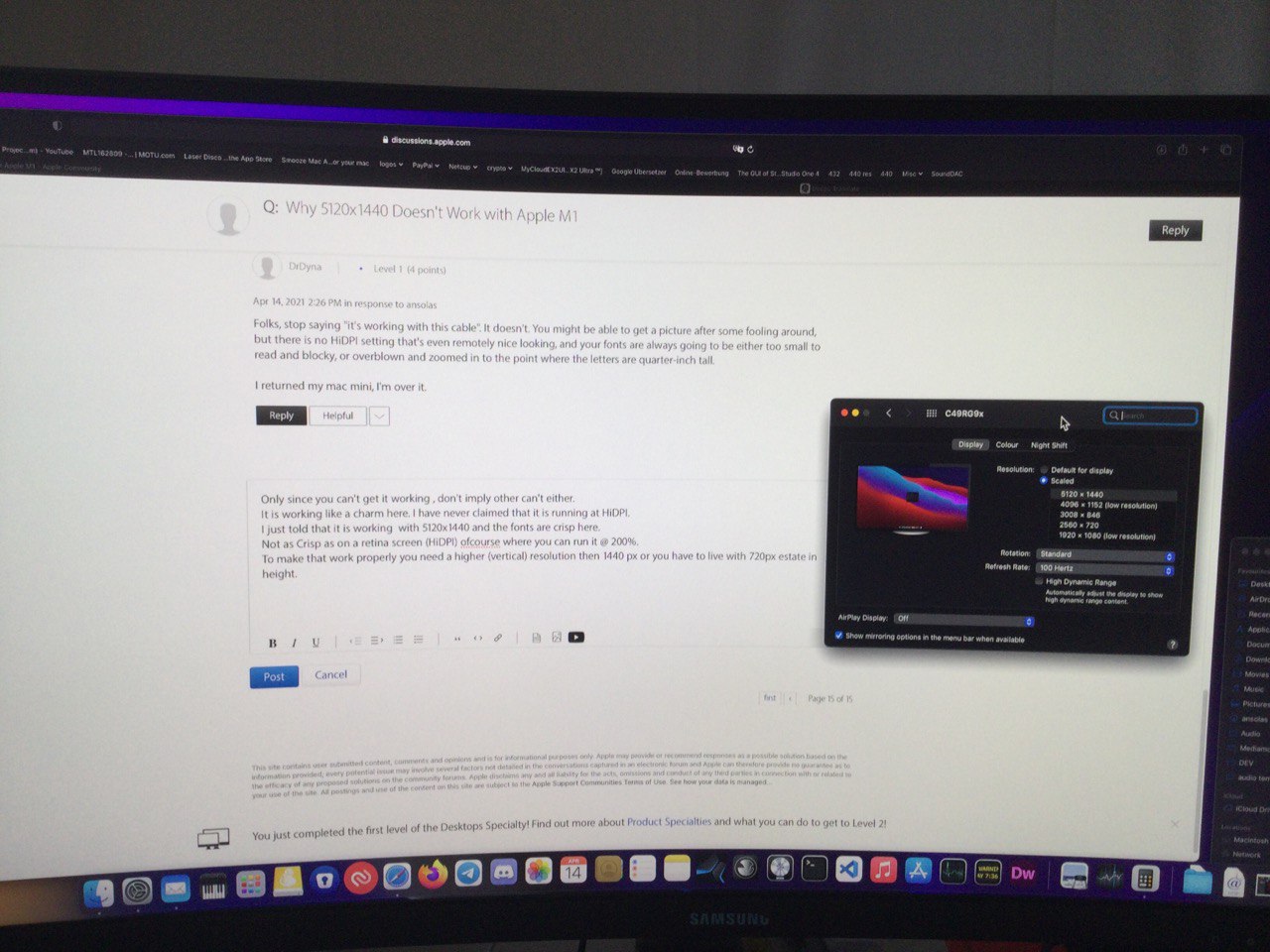
Only since you can't get it working , don't imply other can't either.

It is working like a charm here.


We have never claimed that it is running at HiDPI.


HiDPI is unequal to Ultrawide.


I just told that it is working with 5120x1440 and the fonts are crisp here.

Not as Crisp as on a retina screen (HiDPI) ofcourse where you can run it @ 200%.

To make that work properly you need a higher (vertical) resolution then 1440 px or you have to live with 720px estate in height. But that Screen would cost a lot more than a ultra wide ;)


eg LG Ultrafine has a resolution of 5120 x 2880


That would give you a screen estate of 1920x1080 @ 200%.

So I would need at least 3 of them to get more estate (dual head suxx since you would have always a bezel in the middle of the view)


5720 x 2880 would be lovely :) and then in OLED Quality, THAT would be crisp and enough estate @ 200%

I wonder how much this would (will) cost.


This thread has been closed by the system or the community team. You may vote for any posts you find helpful, or search the Community for additional answers.

Why 5120x1440 Doesn't Work with Apple M1

Welcome to Apple Support Community
A forum where Apple customers help each other with their products. Get started with your Apple Account.
