Hello kian292,
Thank you for participating in the Apple Support Communities! We understand that you'd like to prevent your iPhone from lowering the volume automatically when playing music at a loud volume. You've come to the right place for help.
Headphone audio level notifications were recently introduced in iOS 14.2, which is causing the notification shown in your screenshot:
Headphone notifications on your iPhone, iPod touch, or Apple Watch - Apple Support
If you'd like to turn off the notifications and/or prevent your iPhone from lowering the volume automatically, follow the steps in this section:
"
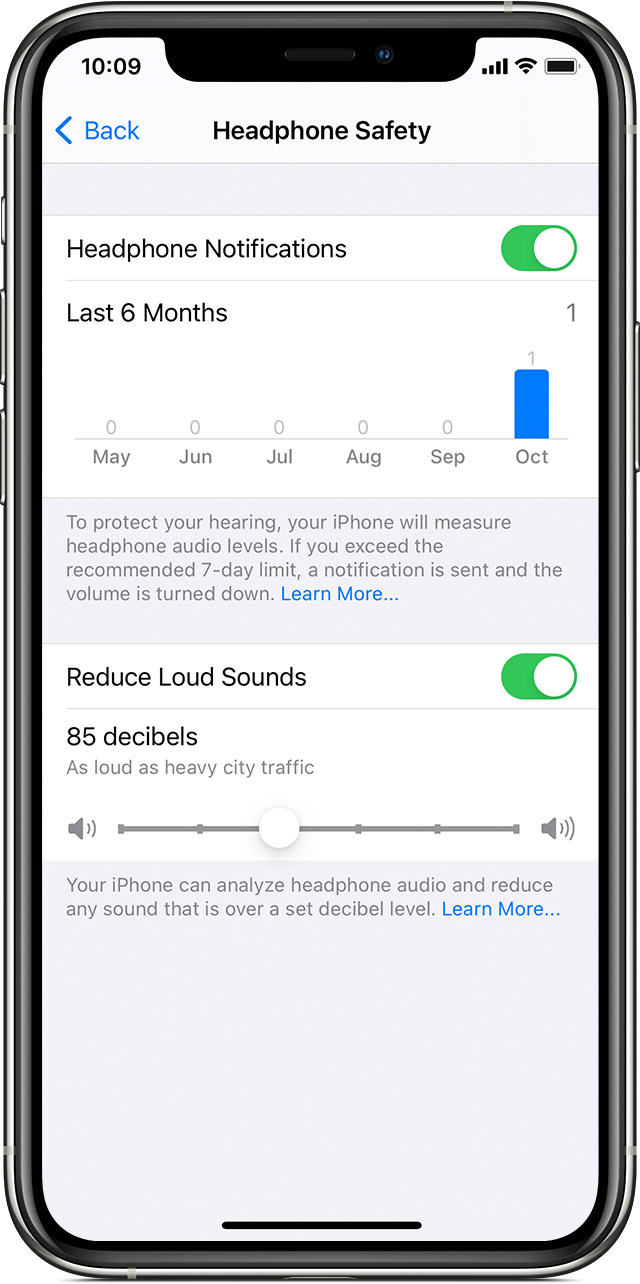
- Open the Settings app on your iPhone or iPod touch.
- Tap Sounds & Haptics, then tap Headphone Safety.
- Turn Headphone Notifications on or off.*
You can also turn on Reduce Loud Sounds to automatically lower your headphone volume when it exceeds your set decibel level.
*Due to regulations and safety standards, headphone notifications can’t be turned off in certain countries or regions."
Take care.


