
iMac 27 2020 memory upgrade

  • How to allocate different capacity memory chips? According to apple (quoted), the channels should be equal capacity, I.e., channel A (slots 1 and 2) should equal channel B (slots 3 and 4).
  • “iMac (Retina 5K, 27-inch, 2020) DIMMs have a notch on the bottom, slightly left of the middle. If your DIMMs are mixed in capacity, minimize the capacity difference between Channel A (slots 1 and 2) and Channel B (slots 3 and 4) when possible.”
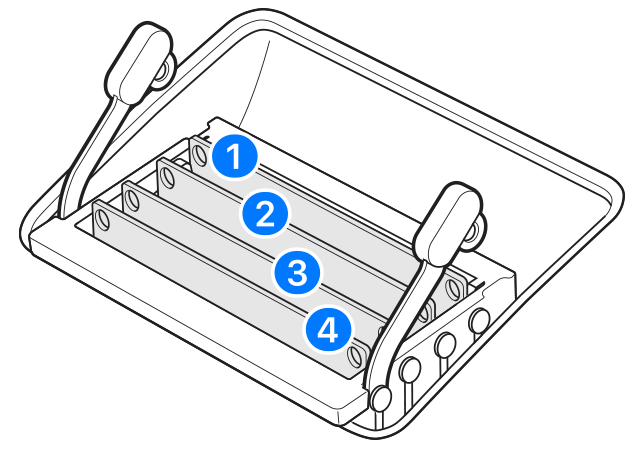
I intend to add 2Xist 32 and leave the 8G currently installed if it is in 2x4.

Sound right?

Posted on Dec 5, 2020 5:24 PM

Reply
3 replies

Dec 5, 2020 6:56 PM in response to map989

On a 2020 iMac installing upgraded RAM is pretty easy. If you are going to use the original 8GB DIMMs put those in slots 1 & 2 (the top 2 slots) and the upgraded RAM in slots 3 & 4. This will yield the best performance. When you buy your RAM only buy it from Crucial.com or Macsales.com, NEVER buy from a reseller such as Amazon or anyone else. Just Crucial.com or Macsales.com direct.


Below are pictures of my RAM installation, please pay close attention to the slots and speeds of the RAM!!!!!!!


This thread has been closed by the system or the community team. You may vote for any posts you find helpful, or search the Community for additional answers.

iMac 27 2020 memory upgrade

Welcome to Apple Support Community
A forum where Apple customers help each other with their products. Get started with your Apple Account.