GarageBand - Error while trying to synchronize Audio and MIDI

Just opened GarageBand (v 10.3.5) for the first time since updating to Catalina on my iMac. Now, none of my GB projects will play, and I'm getting the dreaded message of "Error while trying to synchronize Audio and MIDI. Sample Rate 40,452 recognized. Check conflict between GarageBand and external device."


The weird thing is that I have no external devices connected, and I get the error even in projects that have no audio, but only Software Instrument (MIDI) tracks.


Anybody have suggestions? Thanks, and Happy Holidays!

iMac 27″, macOS 10.15

Posted on Dec 18, 2020 1:40 PM

Reply
Question marked as Top-ranking reply

Posted on Dec 21, 2020 8:31 AM

Hi unclemike47,


Thank you for posting in the Apple Support Communities. We understand you are receiving an error related to audio while attempting to launch GarageBand. Let's take a look.


"Open GarageBand without audio input and output


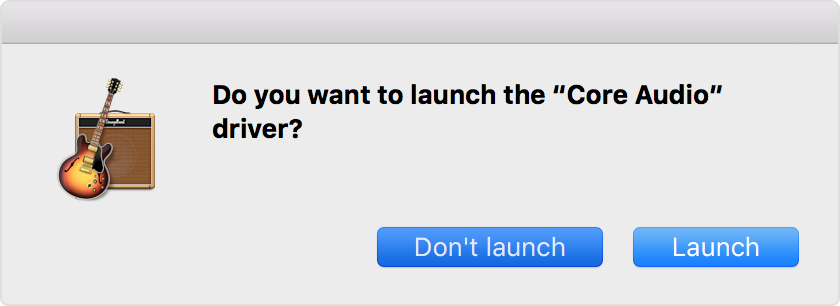
  1. Open GarageBand and immediately press and hold the Control key before a project opens.
  2. In the alert, click Don’t Launch.


If GarageBand opens, it can indicate the following:

  • You might need to update or service your external audio interface. Contact the manufacturer for support.
  • An Audio Units plug-in might be damaged, or it might not be compatible with your version of GarageBand. You can try disabling plug-ins to troubleshoot your issue."


You'll find additional troubleshooting steps here: If GarageBand isn't working on your Mac


Cheers!

Similar questions

1 reply
Question marked as Top-ranking reply

Dec 21, 2020 8:31 AM in response to unclemike47

Hi unclemike47,


Thank you for posting in the Apple Support Communities. We understand you are receiving an error related to audio while attempting to launch GarageBand. Let's take a look.


"Open GarageBand without audio input and output


  1. Open GarageBand and immediately press and hold the Control key before a project opens.
  2. In the alert, click Don’t Launch.


If GarageBand opens, it can indicate the following:

  • You might need to update or service your external audio interface. Contact the manufacturer for support.
  • An Audio Units plug-in might be damaged, or it might not be compatible with your version of GarageBand. You can try disabling plug-ins to troubleshoot your issue."


You'll find additional troubleshooting steps here: If GarageBand isn't working on your Mac


Cheers!

This thread has been closed by the system or the community team. You may vote for any posts you find helpful, or search the Community for additional answers.

GarageBand - Error while trying to synchronize Audio and MIDI

Welcome to Apple Support Community
A forum where Apple customers help each other with their products. Get started with your Apple Account.