Slow wifi after Big sur update

After updating to Big sur my wi-fi speeds are at about a third of what i'm used to. Right now i get something like 50-100mbit/s both ways on my macbook and 350-400mbit/s on my iphone that is right beside the computer. I'm on a 500mbit connection and I use the same 5ghz network on both devices. Before updating I got the same speeds on both devices.


I have tried everything from this guide: https://osxdaily.com/2020/11/23/how-fix-macos-big-sur-wifi-issues/


Any other ideas?


MacBook Pro 13″, macOS 11.1

Posted on Dec 21, 2020 1:02 PM

Reply
Question marked as Top-ranking reply

Posted on Apr 5, 2021 2:11 AM

Guys I think I may have found a solution for this problem.


  1. Turn off bluetooth.
  2. Disconnect all peripherals from your computer.
  3. Open System Preferences. In the "Energy Saver" preference, de-select "Wake for network access" (no check, and leave it that way).
  4. Open the finder. Select the "Go" menu. Select "computer." Select "Macintosh HD." Go the the "Library" folder. Go to the "Preferences" folder. Find the preference file "com.apple.bluetooth.plist."
  5. Rename "com.apple.bluetooth.plist" as "com.apple.bluetooth.plist.old" (i.e. add ".old"). Eventually, if this solution works for you, you can delete this "old" preference file.
  6. Restart your computer (this will create a new "com.apple.bluetooth.plist" preference file).
  7. Turn bluetooth back on.


Apparently, the problem is a bug caused by a bad interaction between the bluetooth preference file and wifi.

Similar questions

58 replies
Question marked as Top-ranking reply

Apr 5, 2021 2:11 AM in response to FA-RO

Guys I think I may have found a solution for this problem.


  1. Turn off bluetooth.
  2. Disconnect all peripherals from your computer.
  3. Open System Preferences. In the "Energy Saver" preference, de-select "Wake for network access" (no check, and leave it that way).
  4. Open the finder. Select the "Go" menu. Select "computer." Select "Macintosh HD." Go the the "Library" folder. Go to the "Preferences" folder. Find the preference file "com.apple.bluetooth.plist."
  5. Rename "com.apple.bluetooth.plist" as "com.apple.bluetooth.plist.old" (i.e. add ".old"). Eventually, if this solution works for you, you can delete this "old" preference file.
  6. Restart your computer (this will create a new "com.apple.bluetooth.plist" preference file).
  7. Turn bluetooth back on.


Apparently, the problem is a bug caused by a bad interaction between the bluetooth preference file and wifi.

Apr 20, 2021 12:18 AM in response to jens8553b

unreal, i was using my download speed on macboook air 2017 all the time with not even 1/3 of speed until i realize there is a problem with Big Sur.

I have 60mbit download and 20mbit upload with my Hybrid Router connection, and works fine with all devices just on macbook air i got max. 15mbit download ( (after restart up to 22mbit for 10min after that again 15mbit) and upload was always fine about 20mbit. So the problem is only with download speed.


After reading the solutions here (i have no energy save option, i have no apple watch) i just turned my Bluetooth off and yes it works perfectly now with full speed 60/20.


unreal apple didnt fix it, For "Big Sure" there is a problem with OS.


thank you guys

May 21, 2021 1:59 PM in response to jens8553b

Update 5-21-21


Just wanted to give an update in case this helps someone else.


I tried all the solutions above and they DID NOT WORK for me.


However, I managed to downgrade to 11.3 to 11.2.3 using these instructions:


https://www.youtube.com/watch?v=TDUYiMIT4jM&t=191s


and these installers:


https://mrmacintosh.com/macos-big-sur-full-installer-database-download-directly-from-apple/


What happened?


My wifi no longer disconnected and stopped saying NO INTERNET so that was good.


However, I noticed my internet was still about only 25% the speed of every other device in the same room (mac mini was getting about 50mbps when all other devices, including an older mac mini, were getting 100-200 mbps).


So, I read this:


https://www.reddit.com/r/apple/comments/9290dr/usbc_adapter_kills_my_wifi_on_mbp/


And it turned out that once I unplugged my HDMI to USB C adapter I got FULL SPEED!


So, to summarize, the fix that worked for me was to:


1 - downgrade to 11.2.3

2 - unplug the USB C adapter


Now, of course, leaving the USB C adapter is not a permanent solution but it is a work around for now. I have since ordered 4 more adapters of various brands to see if the shielding is better on one of those (fingers crossed).


Anyway, I hope this helps others that might have the same setup as me.


If anyone wants an update on the new adapters, just post here and I'll come back to update.


Cheers,


Saul

Dec 23, 2020 4:32 PM in response to jens8553b

Hey jens8553b,


We're glad you thought to ask Apple Support Communities about the slow network speeds you're experiencing after installing macOS Big Sur. We want to help! You've completed some great steps so far, so let's see if we can narrow it down further. If you haven't already, use Wireless Diagnostics to see if it reports: Use Wireless Diagnostics on your Mac


To help isolate and narrow our focus we'll also want to test this while using safe mode, a new user account, and macOS Recovery. Safe mode will tell us if a third-party app is possibly causing this to happen. Here's more information on safe mode and how to start there: How to use safe mode on your Mac


After noting the results of safe mode, restart your Mac normally to exit, and we'll then create a new user account to test. Please do not use the Guest account. This will let us know if the issue is with your account only, or system-wide: Set up users, guests, and groups on Mac


After noting those results, we'll start to macOS Recovery and use the option to Get Help Online. This takes macOS completely out of the equation: About macOS Recovery on Intel-based Mac computers


Keep us posted on the results.


Take care.

Feb 3, 2021 6:14 AM in response to chuck_3rd

Hi,


I can confirm that the issue is still there with Big Sur 11.2. And I am 100% sure that the issue only happens in Big Sur.

I did a lot of testing, changed the Channel of 5GHz Wifi, optimized all settings, wrote with netgear support and double-checked everything. None of my other devices is having issues. So I decided to test if it's an hardware-related or software-related problem.


So I just installed macOS Catalina to an external USB drive and started testing.

Here are the results (I did two days of testing):


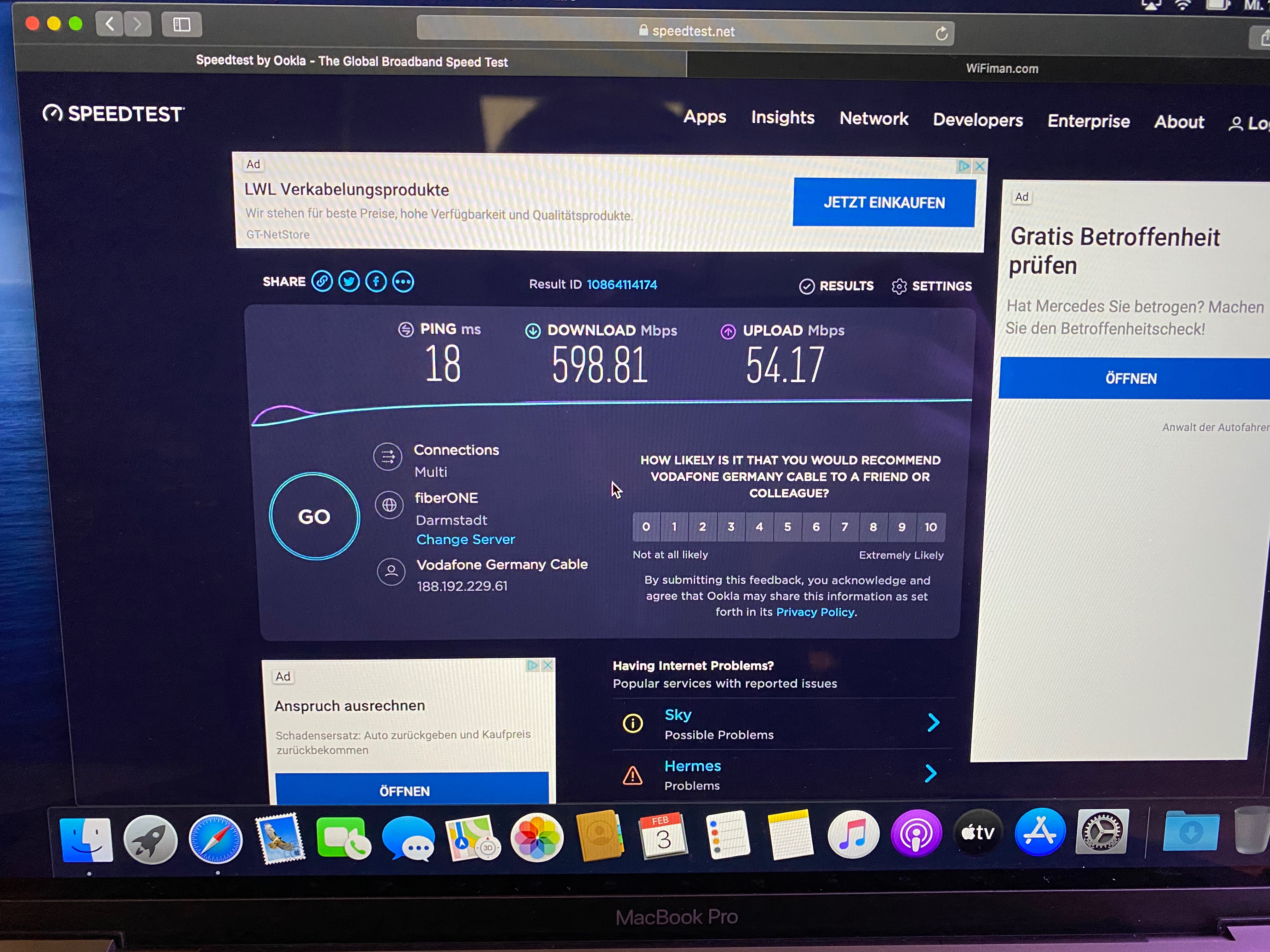
In Catalina I constantly get 450-600Mbit/s of download speed:

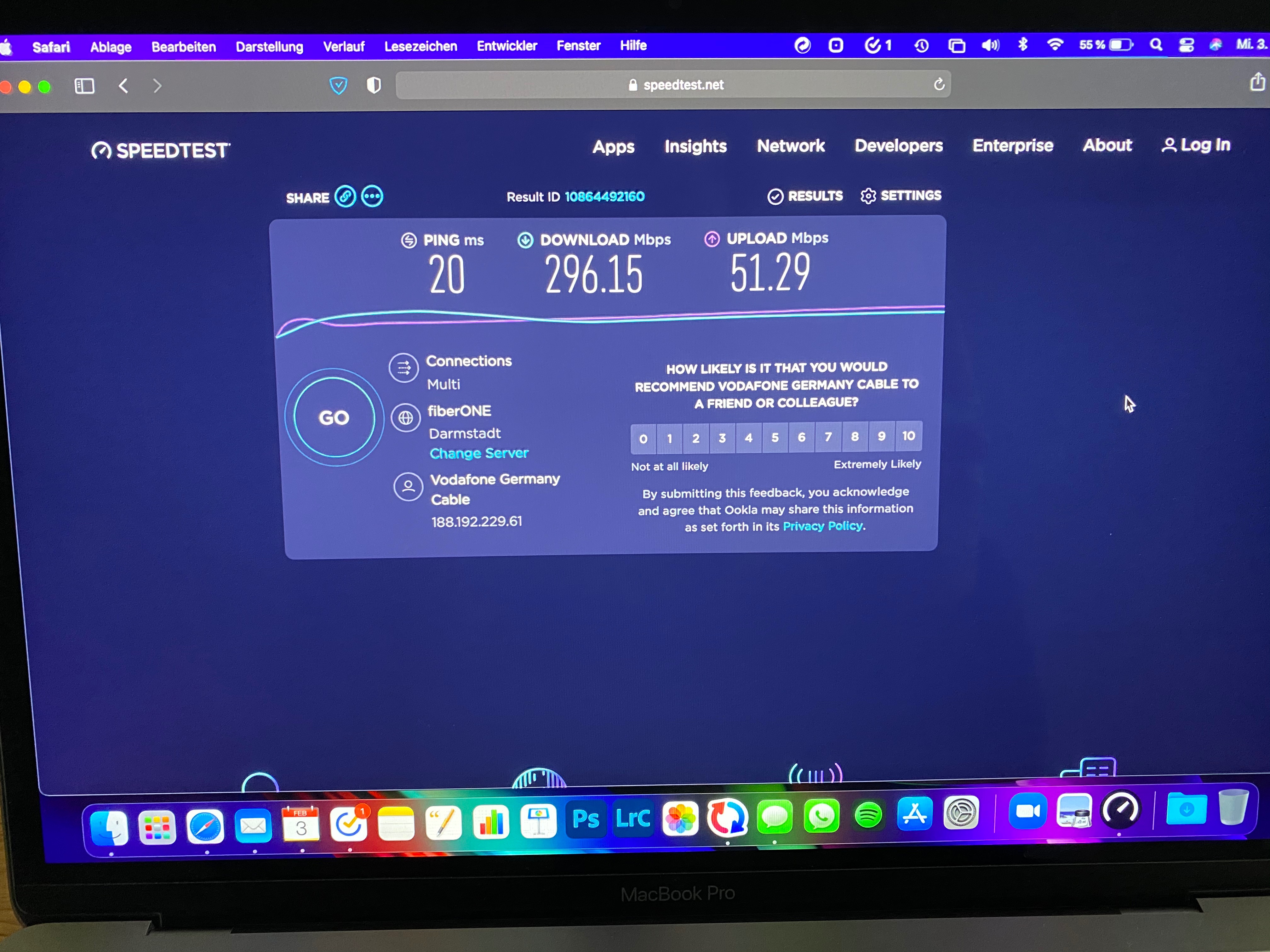
And on Big Sur I get 600 Mbit/s as well, for the first minutes after rebooting. But then - say after 15-20 Minutes, or after waking up from standby - I only constantly get half of the download speed, only 250-300 Mbit/s:

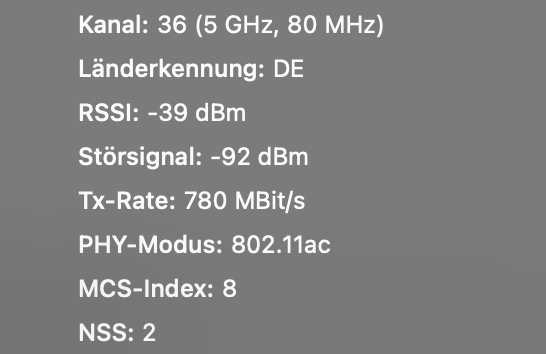
This is so mysterious. I repeated the speedtest many many times and the MacBook Pro from 2018 was on the exact same position on my desk, right next to the Orbi RBS50 Satellite and connected with 5Ghz to the same BSSID. The T/x rate is at 866Mbit/s, even when getting the "low" download speeds.

This absolutely is an evidence for me that the problem is either correlated to Big Sur or any other Software issue. But as I said, I tried everything (new user account, removing Wifi .plist and bluetooth .plist files, creating new network location, removed SCM/PRAM, I don't have any antivirus or firewall installed, Wireless diagnostics didn't found anything, and so on and so on...).


Also the problem only exists on Wifi, I get full speed over ethernet. Also when pinging for example google.com on wifi, I get a spike or some drop-outs, so the wifi connection isn't stable.


I am happy for any help or feedback!

Mar 19, 2021 12:19 AM in response to DreadedJThor

Hi,

I know found a workaround for this bug. As soon as I disabled „Unlock with Apple Watch“ and then did a restart the issue never came back. I now have constant wifi speed from 550-700 Mbit/s. With „Unlock with Apple Watch“ enabled I only got 250-300 Mbit/s (so only the half).


Maybe you could give it a try.

And yes Apple still has to fix this as I already miss this great feature unlocking my Mac with my watch.


I‘m curious if this workaround also fixes your wifi Problems.

Jun 8, 2021 5:54 PM in response to jens8553b

UPDATE:


So, I was able to get a USB C to HDMI adapter with better shielding and I stayed on 11.2.3 and my internet jumped to 100 mbps download.


Granted that is still not as fast as my iphone 11 which is setting right next to my M1 mac mini and it's getting 300 mbps download.


Then, I decided to update today to 11.4...do'h!


Now my internet is right back to 8-10 mbps...wow.


I tried the solutions above with the bluetooth plist fle but that did not work for me.


Then I tried waht "blujez " recommended and I

    1. turned off my bluetooth,
    2. turned off my wifi,
    3. turned wifi back on,
    4. turned bluetooth back on...
    5. internet is now back to 100 mbps, go figure.


I have no idea why that worked but I'm going to leave it alone for now because I do not feel like downgrading to 11.2.3 again.

Jan 19, 2021 8:06 PM in response to jens8553b

Jens,


That's good to know. What happened in the test user account, and did Wireless Diagnostics report any issues? You may consider creating a new network location to see if settings there are causing this: How to use network locations on your Mac


Also, since the speeds pick up in safe mode, check the steps under "If the issue doesn't continue in safe mode" here: How to use safe mode on your Mac


Keep us posted.


This thread has been closed by the system or the community team. You may vote for any posts you find helpful, or search the Community for additional answers.

Slow wifi after Big sur update

Welcome to Apple Support Community
A forum where Apple customers help each other with their products. Get started with your Apple Account.


