big sur too slow

After the upgrade to Big Sur, almost every application (starting with the login) is running much slower or ever hanging (e.g. mail) at start. I wish I wouldn't have done this upgrade.

Is anyone experiencing the same?

Thanks and regards,

Posted on Jan 6, 2021 11:56 PM

Reply
Question marked as Top-ranking reply

Posted on Feb 16, 2021 4:57 PM

Hello,


I followed your raised question and here are some fixes for your Mac but first of all I would I have to tell you to not downgrade to Catalina because Catalina's support is ended and apple is fully concentrated on Mac Big Sur, to keep in touch the apple's movement and latest features, I highly suggest you stay with Mac Big Sur.


Here are some fixes that worked with my 2017 iMac which came with Mac Catalina when I first got it, now I have Big Sur and it's as smooth as butter.


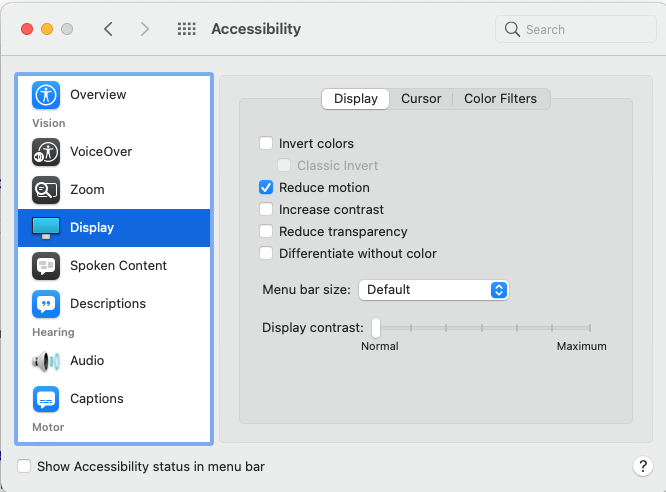
  • Enable reduce motion (This will help reduce or perhaps fully stop your map from lagging. If you still face slowing/lagging/glitching issues, you can also reduce transparency which will help for sure but won't look as good).

  • Make sure to get CleanMyMac and run all of its free programs (You can also get paid version if you want).

https://cleanmymac.com/


  • If you just recently updated to macOS Big Sur and you feel the Mac is slower than usual, the best course of action is to keep the Mac awake, plugged in (if it’s a laptop), and let it sit for a while (perhaps overnight or for a nights) – basically, hurry up and wait. I know that sounds like weird advice, but here’s the logic behind it: after a major macOS system software update, the Mac performs various maintenance routines behind the scenes, it reindexes the drive for Spotlight and Siri and apps like Photos may reindex too. So basically, let the Mac sit turned on overnight, perhaps for a few nights in a row, and allow those indexing and optimization processes to complete. When they’re finished, the performance of the Mac should be significantly better, if not entirely back to normal. This is often the number one reasons Mac users think a new

the operating system is slower than a prior version, so don’t disregard this

simple advice!

  • You should also get firefox instead of using chrome (if you do) because chrome can slow your mac very much and plays key part, especially on Mac Big Sur. Firefox is one of the Top 3 browsers and it's very smooth.


Taking these steps has helped me significantly to reduce total lag and other slowing issues. In-fact, my iMac now runs better with Mac Big Sur compared to Catalina.


4 replies
Question marked as Top-ranking reply

Feb 16, 2021 4:57 PM in response to tashi10

Hello,


I followed your raised question and here are some fixes for your Mac but first of all I would I have to tell you to not downgrade to Catalina because Catalina's support is ended and apple is fully concentrated on Mac Big Sur, to keep in touch the apple's movement and latest features, I highly suggest you stay with Mac Big Sur.


Here are some fixes that worked with my 2017 iMac which came with Mac Catalina when I first got it, now I have Big Sur and it's as smooth as butter.


  • Enable reduce motion (This will help reduce or perhaps fully stop your map from lagging. If you still face slowing/lagging/glitching issues, you can also reduce transparency which will help for sure but won't look as good).


  • Make sure to get CleanMyMac and run all of its free programs (You can also get paid version if you want).

https://cleanmymac.com/


  • If you just recently updated to macOS Big Sur and you feel the Mac is slower than usual, the best course of action is to keep the Mac awake, plugged in (if it’s a laptop), and let it sit for a while (perhaps overnight or for a nights) – basically, hurry up and wait. I know that sounds like weird advice, but here’s the logic behind it: after a major macOS system software update, the Mac performs various maintenance routines behind the scenes, it reindexes the drive for Spotlight and Siri and apps like Photos may reindex too. So basically, let the Mac sit turned on overnight, perhaps for a few nights in a row, and allow those indexing and optimization processes to complete. When they’re finished, the performance of the Mac should be significantly better, if not entirely back to normal. This is often the number one reasons Mac users think a new

the operating system is slower than a prior version, so don’t disregard this

simple advice!

  • You should also get firefox instead of using chrome (if you do) because chrome can slow your mac very much and plays key part, especially on Mac Big Sur. Firefox is one of the Top 3 browsers and it's very smooth.


Taking these steps has helped me significantly to reduce total lag and other slowing issues. In-fact, my iMac now runs better with Mac Big Sur compared to Catalina.

Feb 17, 2021 2:14 AM in response to Muthubaskar

  • @ Muthubaskar - all points made are very good BUT Totally disagree with " Make sure to get CleanMyMac and run all of its free programs " - that &^%$ software is equal to an invitation to disaster and causes more harm that good. It will remove and delete things that will cause havoc right up to the point it may corrupt the OS. Thusly, rendering the OS unusable and require reinstalling from start.

This thread has been closed by the system or the community team. You may vote for any posts you find helpful, or search the Community for additional answers.

big sur too slow

Welcome to Apple Support Community
A forum where Apple customers help each other with their products. Get started with your Apple Account.