Quicktime Audio using Zoom

I'm recording a presentation hosted on Zoom. I'm using Quicktime (screenrecording) for macOS big sur. it does record the audio on the zoom however it also records me breathing etc while I'm recording. I've tried changing the audio settings but same result. Is there a way to ONLY record the audio that is coming from zoom and NOT using the computer mic to record sounds happening in my house?


Posted on Jan 25, 2021 4:27 PM

Reply
Question marked as Top-ranking reply

Posted on Jan 25, 2021 5:13 PM

as long as you only need to record the audio of the zoom meeting but NOT record the sounds coming from your end, you need additional software. i use the BlackHole Virtual Audio Driver. then you can choose "BlackHole 2ch" in the recording options instead of "Built-in Microphone."
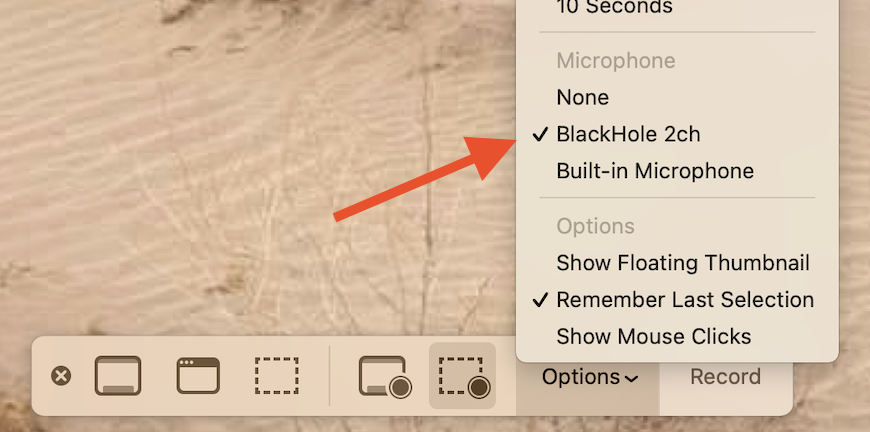

you will also need to set up a multi-output device in your audio MIDI setup utility to be able to both hear and record the internal audio at the same time.

to set up a multi-output device:

Open Audio MIDI Setup: (found in /Applications/Utilities)

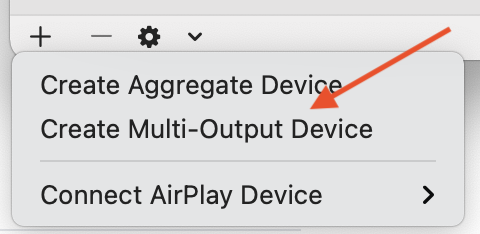
hit the '+' button in the bottom left corner and select "Create Multi Output Device"

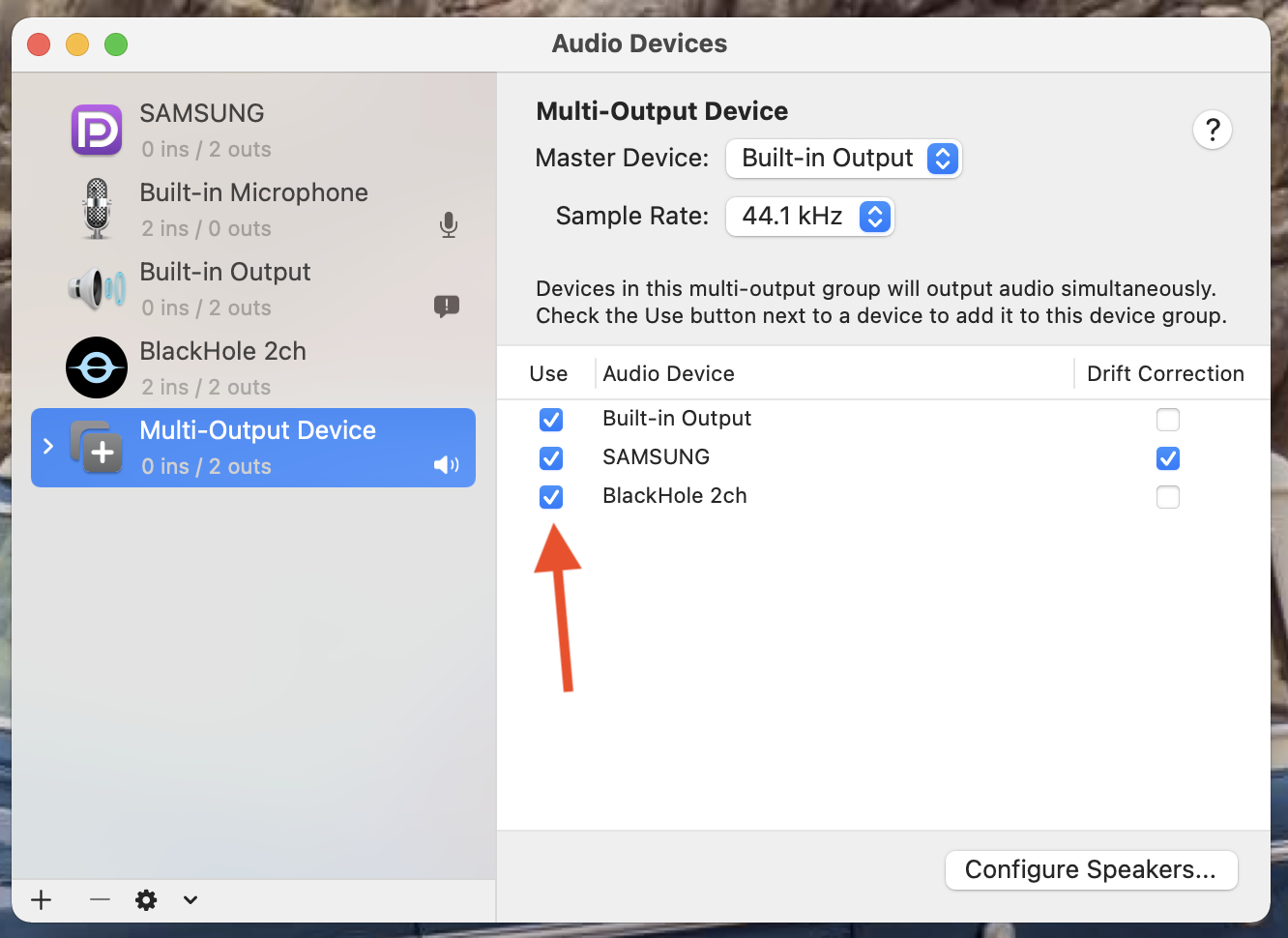
then in the panel that appears on the right, select "Built-in Output" AND "BlackHole 2ch". (and, if you want, any of your other connected devices.)

once you do that, (and BEFORE recording) you can choose "BlackHole 2ch" or "Multi-Output Device" in your "sound options". 
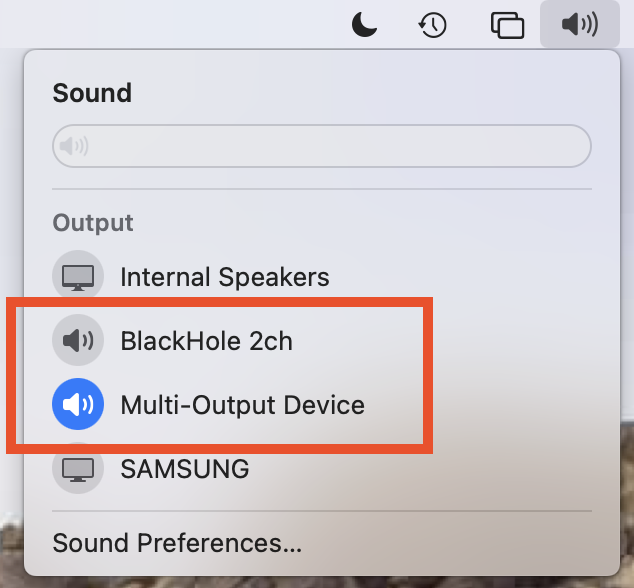

to both hear the speakers and record the audio at the same time, choose "Multi-Output Device". before choosing multi-out, set the internal speakers' volume to a comfortable level first. you cannot control the volume once you are in multi-out mode.


14 replies
Question marked as Top-ranking reply

Jan 25, 2021 5:13 PM in response to PaulaHubble

as long as you only need to record the audio of the zoom meeting but NOT record the sounds coming from your end, you need additional software. i use the BlackHole Virtual Audio Driver. then you can choose "BlackHole 2ch" in the recording options instead of "Built-in Microphone."


you will also need to set up a multi-output device in your audio MIDI setup utility to be able to both hear and record the internal audio at the same time.

to set up a multi-output device:

Open Audio MIDI Setup: (found in /Applications/Utilities)

hit the '+' button in the bottom left corner and select "Create Multi Output Device"


then in the panel that appears on the right, select "Built-in Output" AND "BlackHole 2ch". (and, if you want, any of your other connected devices.)


once you do that, (and BEFORE recording) you can choose "BlackHole 2ch" or "Multi-Output Device" in your "sound options". 


to both hear the speakers and record the audio at the same time, choose "Multi-Output Device". before choosing multi-out, set the internal speakers' volume to a comfortable level first. you cannot control the volume once you are in multi-out mode.

Feb 25, 2021 2:41 PM in response to michaelbierman

for me, that video tells what i already knew. sorry if i didn't explain it in a way you understood. but, unlike the video, you don't need to go into system preferences to change the sound output. all you need to do is click on the menubar's sound options and choose the desired output. i always use multi-out while recording, then i can either leave it there for playback, or when i'm done recording for the day, i can switch back to internal speakers.


all you do is click on the desired output. you can see internal speakers is selected in the above screenshot.


as far as recording options, just make sure to always have BlackHole selected. i use it for recording the sound of the video i'm recording or if i'm just making a new QT audio recording.


here's how i leave the screen recording options:


and this is how i set it for audio recording:


and thanks for finding that youtube video. it showed you how to use it. and, for me, i don't have to wait a week and a half to find out that it DOES work for recording zoom meetings. thanks for confirming it.

Feb 24, 2021 5:28 PM in response to michaelbierman

i don't get what you mean by that. recording zoom with zoom's recording options shouldn't include black hole. if you use the zoom app, you just click "record" in the app's window. i only use my BlackHole to record netflix shows, youtube videos and the like. i've never recorded one of my zoom meeting, but in the app there IS a recording option. i would try to record zoom that way.

This thread has been closed by the system or the community team. You may vote for any posts you find helpful, or search the Community for additional answers.

Quicktime Audio using Zoom

Welcome to Apple Support Community
A forum where Apple customers help each other with their products. Get started with your Apple Account.