
my typing screen has slit in two. how do I put it back together.?
My typing screen has slit in two how do I put it back together
iPad, iPadOS 14
My typing screen has slit in two how do I put it back together
iPad, iPadOS 14
See >>> Split and move the keyboard on your iPad – Apple Support
To easily return the Split Keyboard to the full on-screen keyboard, you can either use two fingers (one on each of the two half-keyboards) and swipe the two halves together - or touch-and-hold the “keyboard” key, then slide your finger to the Merge & Dock option and release.
I hope this information and guidance proves to be helpful in resolving your difficulties.
See >>> Split and move the keyboard on your iPad – Apple Support
To easily return the Split Keyboard to the full on-screen keyboard, you can either use two fingers (one on each of the two half-keyboards) and swipe the two halves together - or touch-and-hold the “keyboard” key, then slide your finger to the Merge & Dock option and release.
I hope this information and guidance proves to be helpful in resolving your difficulties.
If you mean the keyboard is split in two, see the following from If your iPad keyboard is small or split in half - Apple Support
How to get your split iPad keyboard back to normal
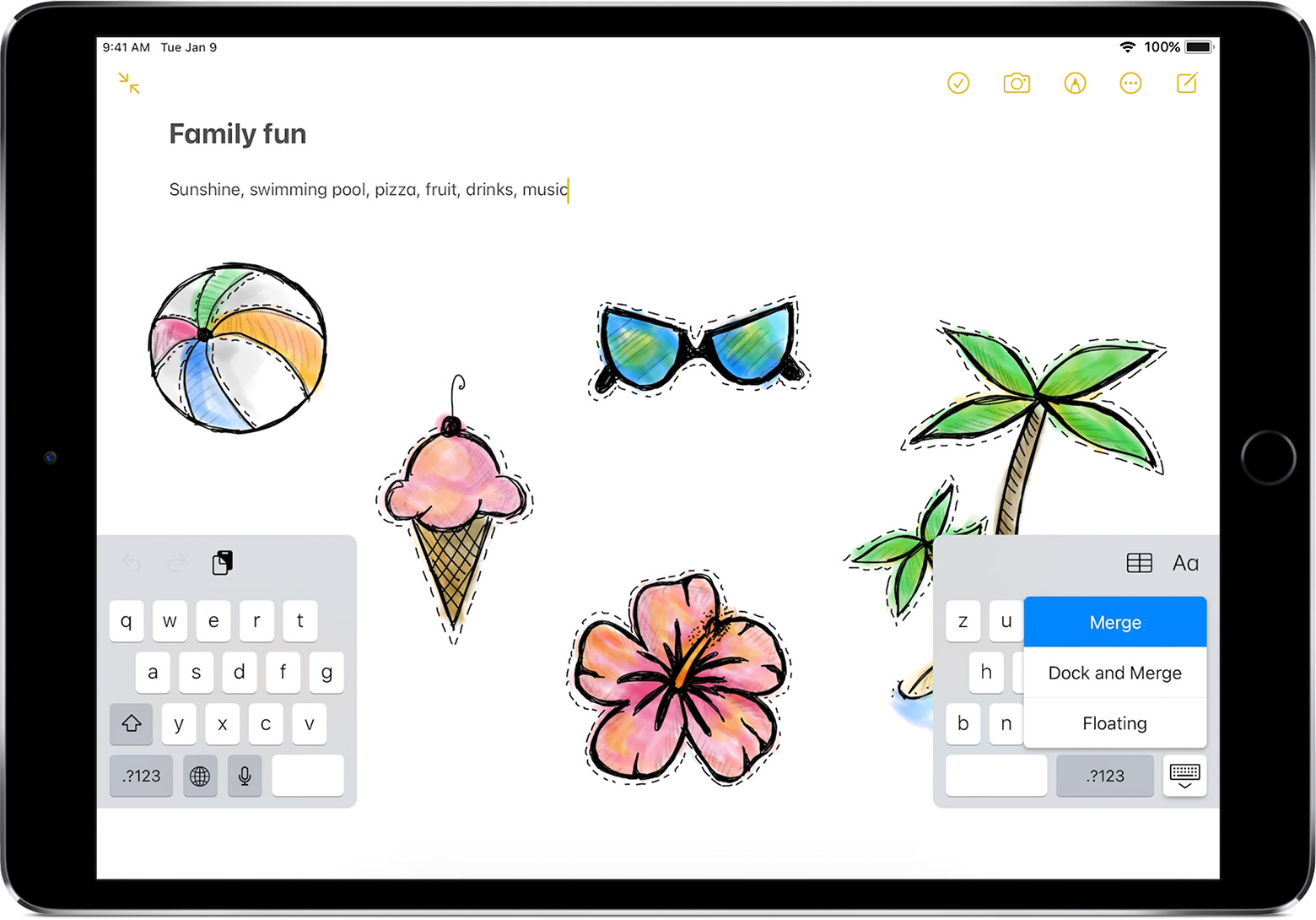
 in the lower-right corner of the keyboard.
my typing screen has slit in two. how do I put it back together.?

