Spotlight not working AND mdutil not working

TL;DR

  • Spotlight works with COMMAND + SPACE
  • Spotlight does not work INSIDE any application
  • mdutil does not respond with any terminal output, no matter what command i try


----


Hey community,


I'm having a super weird issue on my MacBook Air M1, Big Sur 11.3 -

  • Spotlight DOES work when using COMMAND + SPACE.
  • But: Spotlight DOES NOT work inside any single app (eg. Apple Mail won't find any mail, Apple Notes won't find any note etc.).


The strangest part:

When I write

-sudo mdutil -s

in the terminal, it does not give me any response.

So, it's neither saying that it's inactivated, nor it's responding that it's activated.


Other mdutil-Commands do not work as well. Although, when I just type mdutil and hit enter, it still lists me all the parameter options in the terminal.. ..unfortunately, none of these work in the end. Feels like mdutil is broken or something.


Can someone help?


Thanks in advance! :)

MacBook Air 13″, macOS 11.3

Posted on May 21, 2021 10:39 AM

Reply
Question marked as Top-ranking reply

Posted on May 22, 2021 11:48 PM

Hey there!


You aren’t using a beta OS version right?


Have you tried the standard way of reindexing Spotlight:


Rebuild the Spotlight index on your Mac:

https://support.apple.com/en-us/HT201716


Making sure to drag the entire “Macintosh HD” volume to the Privacy window?


What do you see when you click on the Spotlight magnifying glass on the top right and type something in the search field? (Do you see “Indexing” all the time)?


Another valid question. How long has this been happening? Likewise, did this start after an update/restore/reinstallation/migration? If so, this maybe expected to happen for a decent amount of time, depending on the amount of files/data is on your hard drive.


Are there just no results at all when searching Notes and Mail, etc.?


Likewise, can you say if the same happens in Safe Mode, or in a new user account? These answers may help to find a cause, and solution.


If you enter these commands in succession, any results, (such as “Indexing disabled/enabled”)?:


sudo mdutil -i off /

sudo mdutil -E /

sudo mdutil -i on /


This should fix an indexing problem if one exists, if in fact an OS issue.


Otherwise, can you say what you show in System Preferences > Users and Groups > Login Items? Some apps that maybe launching at startup may affect the OS functions.


Thanks!


4 replies
Question marked as Top-ranking reply

May 22, 2021 11:48 PM in response to xindray

Hey there!


You aren’t using a beta OS version right?


Have you tried the standard way of reindexing Spotlight:


Rebuild the Spotlight index on your Mac:

https://support.apple.com/en-us/HT201716


Making sure to drag the entire “Macintosh HD” volume to the Privacy window?


What do you see when you click on the Spotlight magnifying glass on the top right and type something in the search field? (Do you see “Indexing” all the time)?


Another valid question. How long has this been happening? Likewise, did this start after an update/restore/reinstallation/migration? If so, this maybe expected to happen for a decent amount of time, depending on the amount of files/data is on your hard drive.


Are there just no results at all when searching Notes and Mail, etc.?


Likewise, can you say if the same happens in Safe Mode, or in a new user account? These answers may help to find a cause, and solution.


If you enter these commands in succession, any results, (such as “Indexing disabled/enabled”)?:


sudo mdutil -i off /

sudo mdutil -E /

sudo mdutil -i on /


This should fix an indexing problem if one exists, if in fact an OS issue.


Otherwise, can you say what you show in System Preferences > Users and Groups > Login Items? Some apps that maybe launching at startup may affect the OS functions.


Thanks!


May 23, 2021 1:33 AM in response to DiZoE

First, thanks a lot for your response!


Have you tried the standard way of reindexing Spotlight:

Making sure to drag the entire “Macintosh HD” volume to the Privacy window?

> Yes, I already tried to rebuild the spotlight exactly as explained in the link, several times.

After this step, there also indeed was a process of "indexing" going on, which also seemed to finish regularly after some time.

But that changed nothing.


Another valid question. How long has this been happening?

The issue of showing "0 results" in all apps persists since weeks regardless what I tried to do.


If you enter these commands in succession, any results, (such as “Indexing disabled/enabled”)?

No, when I enter any of these commands, the Terminal replied with: Nothing. Also no "indexing disabled" or similar.


Are there just no results at all when searching Notes and Mail, etc.?

> Yes, there are always "0 results" inside each app.

Yet, the Spotlight-Search using CMD + SPACE does work.


ADDITION:

Also a weird behaviour of my MacBook:

When I use CMD + SPACE and Type in trackpad or keychain access or anything else I would usually find in System Controls, it returns no matching results. Don't know if this is related, but - although rather minor - this part of Spotlight definitely seems to be broken, too.


---


UPDATE:

As I was unsure if there will be any solution for this problem, I just recently did a full reset of the whole Mac (deleted the whole disk and reinstalled a fresh Big Sur via the Recovery Tool).

Now:

  • Spotlight works again as intended (via CMD + SPACE and in apps like Mail or Notes), but
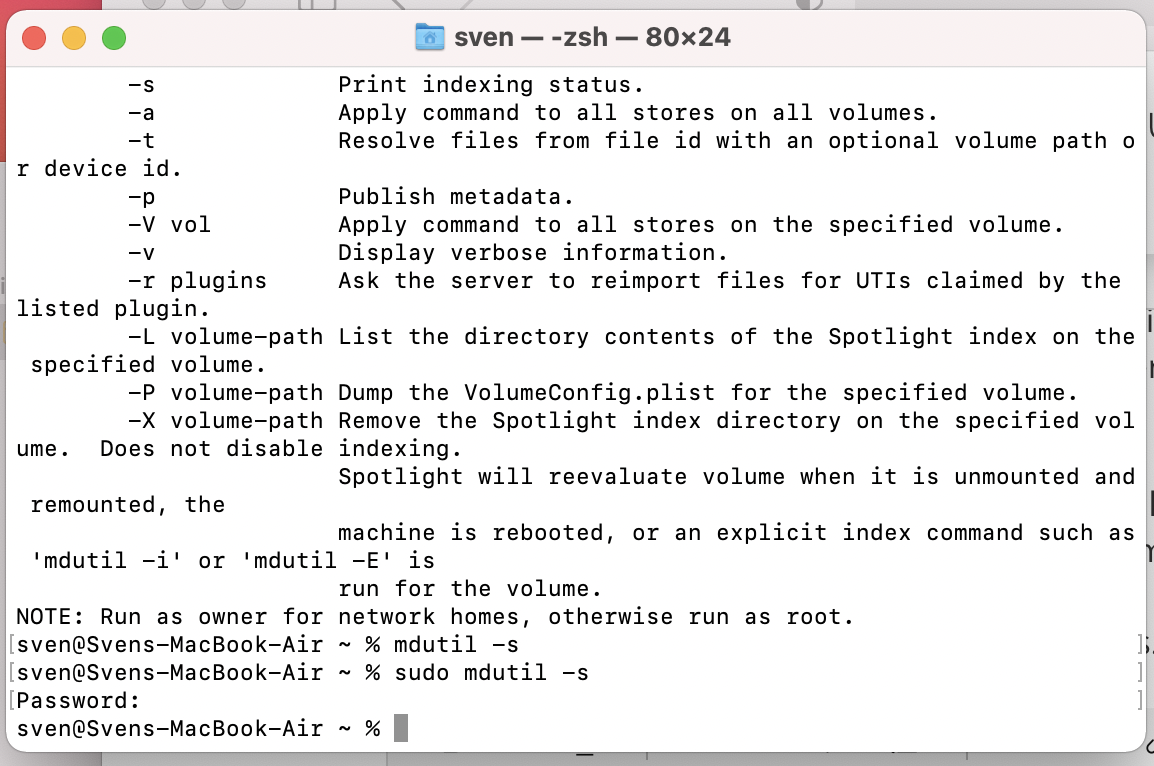
  • Typing mdutil -s in the Terminal still does not lead to any Terminal output (see attached screenshot).

As the latter behaviour still seems to be wrong, I'm still wondering if this problem is fixed, now - or if it's a matter of time until it's occurring again.


I'll keep this thread updated in case of any (bad) news.

If any ideas arise regarding why this issue was and why mdutil still does not work, even on a fresh Big Sur install, I'd still be super curious about it! :)
May 23, 2021 2:35 AM in response to xindray

Hey again! No worries.


Glad you were able to sort it out. Most of the time, people are, naturally, hesitant to do a full factory reset, (clean install). But it appears you are quite comfortable and confident in your computer knowledge. So glad it worked out.


I’m also curious to see how it goes. Did you happen to migrate the data from a backup? Or manually move or re-download your data?


Likewise, did the search function also not work in/for third party/non-Apple apps?


You weren’t using an external keyboard/trackpad were you? And finally, We’re there any connected external drives, monitors, etc. whether by cable or network?


If it works now, that’s awesome, congrats! My mind is always wondering though, that’s the plight of an artist/writer/creator.


Best of luck! Hope it sticks!

This thread has been closed by the system or the community team. You may vote for any posts you find helpful, or search the Community for additional answers.

Spotlight not working AND mdutil not working

Welcome to Apple Support Community
A forum where Apple customers help each other with their products. Get started with your Apple Account.
