iPad 7 Generation did a last version update and stopped turning it on

Dear apple colleagues


Our family has been your loyal customer for 11 years. Satisfaction was really high before, but this time it's really disappointing. My eldest son's iPad 7 Generation did a last version update and stopped turning it on. It used to work fine without any problems. I showed iPad your Perth city genies bar branch yesterday at 12:20 pm. Your staff said hardware failure. I don't understand. Why does a working iPad become a hardware failure? Please check it again. iPad serial number F9***F3M.


Lkhagvasuren


[Personal Information Edited by Moderator]

Posted on Jul 5, 2021 11:12 PM

Reply
Question marked as Top-ranking reply

Posted on Jul 6, 2021 3:55 AM

Nobody here can check anything for you. This is a user-to-user technical support forum; we are all end users, just like you. Many here do, however, have in depth knowledge of issues - and will attempt to offer advice where we can.


It is possible that a hardware failure can occur during an update. Whilst rare, issues can occur.


So, lets concentrate on what we can do. If iPad isn’t responding, do one of the following:


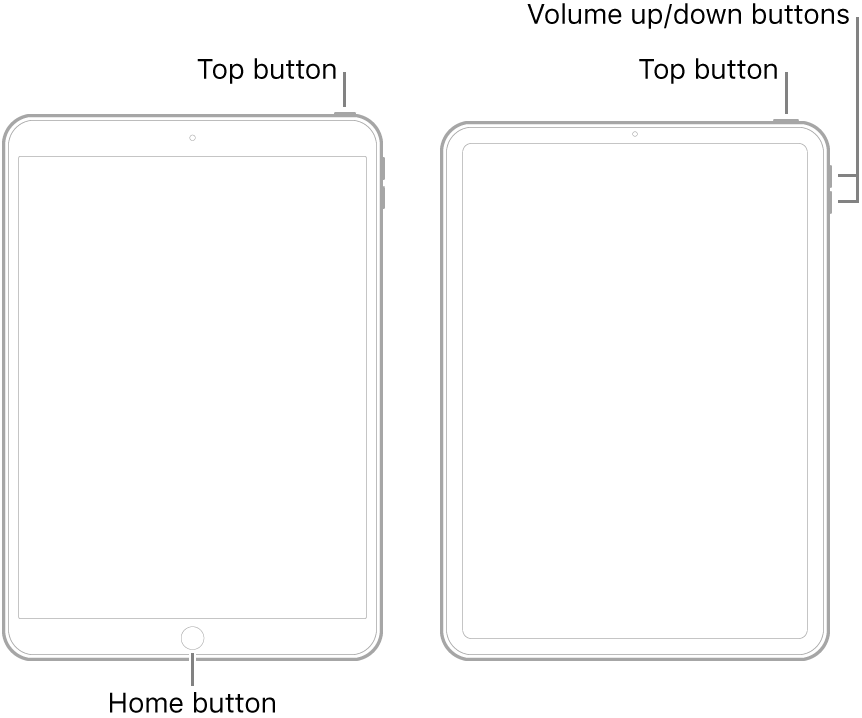
  • On an iPad with a Home button: Press and hold the top button and the Home button at the same time. When the Apple logo appears, release both buttons.
  • On other iPad models: Press and quickly release the volume up button, press and quickly release the volume down button, then press and hold the top button. When the Apple logo appears, release the button.


If iPad still doesn’t turn on, or if it gets stuck during start up, see the Apple Support article If your iPhone, iPad, or iPod touch won't turn on or is frozen. Or if your iPad isn’t working correctly after you restart it, see the iPad Support website.


If you are unable to resolve the problem with assistance from Apple Support, you may well have to return to the Genius Bar at your local Apple Store. Your iPad may require repair.

2 replies
Question marked as Top-ranking reply

Jul 6, 2021 3:55 AM in response to lkhagvasuren312

Nobody here can check anything for you. This is a user-to-user technical support forum; we are all end users, just like you. Many here do, however, have in depth knowledge of issues - and will attempt to offer advice where we can.


It is possible that a hardware failure can occur during an update. Whilst rare, issues can occur.


So, lets concentrate on what we can do. If iPad isn’t responding, do one of the following:


  • On an iPad with a Home button: Press and hold the top button and the Home button at the same time. When the Apple logo appears, release both buttons.
  • On other iPad models: Press and quickly release the volume up button, press and quickly release the volume down button, then press and hold the top button. When the Apple logo appears, release the button.


If iPad still doesn’t turn on, or if it gets stuck during start up, see the Apple Support article If your iPhone, iPad, or iPod touch won't turn on or is frozen. Or if your iPad isn’t working correctly after you restart it, see the iPad Support website.


If you are unable to resolve the problem with assistance from Apple Support, you may well have to return to the Genius Bar at your local Apple Store. Your iPad may require repair.

Jul 6, 2021 4:10 AM in response to LotusPilot

Suggestion by LotusPilot seems like the correct place to start - try hardware reset. May be useful also to understand whether the device responds at all to having the charger connected - does it display anything or make any sounds. Maybe try plugging charger in and removing it and then plugging it in and leaving it for a while. iPads and iPhone will generally power on when the charger is connected; but this can take some time if the battery is depleted.


It doesn't compute that a device that is/was working fine should become a paper weight as a result of doing a software upgrade. I have had this happen to me previously, but can't recall the specifics.

This thread has been closed by the system or the community team. You may vote for any posts you find helpful, or search the Community for additional answers.

iPad 7 Generation did a last version update and stopped turning it on

Welcome to Apple Support Community
A forum where Apple customers help each other with their products. Get started with your Apple Account.