Nobody here can check anything for you. This is a user-to-user technical support forum; we are all end users, just like you. Many here do, however, have in depth knowledge of issues - and will attempt to offer advice where we can.
It is possible that a hardware failure can occur during an update. Whilst rare, issues can occur.
So, lets concentrate on what we can do. If iPad isn’t responding, do one of the following:
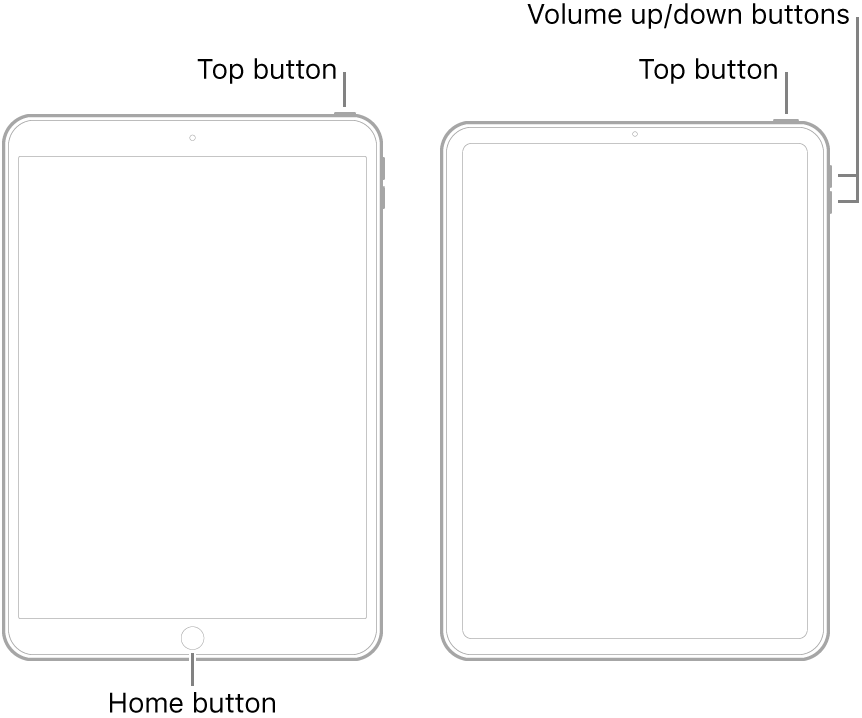
- On an iPad with a Home button: Press and hold the top button and the Home button at the same time. When the Apple logo appears, release both buttons.
- On other iPad models: Press and quickly release the volume up button, press and quickly release the volume down button, then press and hold the top button. When the Apple logo appears, release the button.
If iPad still doesn’t turn on, or if it gets stuck during start up, see the Apple Support article If your iPhone, iPad, or iPod touch won't turn on or is frozen. Or if your iPad isn’t working correctly after you restart it, see the iPad Support website.
If you are unable to resolve the problem with assistance from Apple Support, you may well have to return to the Genius Bar at your local Apple Store. Your iPad may require repair.

