
How to syn ipod music with itunes on computer
How to syn ipod music with itunes on computer
Windows, Windows 6
How to syn ipod music with itunes on computer
Windows, Windows 6
Good afternoon Mstrassburg,
Welcome to the Apple Support Communities!
It sounds like you would like to sync your iPod with your Windows computer, and we'd like to help. Which iPod model do you have? What happens when you try to sync it with your Windows 6 computer?
Do you have a copy of your iTunes Library saved to an external drive? If not, please do this step first.
Back up and restore your iTunes library on your PC
If you have a friend with a newer Windows PC, you can ask them to create a new user account for you on their computer (to keep your data separate from theirs). Then restore the iTunes library to this new user account and sync with your iPod.
The process for syncing is outlined in the resource you viewed earlier:
Use iTunes to sync your iPhone, iPad, or iPod with your computer
"Open iTunes and connect your device to your computer with a USB cable.
Click the device icon in the upper-left corner of the iTunes window. Learn what to do if you don't see the icon.

From the list under Settings on the left side of the iTunes window, click the type of content that you want to sync or remove.* To turn syncing on for a content type, select the checkbox next to Sync.
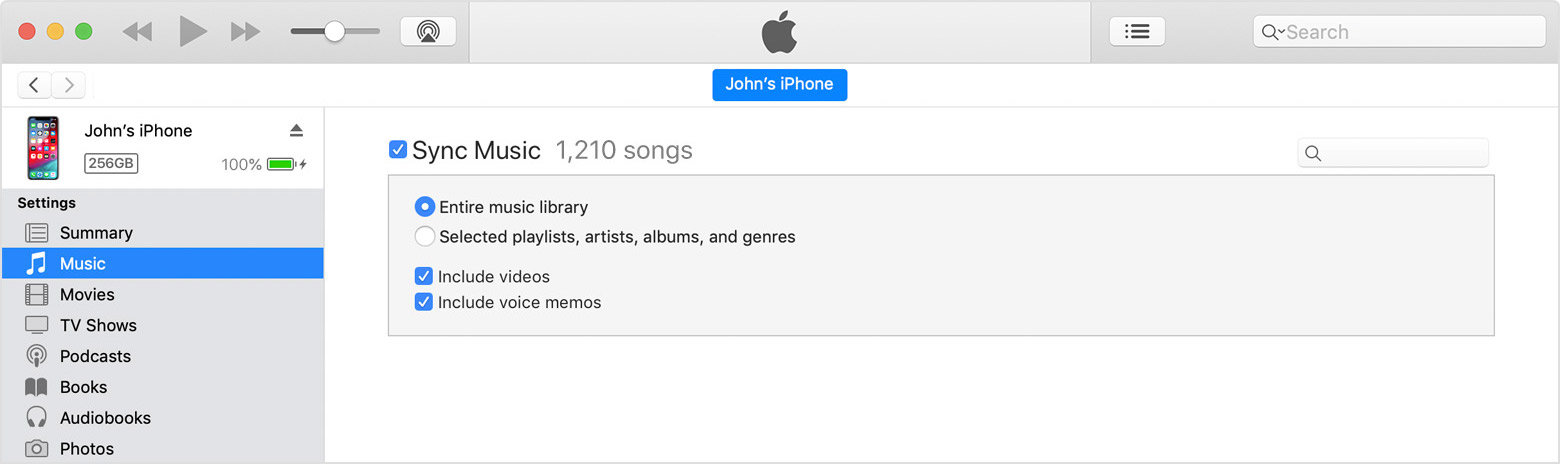
Select the checkbox next to each item that you want to sync.
Click the Apply button in the lower-right corner of the window. If syncing doesn't start automatically, click the Sync button."
Contact Apple for support and service
Take care.
Mstrassburg wrote:
Basically I have a 10 year old ipod which is recognized by my new Windows 10 Laptop. I just want to copy what is on that ipod to the Windows 10 iTunes. A few years ago I tried to Sync and wiped out everything on my iPod as I had nothing on my computers iTunes at the time
Thanks
ps: Over the years I have never found the Windows version of iTunes to be particularly User friendly for such copying.
It isn't meant to be. The idea is that you keep your content in an iTunes library, sync that to your device, and move the library when you change computers. iTunes only supports the transfer of purchases from device to library, not other content.
tt2
In there is content on your device that you want to copy into iTunes see Recover media from an iPod - Apple Community.
tt2
Basically I have a 10 year old ipod which is recognized by my new Windows 10 Laptop. I just want to copy what is on that ipod to the Windows 10 iTunes. A few years ago I tried to Sync and wiped out everything on my iPod as I had nothing on my computers iTunes at the time
Thanks
ps: Over the years I have never found the Windows version of iTunes to be particularly User friendly for such copying.
How to syn ipod music with itunes on computer


