Can't upload songs to library for iTunes matching

I can't upload any songs to my library for matching at Itunes match.

Uploading song has status - trying to match at Itunes Store.

And this status isn't changing at all.

Changing accounts, using other wifi networks - nothing helps.

The Problem began at Thursday. Before that day everything was OK.

Oh - and there is NO problem with downloading already matched songs.


[Re-Titled by Moderator]

Posted on Jul 18, 2021 12:24 PM

Reply
Question marked as Top-ranking reply

Posted on Jul 29, 2021 7:39 AM

So before the call with adviser I did some digging in macos. Music app logs: "log show --predicate 'processImagePath CONTAINS[c] "Music"' --last 2m" in command line. App connects and in few seconds connection get reset by remote server. Same picture in Wireshark - remote server sends RST or FIN packets short after session start.


I told all that to adviser, thats why he asked me to delete VPN profile, I think. He said it gets messed up on OS updates or something similar. Btw, I tested it again. Installed VPN.mobileconfig profile, connected VPN, added an album - no dice. Disconnected VPN - no dice. Removed profile - no dice (!). Restarted macbook - instant match all songs. So its def networking something.

366 replies
Question marked as Top-ranking reply

Jul 29, 2021 7:39 AM in response to BruceDavies

So before the call with adviser I did some digging in macos. Music app logs: "log show --predicate 'processImagePath CONTAINS[c] "Music"' --last 2m" in command line. App connects and in few seconds connection get reset by remote server. Same picture in Wireshark - remote server sends RST or FIN packets short after session start.


I told all that to adviser, thats why he asked me to delete VPN profile, I think. He said it gets messed up on OS updates or something similar. Btw, I tested it again. Installed VPN.mobileconfig profile, connected VPN, added an album - no dice. Disconnected VPN - no dice. Removed profile - no dice (!). Restarted macbook - instant match all songs. So its def networking something.

Aug 7, 2021 10:36 AM in response to Pittboy

Maybe a little update; as regards the mp3 I've been trying to add to the library in the past days still no way, but I tried a different thing as well. I tried to upload "unpublished" tracks; specifically, two recordings from my PC and... Boom, they have been uploaded in a few seconds! So I took one of the (many) songs that currently get stuck in the upload, modified it heavily and then tried to upload it again. Again, no problems at all, and the upload was super fast. So my guess is that only the songs which have an Apple counterpart in Apple music have problems, not the unpublished ones.

Aug 7, 2021 10:49 AM in response to robb-flynn

Yes that’s exactly what I’ve found - tracks / albums that are NOT anywhere on Apple Music or the iTunes Store upload fine. Tracks / Albums that have a “match” are the problem. They are perpetually in “waiting” mode.


A workaround might be to download those tracks from Apple Music and then delete the duplicates that are “waiting”. Or just delete then download from AM. The issue with that is that it might not be the same mastering - but it could solve some issues.

Aug 11, 2021 12:34 AM in response to Pittboy

Hello again,

I had another talk with a iTunes/Music Pro by Apple last week. He listend carefully and a told me that the apple techs will have a deep look in this. And that seemed to be successful – finally.


A had to erase the "hanging" files from my Music library. But when I reloaded them they were uploaded within minutes.

And I was able to download these songs on my iPhone/iPad as well!


So for me every thing is working fine again! 😎

Jul 22, 2021 10:01 AM in response to Joshjan11

I also talked to them and had basically the same runaround. Lady on the phone talked to IT for 5 minutes and they told her everything was fine on their end, to which I told her that this thread clearly shows that this is not a user-specific issue. She told me she would escalate it up and I made her write down this thread's URL to send up as well. Like, there's five of us in this thread with an issue, and another person who made their own thread with the same issue. I understand that this probably accounts for the entire userbase of those who use iTunes match lol but obviously there's something going on with their servers.


Also the only way I was getting any songs uploaded at all was to sign out of iTunes, sign back in, and then sync my iCloud again. However today this almost really screwed me, as it took hours to finally get the iCloud library synced again, so just a warning if you pursue this. It seems pretty obvious that their servers are just being impossibly slow. That's probably why they show as "green", because technically data is transferring, but at such a slow rate that it makes the functionality useless on a practical level.


[Personal Information Edited by Moderator]

Jul 29, 2021 1:11 PM in response to Pittboy

SUMMARY OF THE HUNDREDS OF REPLIES AND REPORTS


so far we know

the problem is affecting MacOS and Windows which run different versions of iTunes

therefore unlikely related to a software update on the client side


we know that the problem is affecting Apple Music users as well as peeps like me who just use iTunes Match


many have tried all the troubleshooting steps:

-reboot

-sign out of iTunes and iCloud

-connect via iphone hotspot over cellular to rule out home networking or ISP issues


many are reporting intermittent success of individual song uploads mixed with incomplete updates


expected symptoms include - greyed out tunes on devices that sync with your iCloud Music Library

the song metadata is being uploaded and synced successfully but the actual audio bits are not there so the song cant be played on any device other than the one the track was originally ripped on


we're all stuck in exactly the same spot:
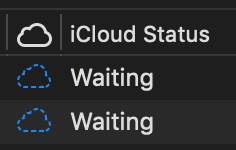

and
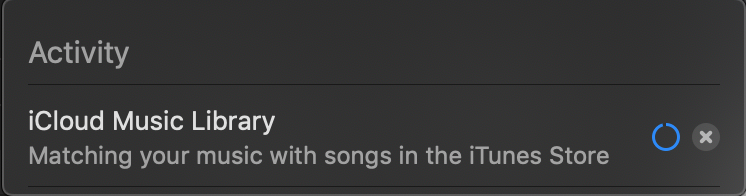

it doesn't take a computer science degree to figure out this is not a client-side issue


Jul 30, 2021 3:18 AM in response to Pittboy

Hey again,

I had a very nice and professional talk with Apple support.


There was an issue with the iTunes Store lately that has been fixed now.

In my Music app the synch is still in progress but my recently added files are online meanwhile. Some of them can be played via iPhone, but only a few so far. And this will take a while because a lot of files need to be synched now, Apple said.


Do you see any progress, too??

Jul 25, 2021 7:35 AM in response to Howtobefreaky

Well, I wanted to waste two hours of my life and I sure did by trying to contact Apple support regarding the issue. They made me try the typical things of log out / log on, uncheck iCloud Music Library and recheck. I even did an uninstall and reinstall of iTunes since a service agent found a communities post saying this fixed the issue back in 2019. Nothing helped as we knew it wouldn't. Almost like they couldn't comprehend that Apple might have an issue with their service. (But the iTunes Service status is Green on the website? lol) I tested loading an album into iCloud (an album previously already matched that I had downloaded and was fixing meta data prior to re-importing into iTunes Match) and 6 out of 18 matched but looks like the process timed out and 12 are now in the "Waiting" iCloud Status. Only thing I can do is either delete them from the library or select File -> Library -> Update iCloud Music Library and hope more match or upload. So far not making much progress as the Library Update usually times out with no progress after 30 minutes. My recommendation would be to not mess around on your side and we just have to wait this one out. Maybe more tickets open will get supports attention.


[Edited by Moderator]


Aug 3, 2021 10:16 PM in response to Donce

So I tried the upsampling trick (96kHz AAC), and it updated the library as quickly as it used to. I then deleted the upsampled file (in Finder [macOS]), and when (Music app) asked to locate that now deleted file, I directed to the original mp3. Had to add cover art to it as well, and it updated just as quickly (was using my iPhone's Music app to see that the file & cover art appeared quickly). My network is a little over 500Mbps down / wireless. M1 MBP.

Aug 5, 2021 3:16 AM in response to Pittboy

I am experiencing the same issue, but it appears uploading songs to library for iTunes matching does still work; it only became extremely slow.


Every day only 3 to 4 songs are matched and added to the library, so a large album can take up to a week. I keep my iMac on 24/7 and gradually the tracks appear on all devices, a few at a time, while the rest of the songs is still “waiting” (being processed).


Of course a fix is desired, but until then a work around can be to keep your computer on overnight.

This thread has been closed by the system or the community team. You may vote for any posts you find helpful, or search the Community for additional answers.

Can't upload songs to library for iTunes matching

Welcome to Apple Support Community
A forum where Apple customers help each other with their products. Get started with your Apple Account.

