
Red dot on I phone when making calls ?
Red dot on I phone when making calls ?
Yes, I did read an answer.
But, I still haven't got it???
So, I place a call and have the orange/red dot in the top right corner of my screen?
The answer is microphone is on..... So the person on the other end can hear me?!?
One answer was an app is being used?!? If I am on a call I am not using an app, so what is the right answer?? Why did the o/r dot just know show up?
I have been a customer for years and obviously made calls before, so where was the dot then? Call me paranoid but
I don't like having a o/r dot on the top of my screen when I place a call!!!
I for one would like to know if or how I can get rid of it????? Still allowing the person on the other end to hear me.
iPhone 7 Plus, iOS 14


 means the microphone is being used by an app on your iPhone.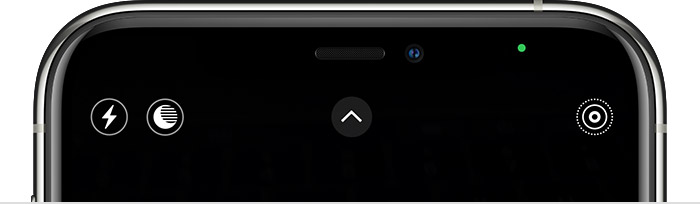
 means either the camera or the camera and the microphone are being used by an app on your iPhone.