USB Accessory notification showing up randomly

I’ve been having a problem where the notification that tells me to unlock my iPad to use accessories pop up even when I’m not charging my iPad/using any accessory. This has bothered me for a while, and I was wondering if somebody could help me with it. I do want to add that the notification pops up and goes away quickly, you’re usually supposed to click the “OK” for it to disappear, mine just appears then disappears. Below is a picture of the notification, I was also not using any accessories when it popped up here:

iPad Pro, iPadOS 14

Posted on Sep 7, 2021 1:37 AM

Reply
Question marked as Top-ranking reply

Posted on Sep 7, 2021 2:53 AM

Are you certain that you’re not using any accessory devices with your iPad, such as a connected keyboard, mouse/trackpad, adapter or storage device - be it USB, Bluetooth or otherwise?


If you are certain that you have no external devices, try a forced restart of your iPad - as this will often resolve a software issue:


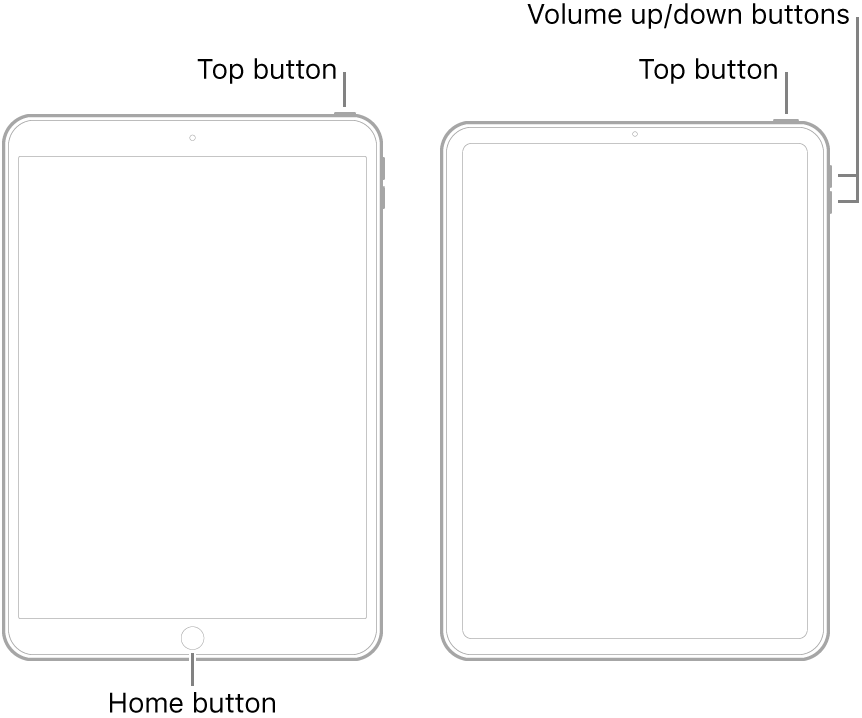
  • On an iPad with a Home button: Press and hold the top button and the Home button at the same time. When the Apple logo appears, release both buttons.
  • On other iPad models: Press and quickly release the volume up button, press and quickly release the volume down button, then press and hold the top button. When the Apple logo appears, release the button.


If you see no improvement, try toggling/reseting the USB security Setting in your FaceID/TouchID & Passcode settings:


1 reply
Question marked as Top-ranking reply

Sep 7, 2021 2:53 AM in response to mxellisaz

Are you certain that you’re not using any accessory devices with your iPad, such as a connected keyboard, mouse/trackpad, adapter or storage device - be it USB, Bluetooth or otherwise?


If you are certain that you have no external devices, try a forced restart of your iPad - as this will often resolve a software issue:


  • On an iPad with a Home button: Press and hold the top button and the Home button at the same time. When the Apple logo appears, release both buttons.
  • On other iPad models: Press and quickly release the volume up button, press and quickly release the volume down button, then press and hold the top button. When the Apple logo appears, release the button.


If you see no improvement, try toggling/reseting the USB security Setting in your FaceID/TouchID & Passcode settings:


This thread has been closed by the system or the community team. You may vote for any posts you find helpful, or search the Community for additional answers.

USB Accessory notification showing up randomly

Welcome to Apple Support Community
A forum where Apple customers help each other with their products. Get started with your Apple Account.