Adding applications to Security & Privacy > Microphone

I'm trying to add QuickTime to my Security & Privacy > Microphone so that I can check the box and allow internal sound in screen recordings.


How do I get it in there? I've tried dragging QuickTime into list of permitted apps but that won't work. There is no '+' button to add them either.

Posted on Sep 10, 2021 7:22 AM

Reply
Question marked as Top-ranking reply

Posted on Sep 18, 2021 7:12 AM

Seabeethree wrote:

I'm trying to add QuickTime to my Security & Privacy > Microphone so that I can check the box and allow internal sound in screen recordings.

QT screen recordings is a big chunk of what i use my mac for. but i don't use the microphone to record the internal sound.


to record the mac's internal sound with quicktime you need additional software. i use the free BlackHole Virtual Audio Driver. then you can choose "BlackHole 2ch" in the recording options instead of "Built-in Microphone."
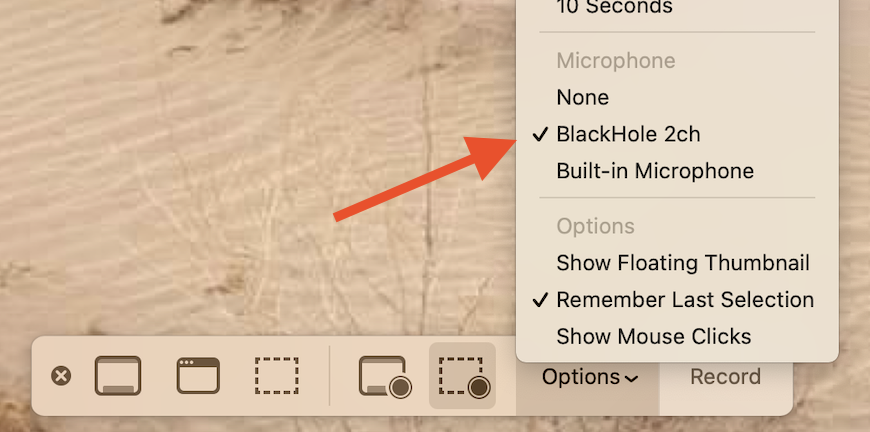

you will also need to set up a multi-output device in your audio MIDI setup utility to be able to both hear and record the internal audio at the same time.


to set up a multi-output device:

Open Audio MIDI Setup: (found in /Applications/Utilities)

hit the '+' button in the bottom left corner and select "Create Multi Output Device"
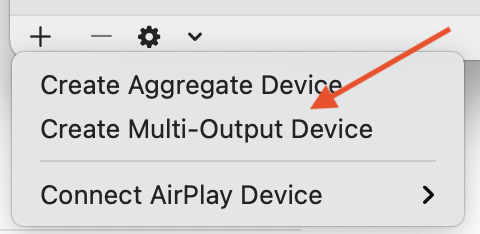

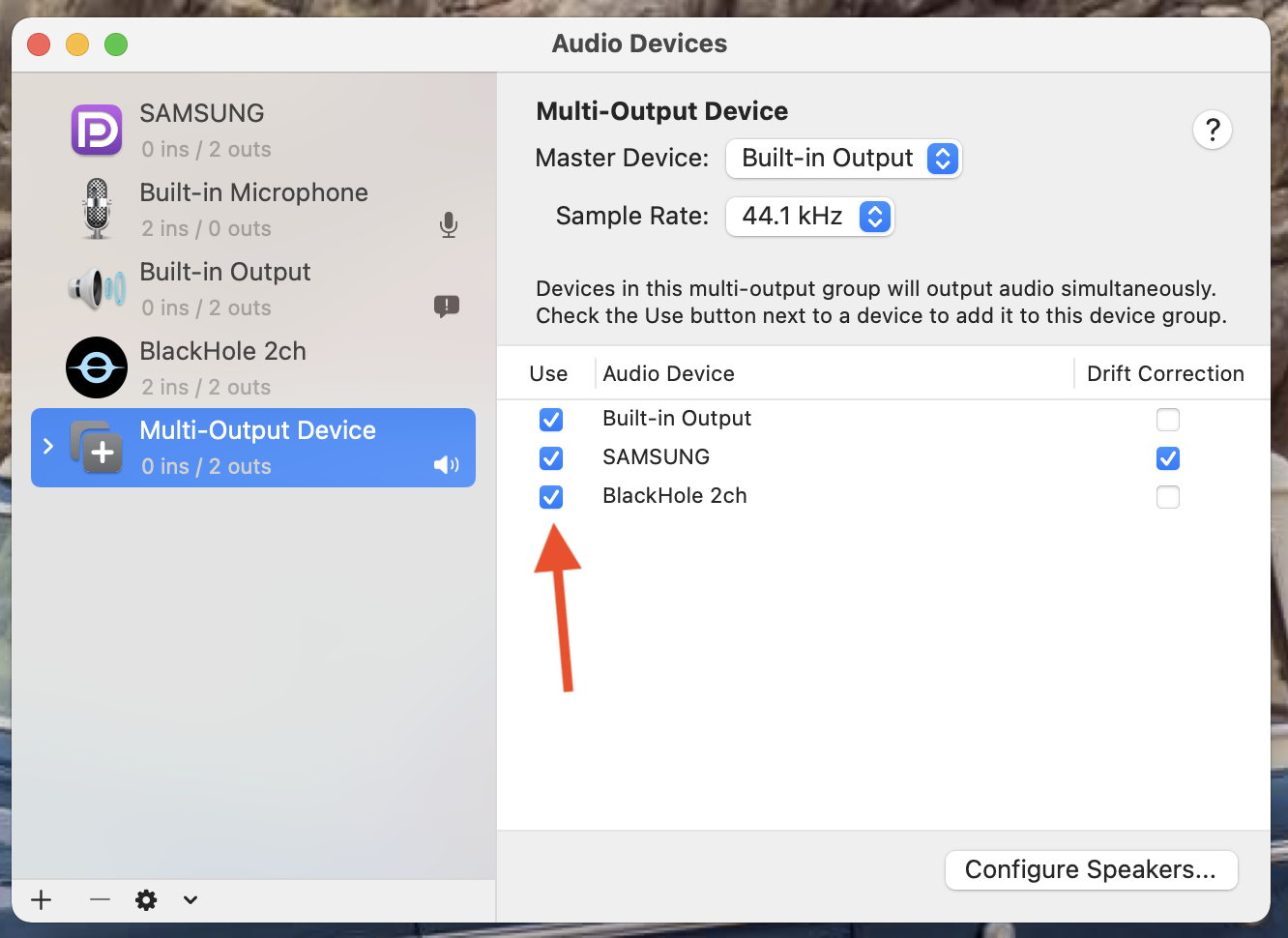
then in the panel that appears on the right, in the Multi-Output Device tab, select "Built-in Output" AND "BlackHole 2ch". (and, if you want, any of your other connected devices.)

once you do that, (and BEFORE recording) you can choose "BlackHole 2ch" or "Multi-Output Device" in your menubar "sound options". 
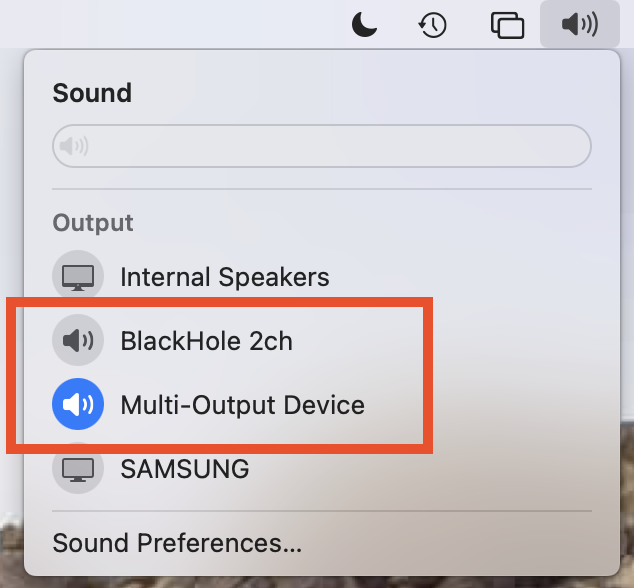

to both hear the speakers and record the audio at the same time, choose "Multi-Output Device". before choosing multi-out, set the internal speakers' volume to a comfortable level first. you cannot control the volume once you are in multi-out mode.


6 replies
Question marked as Top-ranking reply

Sep 18, 2021 7:12 AM in response to Seabeethree

Seabeethree wrote:

I'm trying to add QuickTime to my Security & Privacy > Microphone so that I can check the box and allow internal sound in screen recordings.

QT screen recordings is a big chunk of what i use my mac for. but i don't use the microphone to record the internal sound.


to record the mac's internal sound with quicktime you need additional software. i use the free BlackHole Virtual Audio Driver. then you can choose "BlackHole 2ch" in the recording options instead of "Built-in Microphone."


you will also need to set up a multi-output device in your audio MIDI setup utility to be able to both hear and record the internal audio at the same time.


to set up a multi-output device:

Open Audio MIDI Setup: (found in /Applications/Utilities)

hit the '+' button in the bottom left corner and select "Create Multi Output Device"


then in the panel that appears on the right, in the Multi-Output Device tab, select "Built-in Output" AND "BlackHole 2ch". (and, if you want, any of your other connected devices.)


once you do that, (and BEFORE recording) you can choose "BlackHole 2ch" or "Multi-Output Device" in your menubar "sound options". 


to both hear the speakers and record the audio at the same time, choose "Multi-Output Device". before choosing multi-out, set the internal speakers' volume to a comfortable level first. you cannot control the volume once you are in multi-out mode.

Sep 19, 2021 6:20 AM in response to Seabeethree

i've seen that video before. he is correct, but he also does things the hard way.


once you've set up the audio MIDI settings, you don't need to revisit them each time you want to screen record. it's a matter of "set it and forget it".


same goes in recording options if, in those options, you choose "remember last selection" the options "stick"


the only setting i need to change to record my screen is to change the menubar sound options from "internal speakers" to "multi-output device".

Sep 18, 2021 3:54 AM in response to Miche11e_P

Thanks for the reply,

There's nothing much to see with a movie but here's a side-by-side comparison of Microphone's missing +/- buttons and Accessibility, which *does* have +/- buttons.


Some applications elicit a prompt to add them to the System Preferences, Preference Panes, but I never got this with QuickTime and because of the missing buttons, it seems impossible to achieve. [Although, I'm sure that I did this a few months ago. Somehow].


Any ideas?


TIA!

Sep 19, 2021 4:29 AM in response to jeffreythefrog

Thanks this is perfect. √


Since posting, I discovered this solution, which is the same thing—it uses iShowU in place of BlackHole. Once you're set up, go into Audio Midi Set-up. https://macmost.com/how-to-record-your-mac-screen-with-computer-audio.html


I assume that keep switching the audio settings when changing between normal and recording modes. (i.e., rather than having internal going to both BlackHole *and* external speakers). Do you have any convenient way of doing this? About a decade ago I used a pair of Applescripts to do this, though with SoundFlower. Let me know if you're interested I will try to track them down.


This thread has been closed by the system or the community team. You may vote for any posts you find helpful, or search the Community for additional answers.

Adding applications to Security & Privacy > Microphone

Welcome to Apple Support Community
A forum where Apple customers help each other with their products. Get started with your Apple Account.