Airdrop Not working iPhone 13 Pro Max

I can’t airdrop anything to my wifes phone even though she appears as available. When she tries to airdrop something to me, I don’t come up on her phone as available. I have tried restarting the phone, turning Bluetooth/Wifi on and off and several other methods but still not working. My phone is updated to the newest software and still not able to get it to work. Anyone else having these issues?

iPhone 13 Pro Max

Posted on Oct 3, 2021 7:40 PM

Reply
Question marked as Top-ranking reply

Posted on Nov 27, 2021 6:00 PM

Mine had the same problem.

It looks like the contacts on the phone do not match with contacts of the iCloude

Try

  1. Settings -> Yor Name (Apple ID)-> iCloud -> Turn on Contacts (Green)
  2. Merge
  3. Settings -> Yor Name (Apple ID) : Sign Out from iCloud
  4. Restart the phone (Off/On)
  5. Settings -> Yor Name (Apple ID) : Sign in iCloud


40 replies
Question marked as Top-ranking reply

Nov 27, 2021 6:00 PM in response to SteveO2019

Mine had the same problem.

It looks like the contacts on the phone do not match with contacts of the iCloude

Try

  1. Settings -> Yor Name (Apple ID)-> iCloud -> Turn on Contacts (Green)
  2. Merge
  3. Settings -> Yor Name (Apple ID) : Sign Out from iCloud
  4. Restart the phone (Off/On)
  5. Settings -> Yor Name (Apple ID) : Sign in iCloud


Dec 11, 2021 2:43 PM in response to 4989ken

Just came here to find a solution to the exact same problem between my iPhone 13 Pro and my wife’s iPhone 11. Easily discoverable but neither phone would ever prompt to accept anything from the other.


I had iCloud contacts enabled and she didn’t. I disabled and re-enabled my iCloud contacts while also enabling her’s. Airdrop worked immediately.


It would seem local contacts are enough to discover other people but you need the contact in iCloud for Airdrop to actually perform its function?


Thanks 4989ken!

Dec 22, 2021 12:54 AM in response to 4989ken

4989ken

User level:

Level 1

In response to SteveO2019

Mine had the same problem.

It looks like the contacts on the phone do not match with contacts of the iCloude

Try

  1. Settings -> Yor Name (Apple ID)-> iCloud -> Turn on Contacts (Green)
  2. Merge
  3. Settings -> Yor Name (Apple ID) : Sign Out from iCloud
  4. Restart the phone (Off/On)
  5. Settings -> Yor Name (Apple ID) : Sign in iCloud


After trying numerous other steps. This is what worked for me. Had to do it on both phones.

Dec 27, 2021 4:30 PM in response to SteveO2019

So, I had the same issue where I upgraded my wife’s phone to a new 13 Pro. Other people could AirDrop to us, but we couldn’t AirDrop between us. When checking, I found that each time I tried to connect, there were 2 different accounts. It could send to one that was considered an “other account” but not to the actual account. Reading comments in this chat, I thought that it could be related to iCloud. I took my wife’s iPhone and logged her off of iCloud. After logging her back into iCloud, it worked! Also without the duplicate accounts. I’m thinking that the there was something in the migration from her old iPhone to the new iPhone 13 Pro that caused this issue. I’m optimistic that this has resolved the issue.

Jan 11, 2022 3:58 PM in response to SteveO2019

A modification of a suggestion earlier worked for us, with this same problem between two brand new iPhone 13's, each restored from backups on iCloud that were taken at the Apple Store on our old phones prior to deactivating them.


  1. Settings -> Yor Name (Apple ID)-> iCloud -> Turn off Contacts (because we each had them on)
  2. Keep the contacts on the device
  3. Settings -> Yor Name (Apple ID)-> iCloud -> Turn on Contacts (Green)
  4. Merge


Nov 27, 2021 6:09 PM in response to 4989ken

4989ken wrote:

1. Mine had the same problem.
It looks like the contacts on the phone do not match with contacts of the iCloude
Try
Settings -> Yor Name (Apple ID)-> iCloud -> Turn on Contacts (Green)
2. Merge
3. Settings -> Yor Name (Apple ID) : Sign Out from iCloud
4. Restart the phone (Off/On)
5. Settings -> Yor Name (Apple ID) : Sign in iCloud

Merge?

Dec 26, 2021 9:21 AM in response to Andrzej78

Thank you @Andrzej78! This 100% solved the problem. After a day of debugging, resetting network settings, turning on/off wifi and bluetooth, factory resetting my phone and nothing working, these instructions helped perfectly.


As mentioned, switch off iCloud contacts sync, select "Keep on phone", switch on iCloud contacts sync, select "Merge". Everything works as expected after that.

Nov 30, 2021 11:28 AM in response to marcvv

This problem seems to be caused by the different handling of contacts on the phone and iCloud. When you log out of your iCloud account, you will be asked if you want to merge contacts of your phone and the one in iCloud or cancel.

Choose merge and log out from your iCloud account, restart, and log in your iCloud account will sync the contacts.

Hope it will help.


Oct 8, 2021 9:05 PM in response to RebeccaAustin

I have this problem too, but it is also a problem on my iphone 7 and iphone 12 mini. It all happened after they were each updated to iOS 15. I have done all the troubleshooting steps I can find including: rebooting, toggling wifi, toggling bluetooth, toggling Airdrop, uninstalling VPN app, resetting network settings on both devices, and even restoring to someone else's iphone 7 from backup after resetting that device to factory settings. Nothing worked.


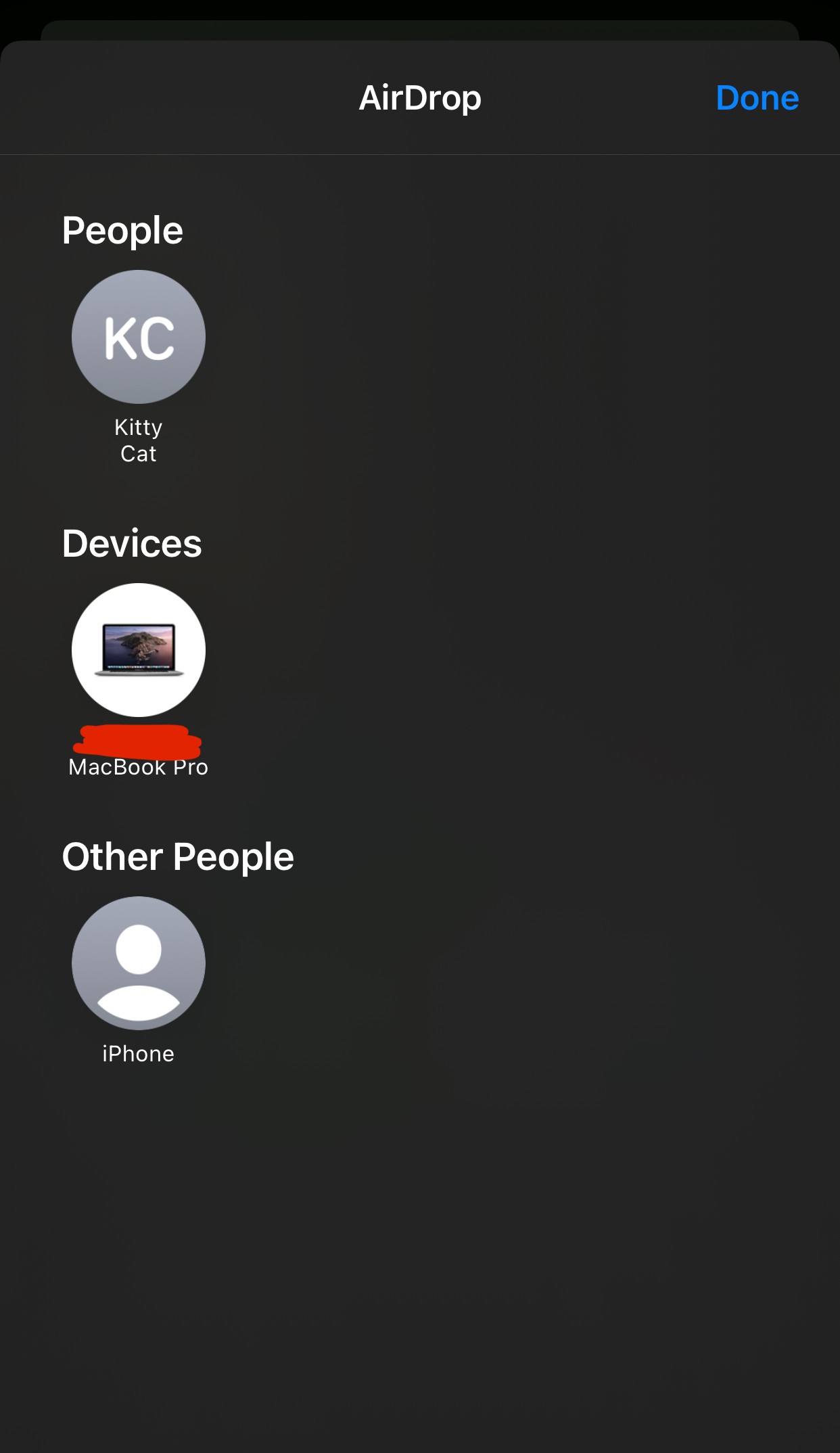
What's weird is that using Airdrop via the sharing icon with the contact doesn't work, but if I open "Airdrop" from the sharing menu, there are actually two entries. The first one with the contact name under "People" is the one that doesn't work, but the second entry under "Other People" works, which is the phone's name instead of contact name. I have been on the phone with Apple support and they are mystified so far, I have another call scheduled for tomorrow to continue.
This thread has been closed by the system or the community team. You may vote for any posts you find helpful, or search the Community for additional answers.

Airdrop Not working iPhone 13 Pro Max

Welcome to Apple Support Community
A forum where Apple customers help each other with their products. Get started with your Apple Account.


