My phone isn't working because of my lack of storage but it won't let me delete anything

So my phone is completely out of storage. I have been trying to fix it but whenever I tried to delete a photo, it would pop back up and not delete. I tried to restart my iPhone but it made it worse. On the home screen a ton of my apps won't show up, I have tried to go into settings and delete things from there but settings then crashes. I also am not receiving any texts, nor are any of my chats showing up so I can delete them. To make matters worse, my phone keeps popping up with the loading screen, so it isn't even usable. So basically, I am all out of storage and I can't do anything to fix it because I can't go into any apps. I don't want to reset my phone because my dog died and all of my pictures of him are on the phone, I can't lose the photos! Can someone please help me?

iPhone 12

Posted on Oct 18, 2021 6:58 AM

Reply

Similar questions

1 reply

Oct 18, 2021 7:28 AM in response to avykennedy

Probably you have synced these Photos from your Mac/PC through iTunes. UN-sync then they would be gone from iPhone.


UN-Sync photos to your device

  1. Connect your device to your Mac.
  2. You can connect your device using a USB or USB-C cable or using a Wi-Fi connection. To turn on Wi-Fi syncing, see Sync content between your Mac and iPhone or iPad over Wi-Fi.
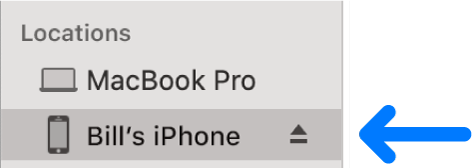
  3. In the Finder  on your Mac, select the device in the Finder sidebar.

  4. Select Photos in the button bar.
  5. Note: When iCloud Photos is turned on, no photo syncing options appear when you select Photos in the button bar.
  6. Select “Sync Photos to your device from” tickbox, then choose Photos, Pictures or a folder from the pop-up menu.
  7. Uncheck Sync photos
  8. Click on Apply / Sync


This thread has been closed by the system or the community team. You may vote for any posts you find helpful, or search the Community for additional answers.

My phone isn't working because of my lack of storage but it won't let me delete anything

Welcome to Apple Support Community
A forum where Apple customers help each other with their products. Get started with your Apple Account.
