I figured out my issue, in which the root culprit was a VPN service that i had already installed on my system; "Cisco AnyConnect Secure Mobility Client".
The above VPN application was already installed on Big Sur OS, and had never caused me issues until the Monterey OS update. I suspect there's a slight working change / compatibility issue between my installed VPN app and Monterey OS.
So what i noticed was, even though AnyConnect VPN wasn't actively connected via the app UI, the underlying VPN "Network Service" was still in a "Connected" state.
Also, i noticed the network service will frequently / regularly auto-connect itself (or re-install itself after removal of network service) in the background..
And so, when the VPN "Network Service" was in a "Connected" state, that's when it caused me local network issues, where i suspect it was overriding and interfering with my perfectly normal network settings.
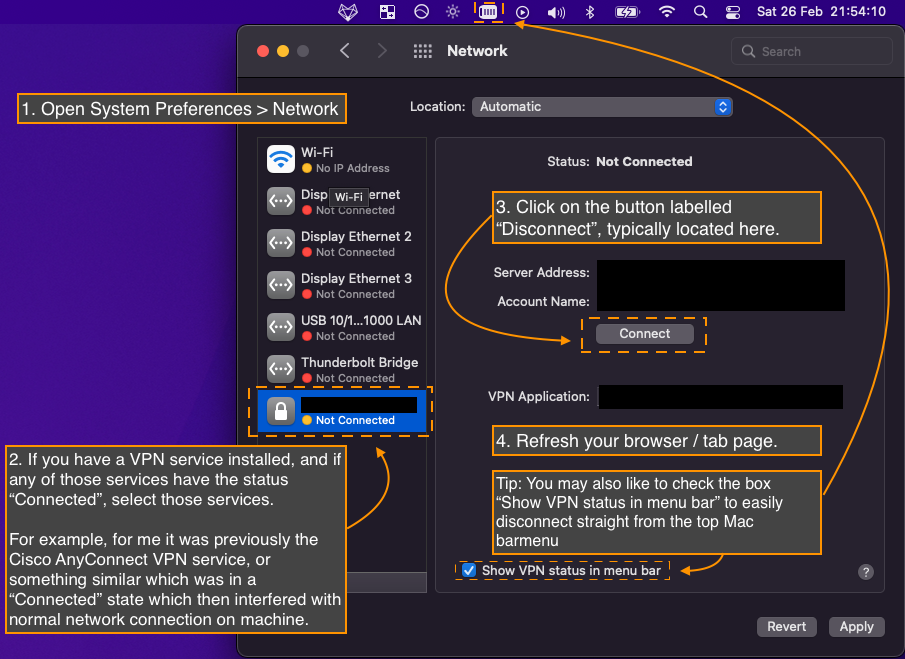
So what i did to resolve my particular issue each time i experience local network issues on the machine, was the following:
- Open System Preferences > Network
- Observe the list of services installed on the left pane, and lookout for any VPN services which are "Connected" (also has a green dot icon to indicate connection status). Then, select the particular VPN services which are currently "Connected".
- Now, on the right pane, there should be a button labelled "Disconnect", click on that.
- Now refresh your browser / tab, and see whether the service disconnect action restored your network connection back to normal.
- Tip: There's also a checkbox labelled "Show VPN status in menu bar". If you check that, then you can easily disconnect the VPN service from the menu bar in future. It would save you some clicks.
- Tip: Also, you could try removing the VPN network service (or app) if you no longer need it, by selecting the VPN service on the left pane, and then selecting the minus "-" button located at the bottom of the left pane. However, i noticed that the network service reinstalls itself frequently (whack-a-mole...)
I've also attached an accompanying annotated screenshot which you may follow visually, below.
So for the rest of you, it may / may not be a VPN network service which is causing your issue, but some other connected service that could be interfering / overriding normal local network operations on your machine, which may just need to be disconnected instead 🤷🏻♂️

