Trackpad gestures stop working randomly after monterey update

I have recently updated from Big Sur to Monterey version 12.0.1 on my Macbook Air M1. Randomly, the swipe gestures stop working. I have asked one of my friends who uses the same device and he too is facing the problem. I often work on applications kept in different windows and with not being able to swipe, I am constantly restarting to recover from the issue. Is it happening with anybody else? Will future updates help in solving the problem or do I need to re-install the OS, heck of a time taking process in later as we need to install the applications again.

Posted on Nov 1, 2021 9:45 PM

Reply
Question marked as Top-ranking reply

Posted on Nov 8, 2021 12:35 AM

Hey Rose thank you for joining in and sharing the same problem. I have got a temporary solution. Earlier I used to restart my mac to get the mission control functions work again. Now, when I quit "Dock" function from the activity monitor, I am able to regain mission control's functions. Even I have given the feedback. Hope this issue gets rectified soon.

105 replies

Mar 15, 2022 9:56 PM in response to laugherdoodle

Thanks… do keep us posted on whether it works… yes, I migrated from an even Oder machine and OS, and I’ve heard similar about a reinstall and pisdible glitches jumping OS like that. Honestly, after all time I’ve spent so far settings to his new machine up and chasing glitches, I haven’t wanted to do an whole install, restore from back up thang. I may just have to bite that bullet. Let us know if your reinstall does solve the issue and Thanks for your solutions and work arounds posted here.

Mar 25, 2022 11:57 AM in response to AlDan

I wasn't able to share the actual shortcut because of security limitations on links in Discussions, but here's the quick way I can reset the gestures (I didn't know about activating the screensaver.


I agree that it sucks that Apple hasn't fixed this. I reported it, and I think that other users here should make sure that they do as well so they know how put out people are.

Mar 25, 2022 9:48 PM in response to rcostain

I reported my issues as you suggest. Not really sure if Apple pays that much attention considering most of these issues have been going on for quite a long time and through several updates. FYI, if it helps anyone. I, too, have issues waking my external monitor while in clamshell mode. One thing I've done that has facilitated a work around is to open the lid on my M1 so that both monitors are active. Then go to system prefs - displays - click display settings on the bottom left. Make sure your external monitor is selected as "main".
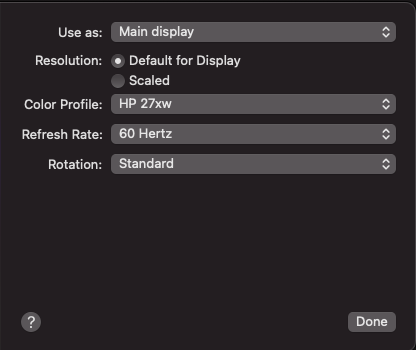
This has allowed my external to wake while the M1 macbook is in clamshell with just a single click of the wireless trackpad or a key on the external keyboard. This is only a work around however as it works MOST of the time for me. Every once in a while, I have to open the lid of my M1 just enough to wake it's screen and then my external wakes as well and shows as my main monitor.

The only other very strange issue I have with waking my external monitor seems to be tied to the many time machine backup external drive issues I've seen many people on the forums having (myself included). My external backup drive rarely (but not never) shows the "disc ejected improperly" window. I also finally found an external backup drive that didn't randomly eject itself (an issue I had when I first set up time machine on a different bus powered drive). The issue now is that when my M1 has been idle for some time, backups still happen, though sometimes at greater intervals than 1 hour). But, my external drive is supposed to shut down completely after it backs up (i.e. the blue light on the drive turns off/goes completely dark). That doesn't always happen - sometimes it does, sometimes it doesn't and it appears random at least as far as I can tell. When it does not turn off as it is supposed to. My first trackpad click to wake the machine and my external monitor actually only wake my backup drive which then immediately shuts down as it was supposed to do on its own. Once it DOES shut down, I can then click my trackpad or any key and wake my external monitor with one click. Phew!


I mean, I couldn't make this stuff up if I tried. Just looking at what I've typed makes me feel exhausted.


I've been on macs since OS6 and I've never had a buggier and literally weirder new machine than this. I'm sharing here in the hopes that even pieces of what I share helps someone else more easily work around their issues. This is how I found my work arounds, trying every little suggestion and piece of information I could find until I found some things that allow me to work with minimal restarting and down time.


It is disappointing and sad that this is what Apple has become. It's an expensive investment to be leaving users out on an island by themselves with only each other to try to find work arounds for a multitude of issues with apparently little to no help from Apple itself.


Mar 27, 2022 8:53 AM in response to SurfinTheLight

I found a new problem, which adds to the bluetooth, external monitor, RAM, trackpad and the thousands of errors that this **** system has, the searches do not work, I'm trying to search in my downloads folder .ai files, can not find anything, I search png files, can not find anything, I search jpg, can not find anything .... when the only thing I have in my downloads folder are png. jpg, eps, ai ....

This is really unbearable already, I can't work with a 4700 dollars machine, I can't downgrade to big sur, I have a nice brick.


Nov 18, 2022 1:44 PM in response to sivaprashantK

I have this issue with the Intel 16" too.

As well as not being able to see all programmes when I swipe 4 finger up, Finder in particular can be really hard to err...find at times. And lots of bugs in general. TouchBar changed how from working well to something I understand why folk dislike it. Touch button also doesn't OK things anymore, so tediously need to enter password instead. Transfer speeds via USB C is now USB2 speed and various dongle devices cause issues or don't work. Everything was fine in Catalina.

Never had an OSX as buggy as Monteray before.

Dec 5, 2022 7:46 PM in response to sivaprashantK

Super helpful; worked immediately!


FWIW, I get very tired of Apple support insisting on the longest most-time consuming methods to fix, e.g., reinstall OS or resetting NVRAM etc. There is usually a simple and easy fix readily available. I've noticed the former is an increasingly more frequent solution [sic] provided by Apple Tech Support — chat or phone — and only requesting upper tier support help finds a simple 1,2,3 done solution to bugs and issues. This is the 3rd time this month that hours have been wasted when the 5 second solution is there.


Thanks again.

This thread has been closed by the system or the community team. You may vote for any posts you find helpful, or search the Community for additional answers.

Trackpad gestures stop working randomly after monterey update

Welcome to Apple Support Community
A forum where Apple customers help each other with their products. Get started with your Apple Account.

