Automatic date and time wrong by 15 days, 5 hrs 36 mins on my MacBook

Hello, I have tried all the obvious things like turning Automatic time off and on, I have checked my time zone etc. and all is correct.

I have now changed the time manually but I would really like to go back to setting the time automatically so that I don't have to think about moving clocks forwarded etc.

I have no idea what is wrong.

The only thing I can think of is that my computer seems to have a bug at the moment (but that is a whole other thread) which won't let me search my inbox and, perhaps more crucially to this topic, won't let the MacBook sleep. So perhaps it is a battery issue?

Please can anyone help? It has been like this for months, but I have never had time to do anything about it!


MacBook, macOS 11.2

Posted on Nov 23, 2021 4:42 AM

Reply
Question marked as Top-ranking reply

Posted on Nov 24, 2021 7:07 AM

Hello convertedluddite,


Welcome to Apple Support Communities!

If we understand your post correctly, the date and time on your MacBook is wrong by days and hours, search function is not working properly, and your MacBook won't sleep. We'd like to see if we can help!


"Check Language & Region preferences

Choose Apple menu  > System Preferences, then click Language & Region.

  • Make sure that the Region menu is set correctly for your region.
  • Use the ”Time format” checkbox to control whether your Mac displays time in the 24-hour format.
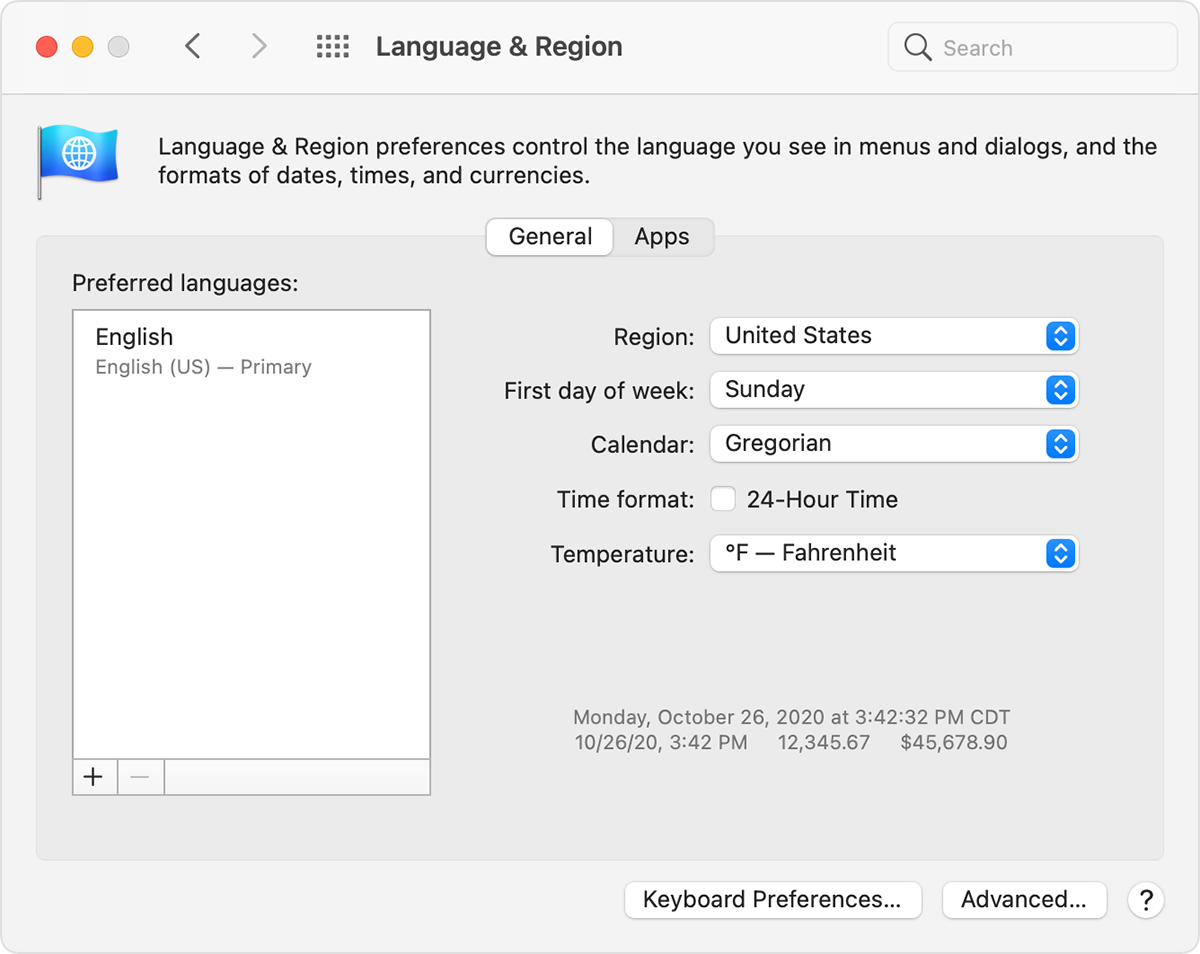
For advanced formatting options, click the Advanced button, then check the settings in the Dates pane and Times pane. These settings control how dates and times are displayed in the Finder and apps. If any settings have been changed, you can click the Restore Defaults button in each pane to use the default settings for your region. If the button is dimmed, your Mac is already using the default settings. 

"

For more information about automatic date and time, see this article: Automatic date and time wrong


For the other issues, search not working and MacBook won't sleep, let's try the following:


Let's try an SMC reset. 

How to reset the SMC of your Mac


You may also want to try an NVRAM reset. 

Reset NVRAM or PRAM on your Mac


We also recommend starting in safe mode. Sometimes just starting in this mode and then restarting can resolve issues like this: How to use safe mode on your Mac


You can also create another user on your Mac and test to see if you experience the same issue. 

Set up users, guests, and groups on Mac


You may want to also run Disk Utility which will check for and fix errors related to the formatting and directory structure of a Mac storage device.

Repair a storage device in Disk Utility on Mac


Let us know if you have any questions.

Thank you for using Apple Support Communities.

Take care!


Similar questions

1 reply
Question marked as Top-ranking reply

Nov 24, 2021 7:07 AM in response to convertedluddite

Hello convertedluddite,


Welcome to Apple Support Communities!

If we understand your post correctly, the date and time on your MacBook is wrong by days and hours, search function is not working properly, and your MacBook won't sleep. We'd like to see if we can help!


"Check Language & Region preferences

Choose Apple menu  > System Preferences, then click Language & Region.

  • Make sure that the Region menu is set correctly for your region.
  • Use the ”Time format” checkbox to control whether your Mac displays time in the 24-hour format.

For advanced formatting options, click the Advanced button, then check the settings in the Dates pane and Times pane. These settings control how dates and times are displayed in the Finder and apps. If any settings have been changed, you can click the Restore Defaults button in each pane to use the default settings for your region. If the button is dimmed, your Mac is already using the default settings. 

"

For more information about automatic date and time, see this article: Automatic date and time wrong


For the other issues, search not working and MacBook won't sleep, let's try the following:


Let's try an SMC reset. 

How to reset the SMC of your Mac


You may also want to try an NVRAM reset. 

Reset NVRAM or PRAM on your Mac


We also recommend starting in safe mode. Sometimes just starting in this mode and then restarting can resolve issues like this: How to use safe mode on your Mac


You can also create another user on your Mac and test to see if you experience the same issue. 

Set up users, guests, and groups on Mac


You may want to also run Disk Utility which will check for and fix errors related to the formatting and directory structure of a Mac storage device.

Repair a storage device in Disk Utility on Mac


Let us know if you have any questions.

Thank you for using Apple Support Communities.

Take care!


This thread has been closed by the system or the community team. You may vote for any posts you find helpful, or search the Community for additional answers.

Automatic date and time wrong by 15 days, 5 hrs 36 mins on my MacBook

Welcome to Apple Support Community
A forum where Apple customers help each other with their products. Get started with your Apple Account.