Auto reply while driving not sending text

I have an iPhone 11 with the iOS 15.1 update that includes focus. When I have the focus set to driving I do not receive texts, but it is also NOT sending an auto reply text. I’m certain the setting are correct.

iPhone 11, iOS 15

Posted on Nov 25, 2021 6:00 AM

Reply
Question marked as Top-ranking reply

Posted on Nov 30, 2021 3:59 PM

Late to the post but I was having the same issue with mine. I just fixed it by going into Settings > Messages > Allow Messages to Access and switching the Focus toggle on. I tested it by sending a quick iMessage to myself in Driving Focus mode and it seems to work now; configured auto replies now send and the Focus Status now shows in the conversation too. Hope that helps for you! :]

Similar questions

38 replies
Question marked as Top-ranking reply

Nov 30, 2021 3:59 PM in response to MeyJules

Late to the post but I was having the same issue with mine. I just fixed it by going into Settings > Messages > Allow Messages to Access and switching the Focus toggle on. I tested it by sending a quick iMessage to myself in Driving Focus mode and it seems to work now; configured auto replies now send and the Focus Status now shows in the conversation too. Hope that helps for you! :]

May 27, 2022 12:54 PM in response to MeyJules

I’m sure those of you still having issues tried this but you may need to delete the Focus, then allow access, then re-set up the Focus parameters. I set up my Focus parameters first, then went to Settings > Messages > Allow Messages to Access & switched the Focus toggle on, as indicated above. No auto-replies were being sent. Since that didn’t work I deleted the Focus and turned off the phone. Turned back on, went to Settings > Messages > Allow Messages to Access & switched the Focus toggle on. *Then* I set up the Focus parameters and enabled the Focus. Seems to work now! I have an iPhone 13 pro with a dual sim. My business line is set as my default line and according to my tester, the auto-reply was sent from my business line.

Dec 30, 2022 6:00 AM in response to ChrisJ4203

My device was not sending an auto-reply b/c under the "Auto-Reply To" my default setting was to FAVORITES only. Unbelievable there is NO option for everyone.


Only options are:


No One

Recents

Favorites

All contacts


So, if someone contacts you from a new number, they will not be notified.


Best work around:


Focus>Driving-settings>Auto-Reply>click 'All Contacts'


Is probably going to give you the best results, just make sure you add everyone to your contacts.


Jan 16, 2023 2:46 AM in response to Linzles

Try this, it worked for me.


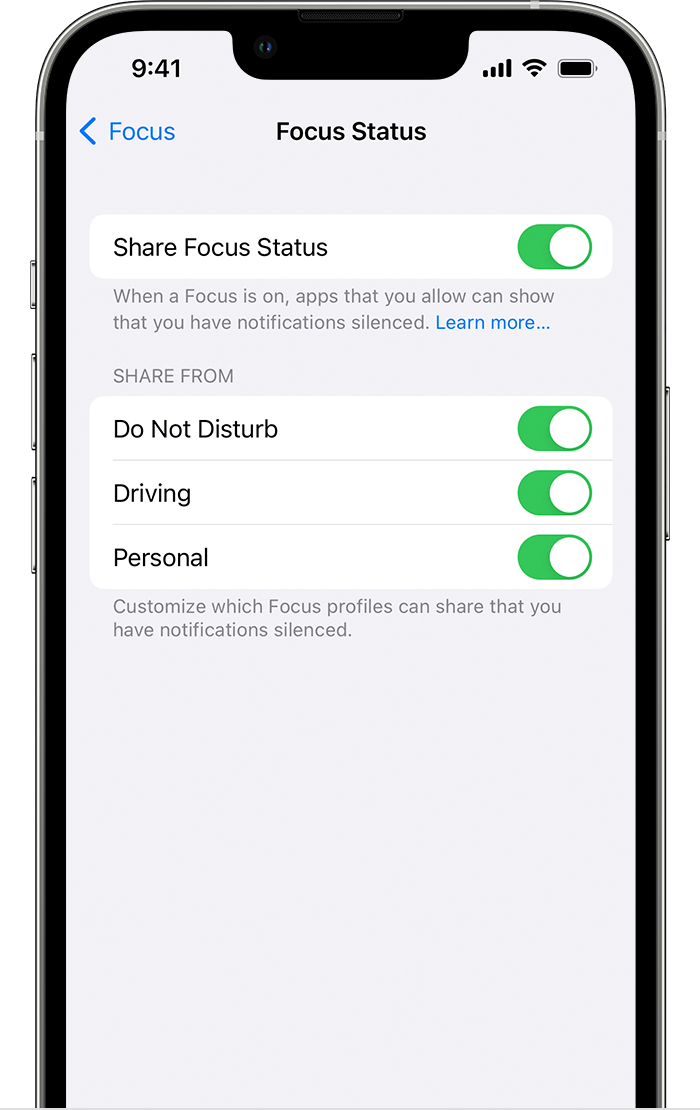
Share your Focus status

When you set up the Driving Focus, you can turn on Focus status so that apps display that you have notifications silenced when people message you. Since apps only know that you have notifications silenced but not which Focus is on, the name is never shared. Focus status is shared in apps when you have a Focus on and after you give an app permission.


To turn Focus status on: 

  1. Go to Settings > Focus. 
  2. Tap Focus Status. 
  3. Turn on Driving.


Nov 25, 2021 6:42 AM in response to MeyJules

I'm not aware of any other troubleshooting steps. You may wish to delete that Focus setup and set it up again and test. If that does not work, you can see if anyone else responds to this that may be using Focus while Driving, or you can use the Get Support link at the top of the page here to contact Apple Support for assistance. I'm sorry, but I do not use that feature when I drive. I have my Apple Watch and have texts read to me.

This thread has been closed by the system or the community team. You may vote for any posts you find helpful, or search the Community for additional answers.

Auto reply while driving not sending text

Welcome to Apple Support Community
A forum where Apple customers help each other with their products. Get started with your Apple Account.