how do you clear data from a numbers spreadsheet and keep the formulars

Id like to keep the spreadsheet but change the data. If you delete the data, the formular goes with it. Without creating the entire spreadsheet again, how do you do it? OS monterery 12.1 using numbers app, saving in excel


Mac mini, macOS 12.1

Posted on Jan 9, 2022 11:50 AM

Reply
Question marked as Top-ranking reply

Posted on Jan 9, 2022 3:34 PM

Determine which cells of your tables contain formulas. You might want to mark these with a colour fill to be able to locate them later.


Also mark all the cells containing labels, intended to be kept.


When you have marked all of the cells whose content you want to keep, select the cells with entered data that will be replaced with new data when you re-use the table. Delete the contents of these cells.


Check for other cells with content you will not need in future documents made with this spreadsheet. Delete that content as well.


When you have removed all the data to be deleted, and have kept all of the formulas and labels that are to be kept, go to the File menu and choose Save as template…


You'll be presented with a choice of where to save that template:
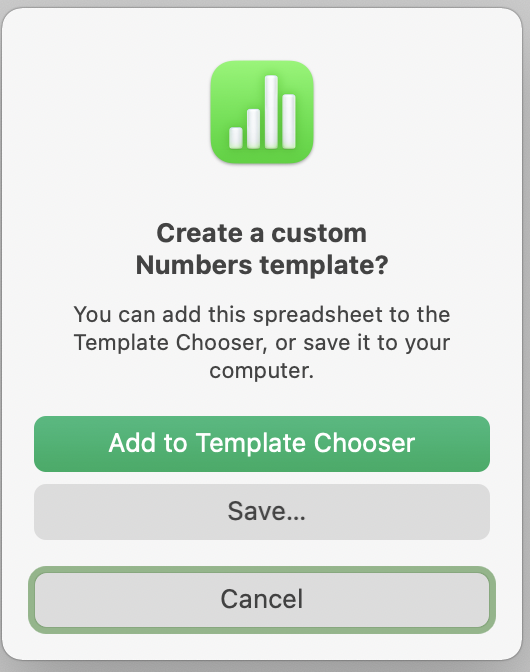


You may want to keep it in the folder you are using to keep the completed versions of the documents, or you may prefer to keep it in the Template Chooser with other templates. Either will work. In the chooser, Your template (and others created by you) will likely be placed in a 'My Templates' section. You may get a choice of what section you want it placed in, but this was not an available choice in earlier versions of Numbers (or Pages) where I've saved templates, and I'vee yet to do that in the current version.


Once the template is in place, you'll have a 'permanent' clean copy of the document to use each time you need a new document.


Regards,

Barry


3 replies
Question marked as Top-ranking reply

Jan 9, 2022 3:34 PM in response to theresa091876

Determine which cells of your tables contain formulas. You might want to mark these with a colour fill to be able to locate them later.


Also mark all the cells containing labels, intended to be kept.


When you have marked all of the cells whose content you want to keep, select the cells with entered data that will be replaced with new data when you re-use the table. Delete the contents of these cells.


Check for other cells with content you will not need in future documents made with this spreadsheet. Delete that content as well.


When you have removed all the data to be deleted, and have kept all of the formulas and labels that are to be kept, go to the File menu and choose Save as template…


You'll be presented with a choice of where to save that template:


You may want to keep it in the folder you are using to keep the completed versions of the documents, or you may prefer to keep it in the Template Chooser with other templates. Either will work. In the chooser, Your template (and others created by you) will likely be placed in a 'My Templates' section. You may get a choice of what section you want it placed in, but this was not an available choice in earlier versions of Numbers (or Pages) where I've saved templates, and I'vee yet to do that in the current version.


Once the template is in place, you'll have a 'permanent' clean copy of the document to use each time you need a new document.


Regards,

Barry


Jan 10, 2022 6:25 AM in response to theresa091876

You can use a short script to clear the data but leave the formulas. No need to know AppleScript. Just copy-paste, point, click.


  • Copy-paste script below into Script Editor (in Applications > Utilities).
  • Make sure Script Editor is listed and checked at System Preferences > Security & Privacy > Privacy > Accessibility.
  • Click any cell in a Numbers table where you want to clear the values but leave any formulas.
  • Click the triangle 'run' button in Script Editor.


This changes your document so be sure to back it up first.


SG


The script to copy-paste:


tell application "Numbers" to tell front document to tell active sheet
	tell (first table whose class of selection range is range)
		repeat with aCell in cells of (get cell range)
			tell aCell to if not (exists its formula) then set its value to missing value
		end repeat
	end tell
end tell

Jan 9, 2022 3:33 PM in response to theresa091876

Deleting data does not delete formulas. Select the cells with the data and hit Delete. Do not select or delete the cells with the formulas.


If you need to do this often, save it as a template after the data is removed (and the formulas still intact). You will then be able to create a new spreadsheet from the template without having to delete the data all over again.

This thread has been closed by the system or the community team. You may vote for any posts you find helpful, or search the Community for additional answers.

how do you clear data from a numbers spreadsheet and keep the formulars

Welcome to Apple Support Community
A forum where Apple customers help each other with their products. Get started with your Apple Account.