Update carrier settings on iPhone – why?

A pop-up on my iMac urges me to download an update for phone carrier settings. I'm directed to:

Manually update your carrier settings on your iPhone or iPad - Apple Support

This release document isn't encouraging - the manual-install instructions can't work on my phone.

Nor are any system limitations or download sizes mentioned.


I'm afraid it could cause a melt-down of my antique iPhone 4s. (After all, the last available iOS upgrade will freeze it.) Can I safely ignore it?

And how could I turn off the reminders?

iPhone 4s, iOS 9

Posted on Jan 12, 2022 10:07 PM

Reply
4 replies

Jan 13, 2022 12:20 AM in response to SravanKrA

Thanks for the speedy reply, SravanKrA.

Since Apple's no use, I can't contact the wholesale carrier, & my server denied all knowledge, I decided to bite the bullet.


Nothing on my phone indicated any update, so I turned iTunes off then on again. As a result, the pop-up reappeared & I clicked "Install automatically". To my relief, it only took seconds.

If this message gets posted, it means I'm still on the air...


P.S. Apparently Apple still plays a part. The iPhone automatically checks carriers against data stored on your SIM card, then serves up any notification. (Or so they say.)

Jan 12, 2022 10:30 PM in response to nielshutch

Carrier Settings updates are released by your Carrier. Apple has nothing to do with the release. Please contact your carrier for more info.


Carrier Update (Required): Released by your Cellular Service provider (Carrier Update), affects your Outgoing / Incoming calls, SMS, Data etc..
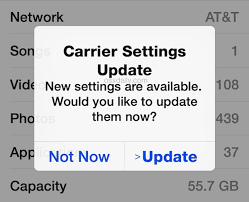


How to Update Carrier Settings

You can manually check for and install a carrier settings, update with these steps: Make sure your device is connected to a Wi-Fi or cellular network. Tap Settings > General > About. If an update is available, you'll see an option to update your carrier settings.

Update your carrier settings on your iPhone or iPad - Apple Support



Few Carrier (Cellular Service Provider) does not provide Carrier Settings in full but they offer APN settings for example

  • Google FI which has APN to be entered manually as h2g2
  • MTN Ghana which provides APN pin to be updated manually as the internet
  • BSNL in India which provides APN pin to be updated manually as bsnlnet (Watch teh GIF below)
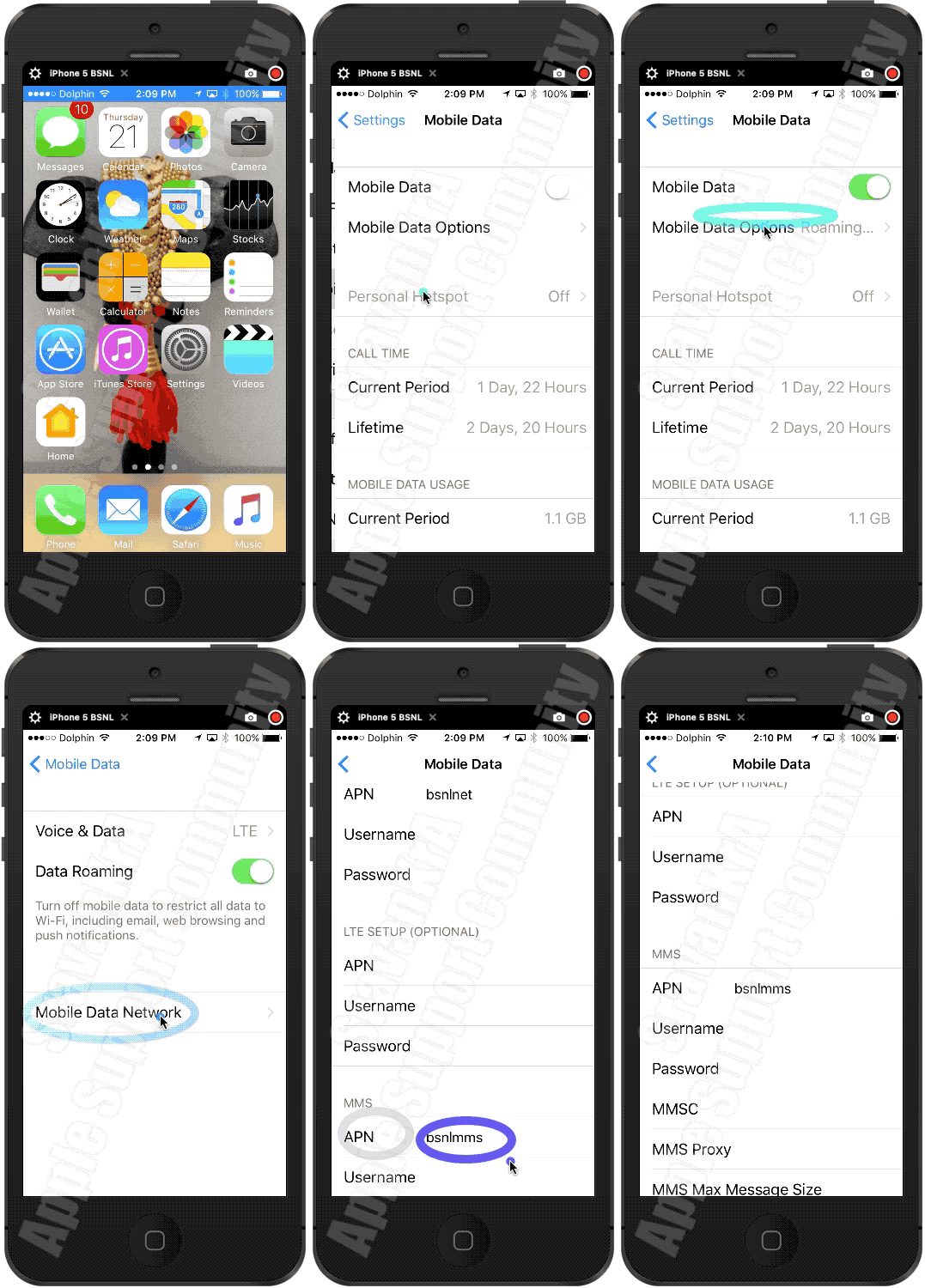

Settings > Mobile Data > APN [under Mobile Data APN] enter the APN pin


View and edit your APN settings

If your carrier allows it, you can view your APN settings in one of the following locations: Settings > Cellular > Cellular Data Options > Cellular Network. Settings> Mobile Data > Mobile Data Options > Mobile Data Network.


View and edit your Access Point Name (APN) on your iPhone ...


Use the APN pin based on your carrier. Ask them (Your Carrrier) or search using any search engine.


Jan 13, 2022 12:29 AM in response to nielshutch

nielshutch wrote:

P.S. Apparently Apple still plays a part. The iPhone automatically checks carriers against data stored on your SIM card, then serves up any notification. (Or so they say.)

I imagine all Android and Google phones do as well (Blackberry as well, if they still exist). This is handshaking process that has evolved within the industry so that SIMs and remote servers ensure your phone is ready to optimally handle data, text and calls.

This thread has been closed by the system or the community team. You may vote for any posts you find helpful, or search the Community for additional answers.

Update carrier settings on iPhone – why?

Welcome to Apple Support Community
A forum where Apple customers help each other with their products. Get started with your Apple Account.
