Hi Diaramirez1891,
Welcome to Apple Support Communities.
When you update your apps, "Recently Deleted Apps" can appear in the Battery overview. You will also see it in the Data Usage menu under Cellular. When updating apps, the phone may see an old version of an app as "deleted", even though the app is still installed, but in a new version. This is something we can test. If you have Automatic Updates enabled for apps, you can turn that off, then update apps manually and compare those updates with the 'Recently Deleted App' indicator.
You'll be able to adjust those settings in Settings > App Store and disabling App Updates under 'Automatic Downloads'. Here's how to install those updates manually when they are available: "How to manually update apps on your iPhone or iPadOpen the App Store.Tap your profile icon at the top of the screen.Scroll to see pending updates and release notes. Tap Update next to an app to update only that app, or tap Update All.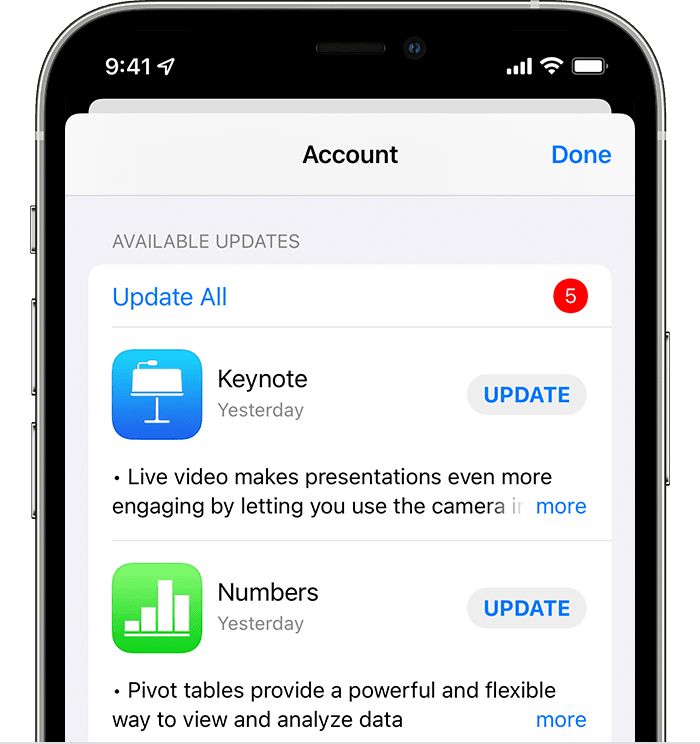 Learn what to do if you can't update an app on your iPhone or iPad."
How to manually update apps on your Apple device
Let us know the results.
Cheers!


