
launcher and application icons do not appear in dock
How can I get the launcher and my application icons to reappear in the dock on my MacBook Air Monterrey 12.2.1
MacBook Air (2020 or later)
How can I get the launcher and my application icons to reappear in the dock on my MacBook Air Monterrey 12.2.1
MacBook Air (2020 or later)
Hi PiperBailey,
Welcome to Apple Support Communities!
We understand that your Launchpad and your application icons no longer appear in the dock on your MacBook Air running the most recent version of macOS, correct?
Are you able to see the Dock and the applications are missing or is the Dock hidden or located in another area on your screen such as the left or right side?
To add your Launchpad to the dock, you can open your Applications folder, drag the Launchpad from the Application folder to the dock then let it go. You can repeat the same process with any other apps as well.
Take a look at Use the Dock on Mac under "Add, remove, or rearrange Dock items" to attempt to recover your icons.
"On your Mac, do any of the following:Add an item to the Dock: Drag apps to the left side of (or above) the line that separates the recently used apps. Drag files and folders to the right side of (or below) the other line that separates recently used apps. An alias for the item is placed in the Dock.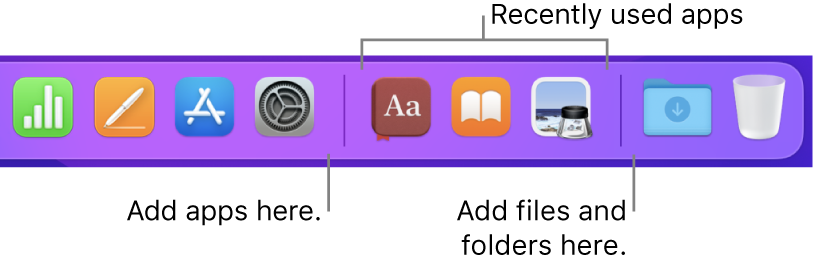 When you drag a folder to the Dock, you can view it as a stack. By default, the Dock comes with a Downloads folder. See Use folders in the Dock.Remove an item from the Dock: Drag the item out of the Dock until Remove is shown. Only the alias is removed; the actual item remains on your Mac.If you accidentally remove an app icon from the Dock, it’s easy to put it back (the app is still on your Mac). Open the app to make its icon appear again in the Dock. Control-click the app’s icon, then choose Options > Keep in Dock.Rearrange items in the Dock: Drag an item to a new location."
Check out the additional resources at the bottom of this article as well if needed.
If you're experiencing different behavior than what you'd expect, feel free to let us know. Any specific details you can provide will help us to assist you further.
Kind regards.
Hi PiperBailey,
Welcome to Apple Support Communities!
We understand that your Launchpad and your application icons no longer appear in the dock on your MacBook Air running the most recent version of macOS, correct?
Are you able to see the Dock and the applications are missing or is the Dock hidden or located in another area on your screen such as the left or right side?
To add your Launchpad to the dock, you can open your Applications folder, drag the Launchpad from the Application folder to the dock then let it go. You can repeat the same process with any other apps as well.
Take a look at Use the Dock on Mac under "Add, remove, or rearrange Dock items" to attempt to recover your icons.
"On your Mac, do any of the following:Add an item to the Dock: Drag apps to the left side of (or above) the line that separates the recently used apps. Drag files and folders to the right side of (or below) the other line that separates recently used apps. An alias for the item is placed in the Dock.When you drag a folder to the Dock, you can view it as a stack. By default, the Dock comes with a Downloads folder. See Use folders in the Dock.Remove an item from the Dock: Drag the item out of the Dock until Remove is shown. Only the alias is removed; the actual item remains on your Mac.If you accidentally remove an app icon from the Dock, it’s easy to put it back (the app is still on your Mac). Open the app to make its icon appear again in the Dock. Control-click the app’s icon, then choose Options > Keep in Dock.Rearrange items in the Dock: Drag an item to a new location."
Check out the additional resources at the bottom of this article as well if needed.
If you're experiencing different behavior than what you'd expect, feel free to let us know. Any specific details you can provide will help us to assist you further.
Kind regards.
launcher and application icons do not appear in dock

